
Full notes
Full Traction Point update
Read the full published notes in a cleaner layout. The original post stays linked below.
What changed
- Store
- Gameplay
- UI and audio
Traction Point changes
Welcome back! This is the fourth post in a series where we explore the core concepts presented on the Traction Point store page. Check out the previous part here in case you missed it. Today we are looking at "All the Gadgets".
Traction Point is a puzzle/exploration game. In many ways, it is similar to the point-and-click adventure games of the 90s. The main difference being, of course, that you move around the game world by driving a vehicle rather than clicking on the screen and seeing your character walk over.
And just like in those old adventure games, you solve puzzles by pickup up objects and using them to manipulate the environment. You might need to find a power cell and plug it into a receptacle to power up a device, or perhaps you need to pick up another one of your vehicles, lift it up onto a ledge it cannot reach by itself, and then switch to that vehicle and drive off. But how does a vehicle pick something up? This is where the gadgets enter the picture.
Like we've discussed in previous posts, the vehicles in Traction Point are very different. Some are large, others are small, some are fast, others are slow. But they also differ in their secondary equipment. While the Scout doesn't have any secondary functions at all, the Gripper Truck has both a gripper arm in the front, allowing it to pick up objects and move them around, as well as a tiltable cargo bed in the back, which can be used to transport many pieces of cargo at the same time.
Using this combination of arm-bed, you can drive around picking up cargo and tossing it into the back, making this the perfect vehicle to "clean up" an area of valuables.
Let's look at the gripper arm in more detail. Creating a gameplay system such as this isn't always very straightforward. You want it to be as easy to use as possible, while simultaneously being powerful enough to let the player experiment and figure out new ways to solve puzzles, perhaps in ways that I as the developer never even considered.
Moving the arm around means driving the different parts (the arm itself, the gripper fingers etc.) using motors to pose it accordingly. This isn't always very intuitive though, especially to players who haven't spent a lot of time playing transport simulators. When you want to move the arm, you need to switch from "driving mode" to "arm mode" to directly control the arm's functions.
To make it both easy to perform the most common tasks, as well as possible to make any kind of fine adjustments to the arm's pose, I am making a two-tier system for controlling the secondary vehicle equipment. You can still enter "arm mode" allowing you to rotate each individual joint as you want, but you can also control it using so called "quick actions", pre-programmed choreographies such as "Pick up the object in front of the gripper arm and throw it into the cargo bed".
These quick actions are available without switching modes, and they are performed using a single button press (currently pressing down on the left thumbstick). If you want to interrupt the quick action midway-through you can do that and continue using the full controls. I think this is the best of both worlds.
Not all equipment has quick actions yet. For example, the cranes of the Mother vehicle don't have any, as I am not sure there is enough context there to perform any common tasks, but that might change for the final release.
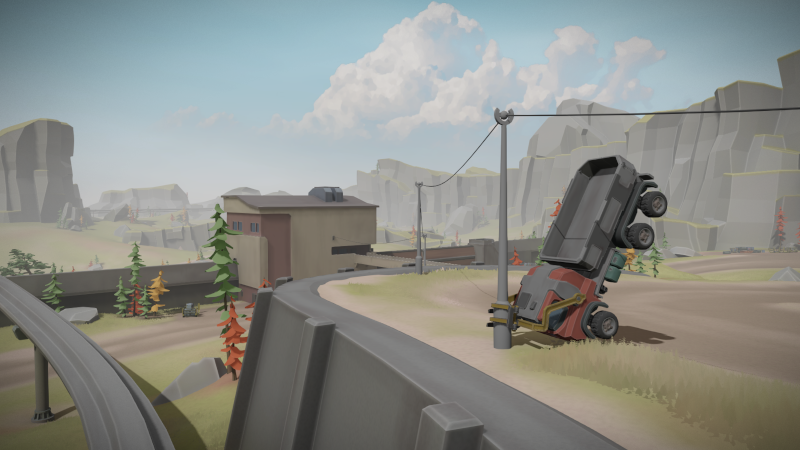
I hope this feels intuitive for both the casual player who just wants to play through the campaign, as well as for the more hardcore simulation type who wants to experiment and try out weird stuff in the sandbox mode. You know, things like grabbing hold of a tree and lifting your entire vehicle into the air:
See you next time!
--Sebastian
Source
Changelog.gg summarizes and formats this update. How we read updates.