
HomeGamesUpdatesPricingMethodology
Steam News13 October 20258mo ago

Exploring The Core Concepts 2/7 - Vehicles of All Sizes

Welcome to the second post in this series where we explore the core concepts presented on the Traction Point store page. Check out the previous part here in case you missed it.

Full notes

Full Traction Point update

Read the full published notes in a cleaner layout. The original post stays linked below.

What changed

0 fixes3 additions3 changes0 removals
  • Store
  • Gameplay
  • UI and audio
changedWelcome to the second post in this series where we explore the core concepts presented on the Traction Point store page. Check out the previous part here in case you missed it. Today we are looking at "Vehicles of All Sizes".
addedFrom the very beginning of the project, the game has revolved around a large vehicle that can be used as a "base" of sorts, with smaller vehicles providing support. Below is the first doodling of a design document created for the game, about two years ago (check out this video to see where it all started). The core idea is already there. The player's vehicles are in the bottom-right corner, the Mother and the Scout, and the X in the top-left is their destination. There is an obstacle in the way, a ravine in this case, and the Mother has a crane which it can use to lift the scout onto the other side. This core idea is very much unchanged in today's version of the game.
addedWhen creating a new vehicle, you choose how many wheels it should have, which determines what kind of differential you need. You then describe the engine, using max engine torque and rotation speed, specify how many gears the gearbox has along with their ratios, describe the suspension lines, which wheels should be steering and so on. Finally, you have to tell the physics engine the shape, mass, inertia etc. for the vehicle body itself as well as for all of its wheels. After that, you let the physics engine take care of actually simulating the vehicle.
changedVehicle parameters can be changed on the fly while the game is running, which is crucial to achieve the "feel" you want for the specific vehicle. This is about as much an art as it is a science. You just know when the vehicle feels right to drive, and you definitely know when it feels wrong. I am not going for a "true" car simulation with Traction Point which means that I can make some of the physics parameters very unrealistic if it makes the game play better.
changedThere's a lot of other things that go into creating a vehicle. Obviously you have to model and texture the chassis and other parts, but there are also sound effects for everything from the tires to the engine, vehicle specific camera parameters and maybe even some secondary animations such as the springy antenna on the Scout.
addedTraction Point allows you to create new vehicles entirely in data, ie. without having to change the game code itself, and you can even base a vehicle on an already existing vehicle. This is what the modding support is all about, and it is really fun to create new wacky vehicles and try them out!

Traction Point changes

changedWelcome to the second post in this series where we explore the core concepts presented on the Traction Point store page. Check out the previous part here in case you missed it. Today we are looking at "Vehicles of All Sizes".
addedFrom the very beginning of the project, the game has revolved around a large vehicle that can be used as a "base" of sorts, with smaller vehicles providing support. Below is the first doodling of a design document created for the game, about two years ago (check out this video to see where it all started). The core idea is already there. The player's vehicles are in the bottom-right corner, the Mother and the Scout, and the X in the top-left is their destination. There is an obstacle in the way, a ravine in this case, and the Mother has a crane which it can use to lift the scout onto the other side. This core idea is very much unchanged in today's version of the game.
addedWhen creating a new vehicle, you choose how many wheels it should have, which determines what kind of differential you need. You then describe the engine, using max engine torque and rotation speed, specify how many gears the gearbox has along with their ratios, describe the suspension lines, which wheels should be steering and so on. Finally, you have to tell the physics engine the shape, mass, inertia etc. for the vehicle body itself as well as for all of its wheels. After that, you let the physics engine take care of actually simulating the vehicle.
changedVehicle parameters can be changed on the fly while the game is running, which is crucial to achieve the "feel" you want for the specific vehicle. This is about as much an art as it is a science. You just know when the vehicle feels right to drive, and you definitely know when it feels wrong. I am not going for a "true" car simulation with Traction Point which means that I can make some of the physics parameters very unrealistic if it makes the game play better.
changedThere's a lot of other things that go into creating a vehicle. Obviously you have to model and texture the chassis and other parts, but there are also sound effects for everything from the tires to the engine, vehicle specific camera parameters and maybe even some secondary animations such as the springy antenna on the Scout.

Welcome to the second post in this series where we explore the core concepts presented on the Traction Point store page. Check out the previous part here in case you missed it. Today we are looking at "Vehicles of All Sizes".

If there is one "main character" in Traction Point, it has to be the Mother vehicle. Mother is the big yellow cargo transporter featured in the key art, and you can see her above proudly lifting up her baby Scout. Mother is both a vehicle which you as the player can drive, as well as an AI construct overseeing the vehicle and its functions, in the story of the game. She looks after her trusty crew, providing them with a home away from home, and they look after her in turn.

From the very beginning of the project, the game has revolved around a large vehicle that can be used as a "base" of sorts, with smaller vehicles providing support. Below is the first doodling of a design document created for the game, about two years ago (check out this video to see where it all started). The core idea is already there. The player's vehicles are in the bottom-right corner, the Mother and the Scout, and the X in the top-left is their destination. There is an obstacle in the way, a ravine in this case, and the Mother has a crane which it can use to lift the scout onto the other side. This core idea is very much unchanged in today's version of the game.

It always felt interesting to have this really large vehicle, almost too large for its own good, and make the game revolve around driving it from point A to point B, solving puzzles and overcoming challenges along the way. This is essentially what the single-player campaign is all about. But how do you make the Mother feel large? By having small vehicles too. If the Mother was the only vehicle in the game, it would just feel like a smaller world. By having both small and large vehicles that the player can drive, the game presents the environments in two very different lights.

Compare this image:

...to this image:

It also makes the levels more interesting since you cannot fit the Mother into every nook and cranny, but on the other hand, it can drive over obstacles which stop the Scout right in its tracks. Oh and speaking of, since you can switch vehicles freely (more about that in the next post) this comes with some interesting challenges regarding path finding for the AI drivers (more about that when we talk about NPC Companions).

So, how do I go about creating the different vehicles? In the last post I said I am not much of a "gearhead", but I know enough to set up the physics engine to handle the difficult parts. PhysX, the physics engine Traction Point uses, has an advanced vehicle SDK and it allows you to specify parameters for the vehicles in a pretty intuitive way.

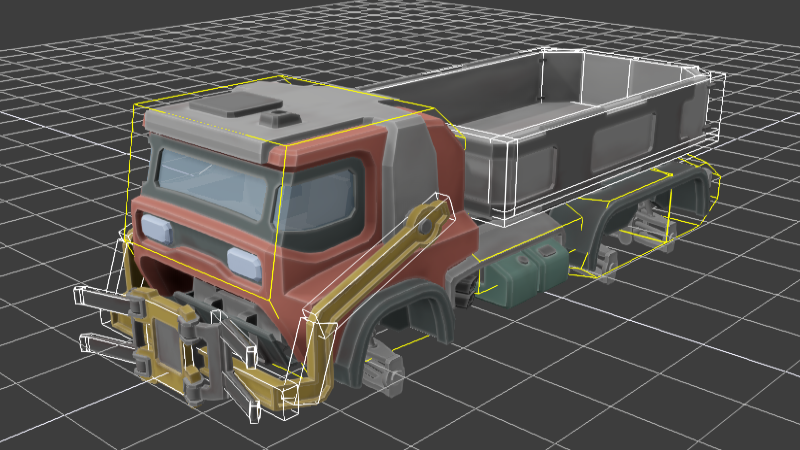
When creating a new vehicle, you choose how many wheels it should have, which determines what kind of differential you need. You then describe the engine, using max engine torque and rotation speed, specify how many gears the gearbox has along with their ratios, describe the suspension lines, which wheels should be steering and so on. Finally, you have to tell the physics engine the shape, mass, inertia etc. for the vehicle body itself as well as for all of its wheels. After that, you let the physics engine take care of actually simulating the vehicle.

Vehicle parameters can be changed on the fly while the game is running, which is crucial to achieve the "feel" you want for the specific vehicle. This is about as much an art as it is a science. You just know when the vehicle feels right to drive, and you definitely know when it feels wrong. I am not going for a "true" car simulation with Traction Point which means that I can make some of the physics parameters very unrealistic if it makes the game play better.

There's a lot of other things that go into creating a vehicle. Obviously you have to model and texture the chassis and other parts, but there are also sound effects for everything from the tires to the engine, vehicle specific camera parameters and maybe even some secondary animations such as the springy antenna on the Scout.

Traction Point allows you to create new vehicles entirely in data, ie. without having to change the game code itself, and you can even base a vehicle on an already existing vehicle. This is what the modding support is all about, and it is really fun to create new wacky vehicles and try them out!

Until next time!

--Sebastian

Source

Steam News / 13 October 2025

Open original post

Changelog.gg summarizes and formats this update. How we read updates.