
In this update5
Full notes
Full Scraps Of The Machine update
Read the full published notes in a cleaner layout. The original post stays linked below.
What changed
- Gameplay
- Balance
- Maps
- Fixes
- UI and audio
Scraps Of The Machine changes
Demo Update!
The Demo has a new update with the following new features and fixes!
Weapon Equip Cost Rework
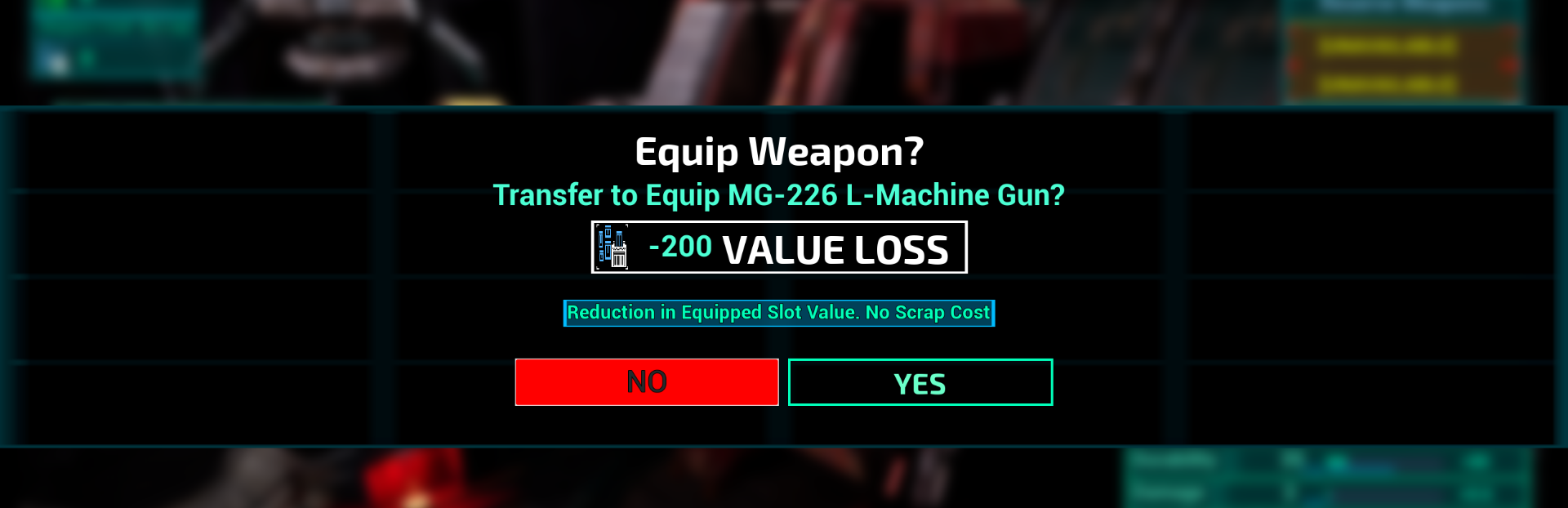
One of the major pain points has been Scrap costs associated with equipping weapons. This could lead to death spirals being particularly punishing, and the desire to try out new weapons frustrating. This reworks that system with an additional 'Value' element which should allow for swapping between weapons more easily and less obstructively.
Equipping Weapons will no longer require the full Scrap cost every time and will only require full Scrap cost when equipping to a Destroyed Weapon Slot
When Equipping Weapons that are worth more Scrap then the currently Equipped Weapon the Scrap cost will only be the difference in Scrap cost between the two.
When Equipping Weapons that are worth equal or less Scrap then the currently Equipped Weapon, the option will be to 'Transfer' to the other Weapon. This will reduce the 'Transfer' Value of that Weapon slot, but cost no Scrap.
Current Weapon stats are now displayed more clearly alongside the selected Weapon type in Blue Text
Steam post imageSteam post image
Bug Fixes and Adjustments
Widened several pathways and lanes in the first level/Rust Canyon to improve flow and movement
Fix for audio loop issues with Weapons, and Jumping/Air Boosting
Fix for audio issue pressing the Jump button while falling
Missiles Turrets have received a pass similar to Mines, where they now have an audio and visual cue to indicate their location as well as an additional alert sound when firing
Increased the range of some sound effects
Fixed Weapon Equip purchases and costs not properly updating while in the Weapon Equip Menu
If you are still having Input related Issues then please try the following fix:
Navigate to the file directory C:\\Users\\YourPCUsernameHere\\AppData\\Local\\ScrapsOfTheMachine\\Saved\\Config\\Windows
Delete the UserUINavSavedInputSettings.ini file.Steam post image
This will reset your Inputs and generate a fresh one when the game is launched which should correctly update.
Launch the game and try changing Inputs
Demo Updates Moving Forward
While there is still plenty to work on direct updates to the demo will be slowing down while I focus on new content for the game (additional levels, enemies, weapons, and bosses). There are fixes and improvements planned as a part of that, but I want to start prepping for the full, or Early Access, release.
A huge thanks to everyone for playing and giving your thoughts on the game! Hope to share more cool, new, stuff soon!
Harrison / Knight Division Games
Source
Changelog.gg summarizes and formats this update. How we read updates.