
In this update4
Full notes
Full My Little Cafe Nightmare update
Read the full published notes in a cleaner layout. The original post stays linked below.
What changed
- Compatibility
- Gameplay
- Fixes
- UI and audio
- Balance
- Server
My Little Cafe Nightmare changes
⚙️ Controller Support & Save&Load Bug-Fixing Patch 0.9.16
As we get closer to the full release of My Little Cafe Nightmare, we’ve tackled some major improvements behind the scenes. The Save & Load system has been reworked and stabilized, and controller support has been significantly enhanced. You can now fully navigate the UI with a controller, and overall controls feel much smoother and more responsive. As always... if you encounter any major issues, you can report them via the in-game tool or directly via Discord.
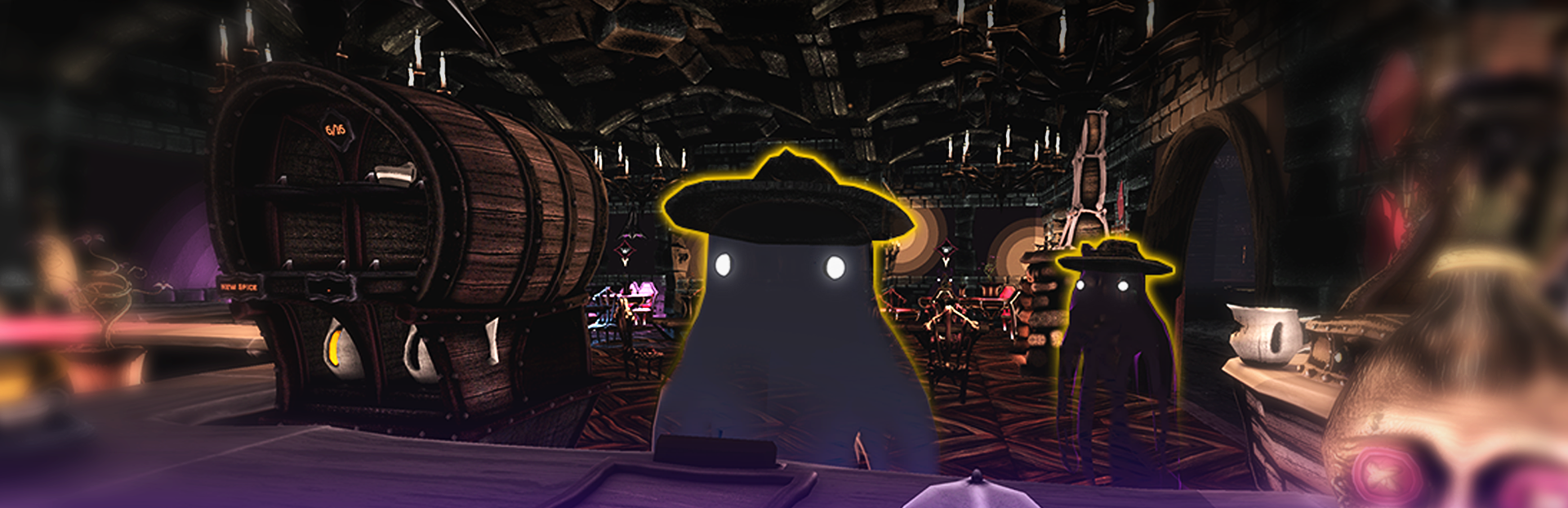
Oh, and we also got new hats. Look at these handsome ghosts:
[carousel autoadvance="true"]
[/carousel]
💀 MAIN PATCH NOTES 👻
🕯️ Added
🔨 Fixed
🎃 Changed
v0.9.16
Content
🕯️ UI - Navigation - Gamepad Support
🕯️ UI - Control Icons for Gamepad
🕯️ Hints - Navigation - Gamepad Support
🕯️ Pricingboard - Navigation & Price Input - Gamepad Support
🕯️ Pricingboard - Coffee Name Randomize Button
🕯️ Computer - Cafe Name Randomize Button
🕯️ Computer - Navigation - Gamepad Support
🕯️ Computer - Zoom is now determined by the active Aspect Ratio of the game. This makes the computer screen larger and small Text more readable for most monitors
🕯️ Controls - Arrow Keys as an alternative Movement Input
🕯️ Controller Disconnection Screen - Pauses the game & Waits for Controller Reconnect or Keyboard / Mouse Action
🕯️ Steamworks Support
🕯️ Gamepad Text Input on SteamDeck and Steams Big Picture Mode
🕯️ Customer - Skin - 2 New Noir Style Hats
🕯️ A new Inside Corner variation for the Bony Counter - lvl 2
🕯️ A new chandelier is ready for purchase to lighten up the cafe! - lvl 10
🕯️ Coffee Pots - now change color based on the type of coffee it holds. Just like the grounded coffee bags
🔨 Camera Controls - Gamepad - Input Lag / Stuttering due to wrong calculation and update frequence - Now it should be butter smooth!
🔨 Fairylights - reduced some collider sizes for better placement / overlap options
🔨 Fireplace - Audio was not connected to the SFX volume
🔨 Besom - Not beeing updated to snap on Navigation Mesh - Results in stopping to clean the Cafe and generally break
🔨 Besom - Sleep Particles not emitting on cooldown
🔨 ServingTray - Not cleaning up sockets when Items are picked up by hand from the tray
🔨 Self ServiceCounter - Nullref when trying to push CoffeePot from ServingTray into ServiceCounter
🔨 Self ServiceCounter - already filled Cups could be pushed into the ServiceCounter
🔨 Self ServiceCounter - ServingTray is not cleaning up after pushing Cups into ServiceCounter
🔨 Self ServiceCounter - Cups not checking for empty sockets on SercingTray correctly
🔨 Self ServiceCounter - Customer endlessly paying while serving themselves / getting stuck
🔨 Self ServiceCounter - Customer getting stuck when grabbing an empty cup from the ServiceCounter
🔨 Computer - Cafe Upgrades - Not correctly Unlocked / locked at start of the game
🔨 Computer - Has selected buttons on start of game - has lead to weird UI behaviours in some cases
🔨 Computer - When pressing gamepad button, Camera suddenly moved to Computer from the bedroom position and glitched out the entire player.
🔨 Customer - Event Skins not disabled after Season Event finished
🔨 Customer - Skins selection ignoring roll chance
🔨 Customer - Skins not excluding event skins when no event is active
🔨 Loca - ENG - Fixed a some typos
🔨 Loca - GER - Fixed a some typos
🔨 UI - A few button icons had the wrong color, making them invisible
🔨 UI - Pausebar - Opening while exiting Computer or Pricingboard with ESC Key / Gamepad
🔨 UI - Pausebar - Still showing when in Playmode - After quitting Submenu (Options) by ESC Key - Slightly Glitched UI afterwards
🔨 UI - Pausebar - Not Opening when pressing Start Button on Gamepad
🔨 UI - Some Close Buttons were broken ( Pricingboard, Feedback Form, Some Popup Hints )
🔨 UI - GameSelection - On first startup on SteamDeck, Load Game Screen was not loading any UI
🔨 UI - MainMenu - (B / O / "Button East" ) on Gamepad was not always returning / closing SubMenus in MainMenu
🔨 Options Menu - Resolution, Fullscreen and VSync Dropdowns not working at all on Linux / SteamDeck
🔨 Options Menu - Resolution Dropdown not loading any Resolutions in some cases ( Especially Linux / SteamDeck)
🔨 Daily Summary Screen - Unlock Cups - is showing everytime even tho no cup was unlocked
🔨 Daily Summary Screen - Unlocks animation glitching out of the screen
🔨 Day Transition - Sometimes stuck due to missing Animation trigger
🔨 Darkroom - Not triggering Dialog Event sometimes - Hardlock
🔨 Darkroom - First Dialog plays also on Level 3 instead of only Level 2
🔨 Darkroom - Some Lamps have not been spawning in when entering
🔨 Pricingboard - Flavour Dropdown does not always trigger due to overlapping text
🔨 Pricingboard - Flavours sometimes trigger twice, disabling themselves again with a mouse click
🔨 Pricingboard -Transitions did not have the correct ID - Rare Soft Lock after Spamming Input
🔨 Pricingboard - Entering Transition never blocked any queued inputs
🎃 Pricingboard - Decreased Transition Time
🎃 Pricingboard - increased Text sizes a little
🎃 Besom - Replaced Unity's NavAgent with a much more simple and custom navigation. - Will walk through walls but at least won't have an issue to recognize targets and move straight to them ignoring customer collisions and furniture. This reduces a lot of potential causes of why it stops cleaning
🎃 Besom - Reduced cooldown from 60 to 30 seconds
🎃 Besom - Increased - dirt to clean before cooldown from 7 to 10
🎃 Sound - Pouring / Fill in - Kettle & Coffee pot - Increased volume slightly
🎃 Computer - Cafe Name Selection is more obvious now
🎃 Computer - Cafe Upgrades - Stat Section received a little bit more clearance
🎃 Computer - Cafe Upgrades - Active Upgrade Selection is more clear and separate from hovering Feedback
🎃 Old Picture 3 - received a new unique Artwork
🎃 Fancy Picture 1- received a new unique Artwork
🎃 Fancy Picture 2- received a new unique Artwork
🎃 Old Bony Service Counter - Redone shop icon to fit the whole set
🎃 Old Bony Counter Counter - Redone shop icon to fit the whole set
🎃 Old Bony Counter - Redone shop icon to fit the whole set
🎃 Old Bony Shelf - Redone shop icon to fit the whole set
🎃 All Hintboxes - overhaul of the texts for better communications
🎃 All Hintboxes - size slightly increased
🎃 All Hintboxes - removed Hint marker as it's not really neccessary and it feels cleaner
🎃 Hintbox - Item Interactions - Split from 2 to 3 Pages for better readability
🎃 Hintbox - Customer Interaction - Text format changed for better readability
🎃 Hintbox - End of Day- Page 1 image content increased Text size
🎃 Hintbox - End of Day- Page 2 image replaced new one with better readability
🎃 Hintbox - Dirt Interactions- Increased Image sizes to read the text content better on SteamDeck
🎃 Hintbox - Pricingboard- Page 1 image content increased Text size
🎃 Hintbox - Pricingboard- Page 2 image content increased Text size
🎃 Hintbox - Pricingboard- Page 3 image content increased Text size
🎃 Hintbox - Finances & Marketprice - Split from 3 to 4 Pages for better readability
🎃 Hintbox - Finances & Marketprice - Text got multiple format changes
🎃 Hintbox - Finances & Marketprice - Increased Image sizes to read the text content better on SteamDeck
🎃 Options Menu - Selection Colors
🎃 Options Menu - Toggle On Color
🎃 Options Menu - AudioSettings - Slider Snap is now now 1 Unit for Mouse and 5 for Gamepads
🎃 Options Menu - From Pausebar - scaled up a little for better readability on SteamDeck
🎃 Options Menu - Dropdowns - scaled up a little for better readability on SteamDeck
🎃 Font - default Font - received a better Bold version for better readability
🎃 Font - default Font - a few characters were changed for better readability
🎃 Tutorial - Checklist - Now staying at the left corner of the screen because it overlapped with the control icons
🎃 Tutorial - Checklist - scaled up as the text was partially too tiny ( especially on SteamDeck)
🎃 Tutorial - Checklist - GER Loca - optimized wording for better readability
🎃 Tutorial - Checklist - Split up "Add Product and Set Price" Task into two seperate tasks
🎃 Tutorial - Checklist - Hides when entering Computer as it overlays to many important buttons. - Shows up when exiting Computer again
🎃 Daily Summary Screen - Unlocks animation replaced by a simple fade in to avoid unnecessary calculation bugs
🎃 UI - Control Icons - Text size increased
🎃 UI - Dialogbox - Nametag size increased for SteamDeck
🎃 UI - Changed the way UI Animations are handled. Should be more Reliable and a little more optimized now
🎃 UI - Updated many UI Element Highlights and Selections for consistancy and gamepad support
🎃 UI - Replaced old Control Icons with more Style / Color Fitting ones
Save & Load
🔨 Missing several SaveableScript Instance Variations for numerous Objects to clear up lots of unnecessary logic on save & load steps
🔨 CafeShopManager - Not cleaning up missing / destroyed objects before loading in saved objects - resulted in unpredictable behaviour for all systems
🔨 CafeUpgrades - Style Buy Screen showing up on previous game saves ( Now for sure. I found the source for this )
🔨 Dirt - Did not saved and even Stopped the Entire Saving Process when hitting a null object
🔨 Shelfs - Did not save it's own item id correctly
🔨 Packages - Did not save it's own item id correctly
🔨 Old Counters - Did not save it's own item id correctly
🔨 GameData - was not correctly created during a New Game and failed to save
🔨 Cleaning Step - Registered Objects not cleaning up there components, messing up the registrations for runtime gameplay
🔨 Coffee Filter Package - Was shelf valid - result in weird loading behaviour on some configurations
🔨 Empty Coffee Bag Package - Was shelf valid - result in weird loading behaviour on some configurations
🔨 Coffee Waste Item - Was shelf valid - result in weird loading behaviour on some configurations
🔨 Coffee Grinder - Was shelf valid - result in weird loading behaviour
🔨 Water Heater - Was shelf valid - result in weird loading behaviour
🔨 Dishwasher - Was shelf valid - result in weird loading behaviour
🔨 Combiner Manual - Was shelf valid - result in weird loading behaviour
🔨 Radio - Was shelf valid - result in weird loading behaviour
🔨 Besom - Was shelf valid - result in weird loading behaviour
🔨 Pricingboard - Was shelf valid - result in weird loading behaviour
🔨 Pricingboard - Not receiving Products when corrupted or destroyed Boards are destroyed -> Valid Board should receive those remaining products when possible
🔨 Self ServiceCounter - Coffee Pots not beeing connected after loading game - When they run out of coffee before saving
🔨 Self ServiceCounter - Coffee Pots generally did not save socket index when placed in any machine / package / box etc
🔨 Self ServiceCounter - Coffee Pots used wrong index when connecting to socket during load
🔨 Self ServiceCounter - Coffee Pots load previous product when it should be empty
🔨 Computer - Shop Editor - Not always Loading the remaining available extensions for extending the Cafe
🔨 Computer - Options - Dropdowns won't be loaded sometimes
🔨 Game Settings - Not loading correct start resolution on first launch - When not using FHD Monitors
🔨 Game Settings - Saved Refreshrate is removed which caused dropdowns to fail create resolution options - Refreshrate is taken by Current Monitor anyway
🔨 Style - Walls - Pillars from the first Style appear after load game with a different Style
🔨 Style - Floor - Only Applied the Style to the start Area when a different Style then the first was saved
🔨 Style - Ceilling - Only Applied the Style to the start Area when a different Style then the first was saved
🎃 Save process of how individual Objects with certain traits are saved in general - should result in much more stable and correct saving
🎃 Changed SaveData Type to be a value type - This ensures that SaveData must exist at any point
Source
Changelog.gg summarizes and formats this update. How we read updates.