
In this update6
Full notes
Full Megastore Simulator update
Read the full published notes in a cleaner layout. The original post stays linked below.
What changed
- Gameplay
- Store
- Fixes
- UI and audio
- Balance
- Performance
Megastore Simulator changes
Restocker Improvements
One of the most requested restocker features is now available.
No More Box Towers!
Added a new Return to Source Rack option for restockers
When enabled, boxes will be returned to the exact same pallet rack from which they were taken
Boxes taken from outside pallet racks will still be returned to the box holding area
This was one of the most asked-for warehouse management features, and it helps give players much more control over warehouse flow and pallet organization.
Added a new restock threshold setting, allowing you to decide when restockers start restocking
Restockers now prioritize the least filled shelves first among shelves below the defined restock threshold
Restockers now take the box with the lowest remaining stock first from pallets, helping reduce half-empty boxes on pallets
Fixed an issue where a restocker could miss a box in the box holding area right after placing one, leaving an extra box there until the next job
This system adds another layer of management to the game.
Because restockers may now return boxes to their original pallet racks, overall restocking can become slower compared to using the box holding area, since they may need to revisit racks more often. This makes pallet rack layout and department grouping more important for efficiency. If a restocker is assigned to a specific department and the products for that department are grouped in nearby pallet racks, efficiency will improve significantly.
The restock threshold setting is also a major new management tool. It directly affects efficiency and lets you tune restocker behavior to better fit your store size and management style. Setting it too high may cause restockers to restock shelves that only need a few items, which can reduce efficiency. Setting it too low may cause shelves to remain empty for longer before restocking begins.
No matter which value you choose, restockers will always prioritize filling the shelves with the lowest stock first. The threshold only affects newly assigned jobs and will not change a task a restocker is already working on.
Toy Section Expansion
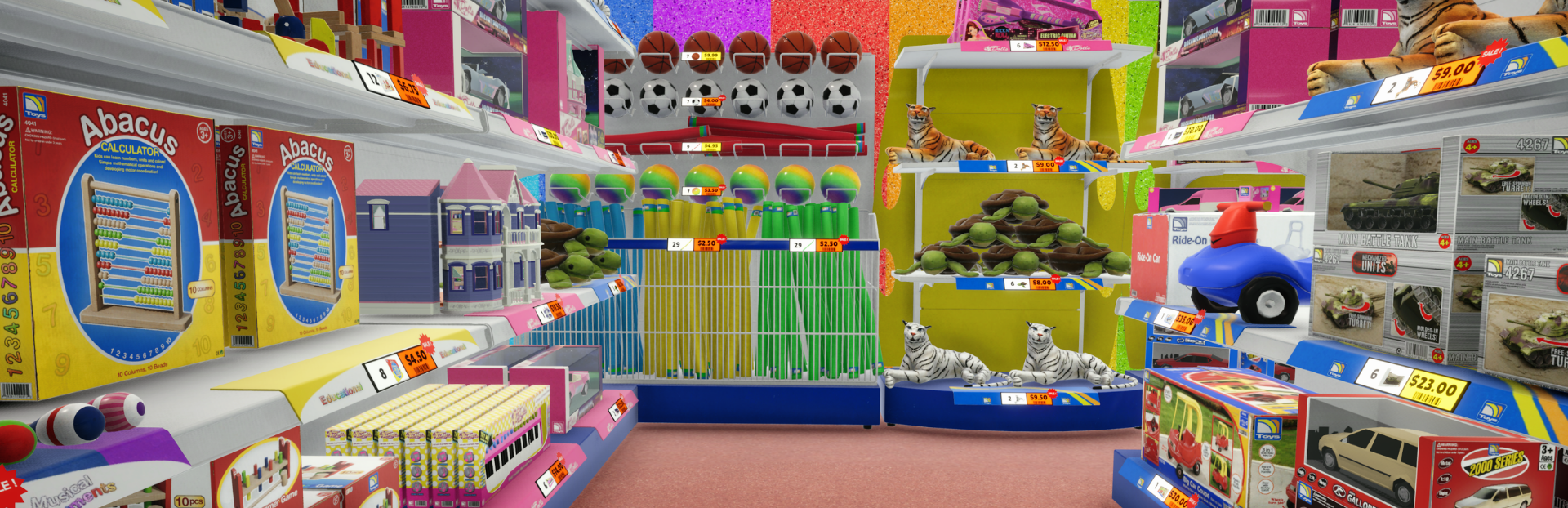
The Toy Section has also been expanded significantly.
The number of Toy Licenses has increased from 11 to 21, adding 10 new licenses in total
49 New toy products have been added, including toy cars, educational toys, balls, dolls, boxed toys, hanging toys, and more variations to make the department feel much fuller and more suited for the megastore environment
4 new shelf types have been added:
Toy Display Shelf
Toy Corner Display
Toy Ball Bin Shelf
Toy Hook Shelf
New labels have been added for toy shelves to indicate toy categories:
Toys
Education
Instruments
Dolls
A new wall decoration has been added for the Toy Section
The appearance of the Toy Section floor has been improved
A new floor style suited for the Toy Section has been added
These additions were made to make the Megastore feel larger, more complete, and more visually rich.
Requested QoL Features
Some other frequently requested quality-of-life and management improvements have also been added.
Unloaders and Restockers can now be paused from the Management window
Bakers can now be paused
Added a Pause All button to the Employee Management window
Added a Shift filter to the Manage Employees window
These changes make employee management much easier, whether you want to control workers one by one or make fast changes across the whole team at once.
Added a toggle to the product purchasing window to filter only labeled products that are already on your shelves
This lets you quickly order only what you are actively stocking, so you can skip scrolling through products that are not relevant to your current shelf setup.
Equipment now includes descriptions to better explain what each one is used for
Customer capacity and the current number of shoppers are now shown in the top-left corner as x/y. Here, x is the number of customers currently shopping, and y is your store’s maximum customer capacity based on the number of checkouts. If you reach this limit during the day, it means your store needs more checkouts.
Added an info window when hovering over pallets
Added a Head Bob setting that can be enabled or disabled for players who may experience motion sickness
Added an SFX Volume setting for footsteps, checkout beeps, doors, UI sounds, vehicles, birds, and more
Added an Ambient Volume setting for morning bird sounds and distant evening traffic
The payment completion coin sound is now 3D, so it is only heard when you are close to checkouts (this can still be reverted depending on feedback)
The purchased trash bin no longer gives deposits back; deposits can now only be recovered through the Recycle Bin or by returning pallets to loading dock trucks
Added translations
Performance Improvements
Several major optimizations have also been made, with performance improvements of up to 50% in some cases, especially for larger stores.
Added a custom system to render products more efficiently
Added a custom system to render shelf labels more efficiently
Improved optimization for boxes in box holding zones and on pallets
Applied general scene-wide optimizations
Improved culling to prevent invisible objects from still being rendered
Improved loading times
Controller Support & Fixes
Added controller support for the new filters and recent UI changes
Fixed missing required license texts on locked seafood products
Fixed an issue that could prevent the game from initializing for players who had product mods installed and later removed them
Source
Changelog.gg summarizes and formats this update. How we read updates.