
Full notes
Full Gremlins, Inc. – Cards & Projects update
Read the full published notes in a cleaner layout. The original post stays linked below.
What changed
- UI and audio
- Gameplay
Gremlins, Inc. – Cards & Projects changes
Yesterday and today, we worked with version 149.2.
By the way, whenever you see ".X" in the version name, this means that we shipped a version, which was found to contain a bug that we didn't like to the degree that we issued a hot fix shortly. Just for the future, when you will encounter a similar numbering during the Steam Playtest ːmaliceː.
Now, version 149 is where we still work on the table UI: assigning resources to/from the table.
Let me take you on a small excursion into one of our rabbit holes:
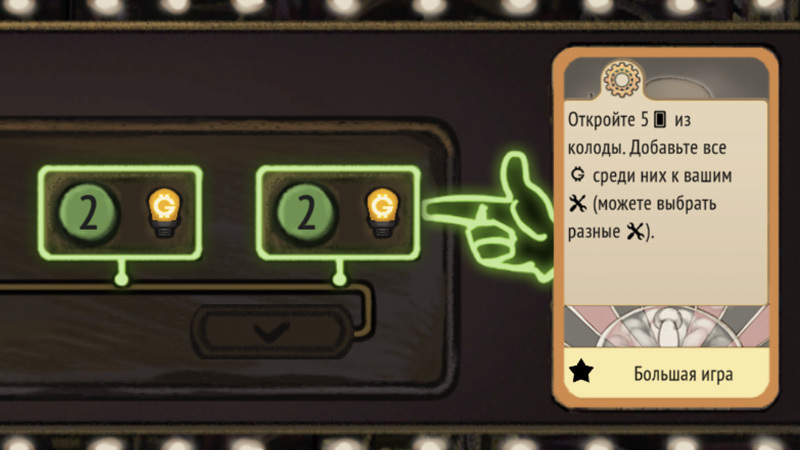
What you see here is me playing an action card that opens 5 cards from the deck, and allows me to assign any ːbh2coinː among them to my projects.
I opened 5 cards, and 4 were actually of the 'gold' type – a rare occasion.
What we do now, is convert those cards into resources immediately on the table, and present you with the resource capsules that show the resource and the number of project where it will go.
The UI in v149.2 –
select project –> * select resource
But it's sub-optimal, when compared to what we plan for 150 (or 151):
select project's resource area –> auto-assign relevant resource capsule
The updated system will save one click per each action: we know that if you click on the 'gold' resource area of project 1, then this is where you want to assign one of the resources from the table, and we can already confirm this. Without asking you to click on another element.
A small step for the UI... but a saving of minutes (!) during multiplayer sessions, as each assignment moves faster, and thus all the players have to spend less time waiting for their opponents.
This is our overall ambition: increase intensity of the game by optimising/automating UI wherever possible.
One more thing to highlight, using this build: if you play Gremlins, Inc. for some years, you may recall the issue we faced with variable font size, and lack of scrolling on the cards. It limited the rules that we could add, and made the game hard to read on smaller screens, when played in Asian languages.
Look what we have in the Card Game, though:
The first row is me playing with font size = 20.
The second is font size = 22.
The third is font size = 27.
changeable on the fly
when text stops fitting the card space, there's a scroll bar on the right of the card that automatically shows up, and allows you to scroll the text with the mouse button when hovering over it
It's one of the little quality of life fixes, that we're happy about, as we could do it because we wrote this game form scratch, and do not depend on the past limitations (also: no vibe coding, no AI or LLM, we like it the old school style ːlunar2019coolpigː).
Source
Changelog.gg summarizes and formats this update. How we read updates.