Finally the Update is here! Thank you to everyone who has been patient whilst I have been working long days and nights to re-write the vast majority of the Core UI code.
In this update9
Full notes
Full CRUMB Circuit Simulator update
Read the full published notes in a cleaner layout. The original post stays linked below.
What changed
1 fix4 additions4 changes0 removals
Performance
Compatibility
UI and audio
Gameplay
Fixes
changedFinally the Update is here!Thank you to everyone who has been patient whilst I have been working long days and nights to re-write the vast majority of the Core UI code. CRUMB may not look too different, but underneath what you can see, it is now a very different and streamlined program. There should not be any issues with numerical entry or crashes. However should you find any other problems do let me know
changedNow available for MacOSA side effect of having to re-write the UI code, is that it jumped me well forward in my development plan and allowed me to build the MacOS version as well. I have included both the Intel 64-bit and Apple Silicon binaries. I have not been able to test the Apple Silicon version myself as I have an older MacBook Pro. If you have any issues, it should run through Rosetta as the Intel binary
addedFeature UpgradesWhilst updating the the Core UI I have also managed to change a few things in CRUMB based on all of your well appreciated feedback. Below are some, but not all of the changes that can be found in the new version of CRUMB
changedManual Scaling of UISome users were finding it difficult to use CRUMB on 4K screens which are not using any OS scaling. I have included the option to manually adjust the UI scale within the Settings Window
addedUpdate to Code EditorPart of the switch to my new Core UI meant that the original solution to my code editor no longer was compatible, so I have created my own bespoke solution (still a work in progress with syntax highlighting) which allows you to view my own Source Code files for the Arduino Nano that I have in CRUMB
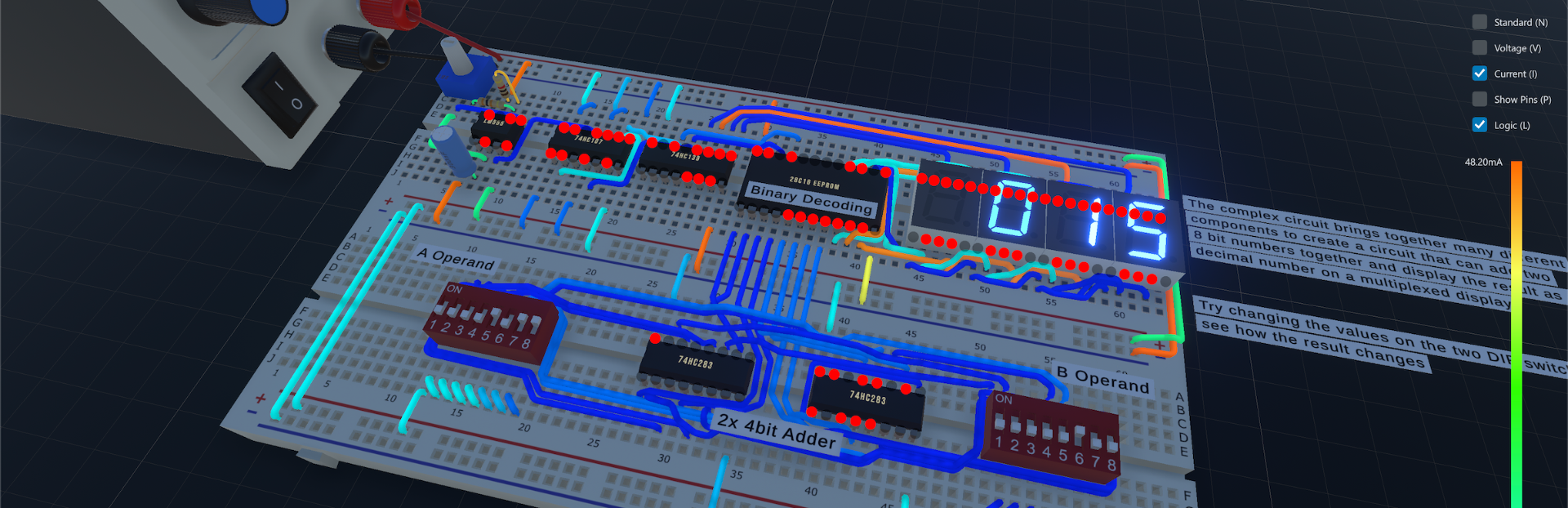
addedVisualisation UpgradesAs shown in the previous announcement I have added some cool visualisation features to help better understand what is happening in a circuit
CRUMB Circuit Simulator changes
changedThank you to everyone who has been patient whilst I have been working long days and nights to re-write the vast majority of the Core UI code. CRUMB may not look too different, but underneath what you can see, it is now a very different and streamlined program. There should not be any issues with numerical entry or crashes. However should you find any other problems do let me know
changedA side effect of having to re-write the UI code, is that it jumped me well forward in my development plan and allowed me to build the MacOS version as well. I have included both the Intel 64-bit and Apple Silicon binaries. I have not been able to test the Apple Silicon version myself as I have an older MacBook Pro. If you have any issues, it should run through Rosetta as the Intel binary
addedWhilst updating the the Core UI I have also managed to change a few things in CRUMB based on all of your well appreciated feedback. Below are some, but not all of the changes that can be found in the new version of CRUMB
changedSome users were finding it difficult to use CRUMB on 4K screens which are not using any OS scaling. I have included the option to manually adjust the UI scale within the Settings Window
addedPart of the switch to my new Core UI meant that the original solution to my code editor no longer was compatible, so I have created my own bespoke solution (still a work in progress with syntax highlighting) which allows you to view my own Source Code files for the Arduino Nano that I have in CRUMB
Finally the Update is here!
Thank you to everyone who has been patient whilst I have been working long days and nights to re-write the vast majority of the Core UI code. CRUMB may not look too different, but underneath what you can see, it is now a very different and streamlined program. There should not be any issues with numerical entry or crashes. However should you find any other problems do let me know
Now available for MacOS
A side effect of having to re-write the UI code, is that it jumped me well forward in my development plan and allowed me to build the MacOS version as well. I have included both the Intel 64-bit and Apple Silicon binaries. I have not been able to test the Apple Silicon version myself as I have an older MacBook Pro. If you have any issues, it should run through Rosetta as the Intel binary
Feature Upgrades
Whilst updating the the Core UI I have also managed to change a few things in CRUMB based on all of your well appreciated feedback. Below are some, but not all of the changes that can be found in the new version of CRUMB
Manual Scaling of UI
Some users were finding it difficult to use CRUMB on 4K screens which are not using any OS scaling. I have included the option to manually adjust the UI scale within the Settings Window
Quick Start Guide
On the Welcome/Open Design Window there is now and option to view a Quick Start Guide that gives a quick run down of some of the basic features of CRUMB. Hopefully this can help clear up any miscommunication
Update to Code Editor
Part of the switch to my new Core UI meant that the original solution to my code editor no longer was compatible, so I have created my own bespoke solution (still a work in progress with syntax highlighting) which allows you to view my own Source Code files for the Arduino Nano that I have in CRUMB
Visualisation Upgrades
As shown in the previous announcement I have added some cool visualisation features to help better understand what is happening in a circuit
Other Changes
There are now keyboard shortcuts for all the major functions in CRUMB
I have corrected a few errors with components and also their information pages
I have reduced CPU drastically compared to the previous version
Future Updates
I am going to have a small break from development over the Christmas period and will be back on it in the new year and will be bringing out new components based on user requests! All the best!!