
In this update7
Full notes
Full CRUMB Circuit Simulator update
Read the full published notes in a cleaner layout. The original post stays linked below.
What changed
- Gameplay
- Performance
- UI and audio
- Workshop
- Balance
CRUMB Circuit Simulator changes
EDIT: I have re-written this post due to some interesting comments that it looked like it was written by AI. Strange time we live in, but hopefully this reads like a normal person now 😒 Good morning/afternoon/evening everyone!
A massive welcome to all the new members of the community, and a big thank you to those of you who have been following along with the journey toward v2.0. The patience is very much appreciated and you’re not far off seeing it pay off now 😊
Progress lately has really picked up pace. Since the last update, I’ve been fully focused on what is essentially the “brain” of v2.0, the systems behind Programmable Components.
This has been something I’ve wanted in CRUMB for years. The idea of being able to create and program your own custom components without ever leaving the app has always been a core goal. After a lot of trial, error, and rebuilding things from the ground up… it’s finally there.
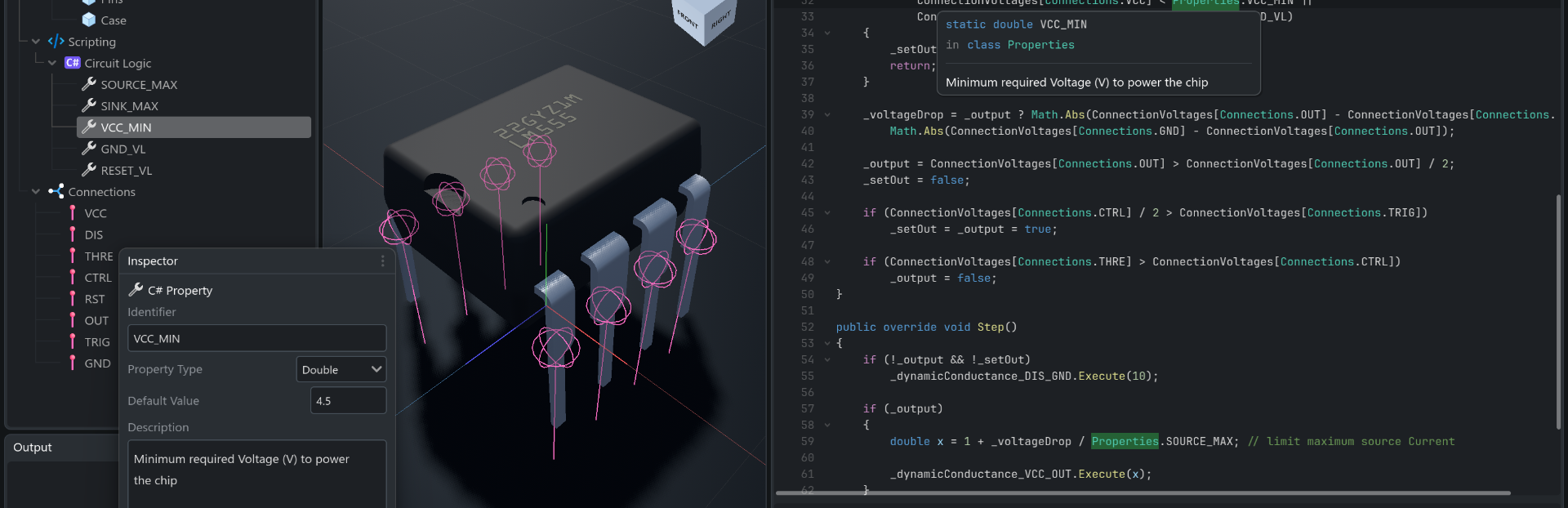
Introducing the Integrated Development Environment (IDE)
The new IDE built into CRUMB v2.0 is designed to feel familiar if you’ve coded before, but still approachable if you haven’t. Here’s a breakdown of what’s going on under the hood:
⚡ Powered by .NET 8 C#
I looked at a lot of options for scripting, but in the end .NET 8 / C# made the most sense.
Performance-wise, it gives us near-native speeds, which is exactly what’s needed for more complex simulations.
At the same time, it’s a very well-documented language and quite beginner-friendly, so it felt like the right balance.
🧠 Intelligent Code Completion & Live Compilation
One of the main goals here was to make the IDE feel helpful, not frustrating.
You’ve got full code completion (IntelliSense-style), so:
If you’re experienced, it should feel very similar to what you’re used to
If you’re new, it’ll guide you with suggestions and explanations as you go
Compilation happens live and instantly. Errors and warnings show up in the console as you type, and you can click them to jump straight to the problem line.
🔗 Seamless Source Generation
This is one of the bigger changes behind the scenes.
The hierarchy and the code are now fully in sync. If you add properties or connections in the editor, they’re immediately available in your scripts.
Properties show up as public, so you can tweak them directly in the designer
You can drag items straight into your code or use “Add Reference” to insert them
It’s all designed to keep things quick and avoid breaking your flow.
🛠️ A Proper Workspace
There’s a lot in here, but the overall idea was simple, you shouldn’t need to leave CRUMB to build something properly.
A few of the quality-of-life things included:
Search & replace for quick refactoring
Symbol highlighting so you can track variables easily
Standard shortcuts so everything feels familiar straight away
Basically, trying to remove as much friction as possible so you can just focus on building.
🛡️ Safety First (Non-negotiable)
Running user-written C# code obviously comes with risks, so this has been a big focus.
Everything runs in a very strict sandboxed environment. Anything that shouldn’t be allowed is blocked outright by the compiler.
The goal here is simple, downloading components from the Workshop should be completely safe, no exceptions. Steam post image
What’s Next?
I’m just about at the point where I can start uploading the first completed components to the Workshop and properly show off building circuits in the new system.
As a reminder, v2.0 will be a completely free update for everyone who already owns CRUMB 🤩 This is the version I’ve always wanted to build, so it only feels right to give it back to those who supported it early on.
If you haven’t picked up CRUMB yet, now’s probably a good time. As v2.0 pushes things more toward a professional-level tool, the price will be going up to match.
Exciting times ahead. I’ll have more to show very soon. Including the first proper circuit demos.
Stay tuned!
Source
Changelog.gg summarizes and formats this update. How we read updates.