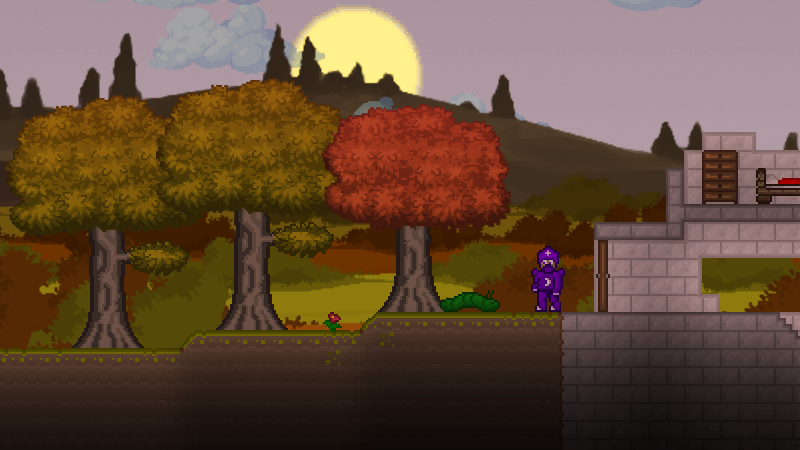
Hello! Thanks again to everyone following Craterlands. Been making a lot more graphic improvements.
Full notes
Full Craterlands update
Read the full published notes in a cleaner layout. The original post stays linked below.
Repeated intro
Hello! Thanks again to everyone following Craterlands.
What changed
1 fix2 additions0 changes0 removals
UI and audio
Gameplay
Fixes
addedBeen making a lot more graphic improvements. There's a fair number of old sprites from when I first started working on this so been trying to replace those now that my art skills have improved. Also I have been polishing the UI Menus so they don't look so bland. I've added borders accents, text shading and other graphical touches so they are looking better. Still will be more changes to come though.
addedOne helpful thing I added in is a smart cursor key. This really helps when mining so you don't have to always select the next brick. It was already in place for Controller but I ported it to mouse so you can activate that by holding down the alt key (or remap in options).
fixedOne other thing I fixed up is the brick pattern. It now repeats instead of being random so it looks much more cohesive and not so weird when placing tiles.
Craterlands changes
addedBeen making a lot more graphic improvements. There's a fair number of old sprites from when I first started working on this so been trying to replace those now that my art skills have improved. Also I have been polishing the UI Menus so they don't look so bland. I've added borders accents, text shading and other graphical touches so they are looking better. Still will be more changes to come though.
addedOne helpful thing I added in is a smart cursor key. This really helps when mining so you don't have to always select the next brick. It was already in place for Controller but I ported it to mouse so you can activate that by holding down the alt key (or remap in options).
fixedOne other thing I fixed up is the brick pattern. It now repeats instead of being random so it looks much more cohesive and not so weird when placing tiles.
Been making a lot more graphic improvements. There's a fair number of old sprites from when I first started working on this so been trying to replace those now that my art skills have improved. Also I have been polishing the UI Menus so they don't look so bland. I've added borders accents, text shading and other graphical touches so they are looking better. Still will be more changes to come though.
One helpful thing I added in is a smart cursor key. This really helps when mining so you don't have to always select the next brick. It was already in place for Controller but I ported it to mouse so you can activate that by holding down the alt key (or remap in options).
Finally got around to fixing up my trees, the old ones had poor shading so they didn't fit very well. Here's a pic of the trees in fall now:
One other thing I fixed up is the brick pattern. It now repeats instead of being random so it looks much more cohesive and not so weird when placing tiles.
I've incorporated these into the latest Demo 0.7.0.8. If anyone has feedback and wants to give me any ideas on what to improve I greatly appreciate it!