
HomeGamesUpdatesPricingMethodology
Steam News16 February 20251y ago

UI Overhaul (0.29.0)

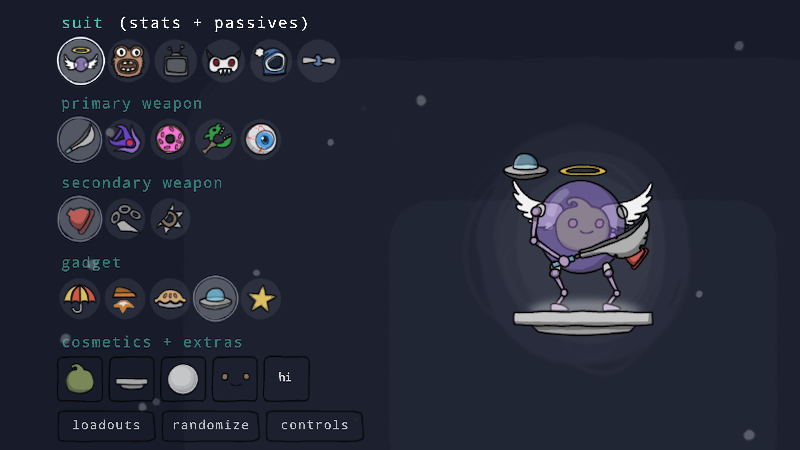
UI Overhaul Redesigned Loadout menus. Instead of being text-based, Loadout menus now use a comprehensive set of menu icons representing gear pieces and skins.

In this update2

Full notes

Full Counterpick Labs update

Read the full published notes in a cleaner layout. The original post stays linked below.

What changed

2 fixes3 additions3 changes1 removal
  • Store
  • UI and audio
  • Fixes
changedUI OverhaulRedesigned Loadout menus. Instead of being text-based, Loadout menus now use a comprehensive set of menu icons representing gear pieces and skins. Players can now create Loadout Presets to easily swap between their favorite gear combinations. Flattened menu and sub-menu structure, allowing for loadout edits with fewer menu actions. Cosmetics are now accessible without toggling to a separate menu. In the Loadout Gallery players can now equip unowned skins and palettes in order to preview them in action and in combination with other unowned cosmetics.
addedUI OverhaulRedesigned Stage Selection menus. Stage selection is now icon-based and flattened. Players no longer need to enter a sub-menu in order to change the stage. Added icons for stage cosmetics, simplifying skin and palette selection. Added the ability to customize one's random stage pool for local and lobby matches. Increased the prominence of the random stage selection option.
changedUI OverhaulRedesigned Play menu.
changedUI OverhaulRedesigned top-level Controls menu.
addedUI OverhaulThe Upgrade Gallery (which shows all available upgrades and their effects) can now be viewed directly from the game mode selection menu.
removedUI OverhaulRe-arranged various other menus. Several intermediate menus have been removed, flattening the game's overall menu structure. This should simplify menu navigation.

Counterpick Labs changes

changedRedesigned Loadout menus. Instead of being text-based, Loadout menus now use a comprehensive set of menu icons representing gear pieces and skins. Players can now create Loadout Presets to easily swap between their favorite gear combinations. Flattened menu and sub-menu structure, allowing for loadout edits with fewer menu actions. Cosmetics are now accessible without toggling to a separate menu. In the Loadout Gallery players can now equip unowned skins and palettes in order to preview them in action and in combination with other unowned cosmetics.
addedRedesigned Stage Selection menus. Stage selection is now icon-based and flattened. Players no longer need to enter a sub-menu in order to change the stage. Added icons for stage cosmetics, simplifying skin and palette selection. Added the ability to customize one's random stage pool for local and lobby matches. Increased the prominence of the random stage selection option.
changedRedesigned Play menu.
changedRedesigned top-level Controls menu.
addedThe Upgrade Gallery (which shows all available upgrades and their effects) can now be viewed directly from the game mode selection menu.

UI Overhaul

  • Redesigned Loadout menus.

    • Instead of being text-based, Loadout menus now use a comprehensive set of menu icons representing gear pieces and skins.

    • Players can now create Loadout Presets to easily swap between their favorite gear combinations.

    • Flattened menu and sub-menu structure, allowing for loadout edits with fewer menu actions.

    • Cosmetics are now accessible without toggling to a separate menu.

    • In the Loadout Gallery players can now equip unowned skins and palettes in order to preview them in action and in combination with other unowned cosmetics.

  • Redesigned Stage Selection menus.

    • Stage selection is now icon-based and flattened. Players no longer need to enter a sub-menu in order to change the stage.

    • Added icons for stage cosmetics, simplifying skin and palette selection.

    • Added the ability to customize one's random stage pool for local and lobby matches. Increased the prominence of the random stage selection option.

  • Redesigned Play menu.

  • Redesigned top-level Controls menu.

  • The Upgrade Gallery (which shows all available upgrades and their effects) can now be viewed directly from the game mode selection menu.

  • Re-arranged various other menus. Several intermediate menus have been removed, flattening the game's overall menu structure. This should simplify menu navigation.

  • Added a slight zoom effect indicating menu depth. This should help with the feeling of getting lost in sub-menus.

Bugs

  • Fixed visual glitch where Copter blades would sometimes disappear for a period of time.

  • Fixed visual glitch where UFO's shading would sometimes disappear while using down special.

Source

Steam News / 16 February 2025

Open original post

Changelog.gg summarizes and formats this update. How we read updates.