
In this update8
Full notes
Full Copperfell update
Read the full published notes in a cleaner layout. The original post stays linked below.
What changed
- Gameplay
- Performance
- UI and audio
Copperfell changes
The Copperfell Demo has been updated to v0.4! Here's what's changed.
DLSS5
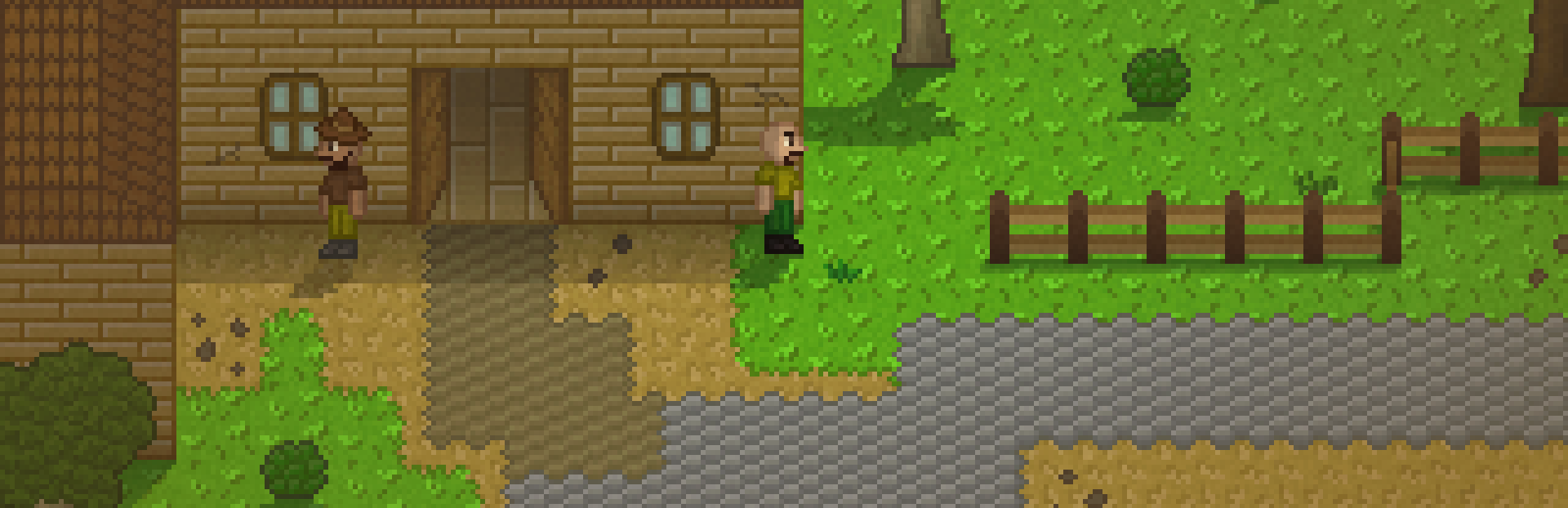
I have been working on improving the visuals for Copperfell. I made 5 main custom shaders, all part of a master graphics system I'm naming "Dynamic Lowkey Sussy Shading 5™" (DLSS5). Here are the 5 main components of this system, showcased with a before and after so you can see the differences more easily.
Color Correction
Each realm now has a slight color tint to make it more defined. The surface realm has a warmer hue now. I also upped the exposure and modified the shadows and highlights. Finally, I also added a vignette-like effect where areas closer to the edge of the screen are less vibrant than the middle portion.
Ambient Occlusion
I made a fake-ambient-occlusion-like shader so that most world objects and buildings have a darker tint near the boittom, while their colors get brighter near the top. This makes them pop out more nicely.
Indoor Lighting
Indoor areas now have an added warmer light color to make them feel more indoors-y. Shadows for objects that are indoors have also been made smaller than for those that are outdoors. This shader is dynamic so that its effects can be seen immediately when you or any other NPC enters or exits a building.
Shadow Overlay
When you or any other world object is standing inside a shadow, you will now get a darker tint. The tint can also be applied only partially, depending on which area is actually inside the shadow and which isn't.
Water Reflection
This was probably the most complex shader to make out of the 5. There are now fully dynamic water reflections! Any object can be reflected by the water. The reflections also move in a wave-like manner.
Animated Grass
Apart from these DLSS5 shaders, tiles with tufts of grass that are scattered across the world are now also animated, adding a bit more of a breeze-y vibe.
More Video Settings
In case you're not a big fan of some of these new effects, or if you're playing Copperfell on a potato and want to squeeze out as much performance as you can, you can toggle any of them via the new settings that have been added to the video settings tab in-game! The new settings include:
Color Correction
Ambient Occlusion
Indoor Lighting
Water Reflection
Shadows (this toggles all shadows, along with the shadow overlay effect as well obviously)
Environment Animations (this toggles all water animation along with the new grass animation)
The last 3 settings should have the biggest impact on performance - the first 3 are likely to be negligible on most hardware.
Skill Recipe Panel
The video settings are not the only new UI that have been added to Copperfell! This has been one of the most commonly requested features by players of the demo so far, so I'm finally adding it in. Each skill in the skills tab can now be clicked to open a skill info panel. The panel contains a list of most items that you can acquire via that skill, including any item ingredients that you need to make them. The list is split into different categories where applicable, which also hint at where you can acquire the items listed.
Bug Fixes and Improvements
An update wouldn't be complete qithout bug fixes! Here's a complete list:
Features and Improvements
World map icons for different traders and resources will now have more explanatory tooltip texts
NPCs whose quests you can't start yet will have a semi-transparent variant
Source
Changelog.gg summarizes and formats this update. How we read updates.