
HomeGamesUpdatesPricingMethodology
Steam News3 March 20197y ago

Patch 0.9.7.1 - Ultrawide support, display fixes, gamepad fixes, and UE 4.21.2 upgrade

General Ultrawide resolutions are now supported - Numerous display-issues have been fixed (vsync, windowed mode, etc.) - Gamepad support is greatly improved - Upgraded to UE 4.21.2 (from 4.21.

Full notes

Full ASTROKILL update

Read the full published notes in a cleaner layout. The original post stays linked below.

What changed

4 fixes1 addition3 changes1 removal
  • Fixes
  • UI and audio
  • Performance
  • Gameplay
fixedGeneralUltrawide resolutions are now supported - Numerous display-issues have been fixed (vsync, windowed mode, etc.) - Gamepad support is greatly improved - Upgraded to UE 4.21.2 (from 4.21.1)
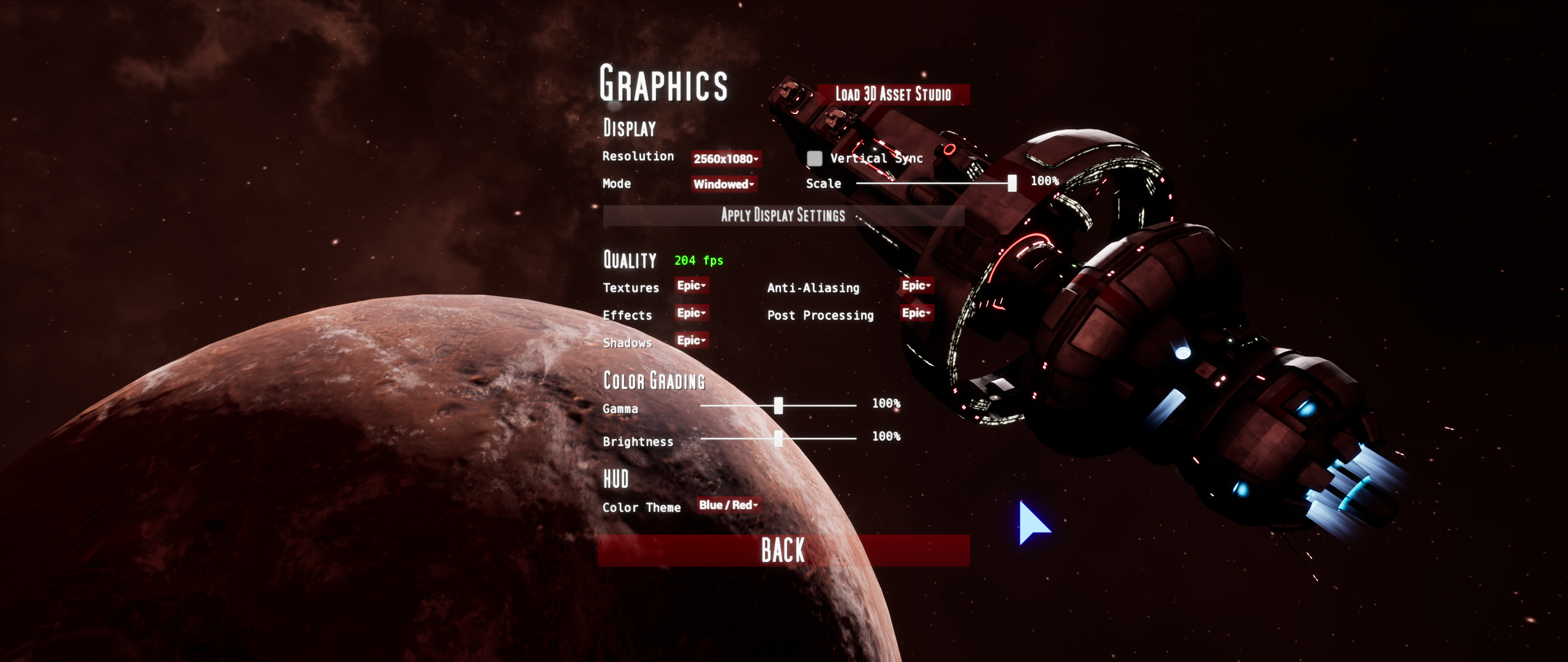
changedGraphicsAll graphics-settings are now saved using UE4's game-user-settings - Anti-aliasing is now off by default (on first-run) - Anti-aliasing setting is now saved properly between runs - Graphics-settings are no longer applied when opening the graphics-menu - Most scalability-settings (low, medium, high, epic) now use engine-defaults (cleaned up years of clutter in DefaultScalability.ini)
changedUIMenus now auto-adjust to ultrawide resolutions - Cursor is now activated and centered when menus are opened - "Apply Display Settings" button is now larger and grayed out when not display-settings match current settings - Moved resolution-scale slider under Display in the Graphics-menu
fixedDisplayVertical sync now works appropriately (framerate no longer smoothed) - Framerates are now uncapped when vertical sync is off (can result in >500 fps in some cases) - Fixed issue with game not starting in windowed mode - Resolution, v-sync, windowed mode, and resolution-scale are now applied only when the "Apply Display Settings" button is pressed
addedCoreCursor, ship-controls, and spectator-cameras no longer slow down when the fps increases - Created a new flight-control-input system that applies input more efficiently and compensates for large fps fluctuations, including exceedingly high fps
removedControlsGamepad-sticks are now mapped using the axis instead of the stick-state - Removed all hard-coded gamepad-mappings to allow full customization - Removed "left-handed roll" option from Controls menu (no longer applicable) - Modifier keys can no longer be mapped with gamepad-buttons - Gamepad now works correctly in the 3D-asset-studio - Inverted controls now work correctly in the 3D-asset-studio

ASTROKILL changes

fixedUltrawide resolutions are now supported - Numerous display-issues have been fixed (vsync, windowed mode, etc.) - Gamepad support is greatly improved - Upgraded to UE 4.21.2 (from 4.21.1)
changedAll graphics-settings are now saved using UE4's game-user-settings - Anti-aliasing is now off by default (on first-run) - Anti-aliasing setting is now saved properly between runs - Graphics-settings are no longer applied when opening the graphics-menu - Most scalability-settings (low, medium, high, epic) now use engine-defaults (cleaned up years of clutter in DefaultScalability.ini)
changedMenus now auto-adjust to ultrawide resolutions - Cursor is now activated and centered when menus are opened - "Apply Display Settings" button is now larger and grayed out when not display-settings match current settings - Moved resolution-scale slider under Display in the Graphics-menu
fixedVertical sync now works appropriately (framerate no longer smoothed) - Framerates are now uncapped when vertical sync is off (can result in >500 fps in some cases) - Fixed issue with game not starting in windowed mode - Resolution, v-sync, windowed mode, and resolution-scale are now applied only when the "Apply Display Settings" button is pressed
addedCursor, ship-controls, and spectator-cameras no longer slow down when the fps increases - Created a new flight-control-input system that applies input more efficiently and compensates for large fps fluctuations, including exceedingly high fps

General

  • Ultrawide resolutions are now supported - Numerous display-issues have been fixed (vsync, windowed mode, etc.) - Gamepad support is greatly improved - Upgraded to UE 4.21.2 (from 4.21.1)

Graphics

  • All graphics-settings are now saved using UE4's game-user-settings - Anti-aliasing is now off by default (on first-run) - Anti-aliasing setting is now saved properly between runs - Graphics-settings are no longer applied when opening the graphics-menu - Most scalability-settings (low, medium, high, epic) now use engine-defaults (cleaned up years of clutter in DefaultScalability.ini)

UI

  • Menus now auto-adjust to ultrawide resolutions - Cursor is now activated and centered when menus are opened - "Apply Display Settings" button is now larger and grayed out when not display-settings match current settings - Moved resolution-scale slider under Display in the Graphics-menu

Display

  • Vertical sync now works appropriately (framerate no longer smoothed) - Framerates are now uncapped when vertical sync is off (can result in >500 fps in some cases) - Fixed issue with game not starting in windowed mode - Resolution, v-sync, windowed mode, and resolution-scale are now applied only when the "Apply Display Settings" button is pressed

Core

  • Cursor, ship-controls, and spectator-cameras no longer slow down when the fps increases - Created a new flight-control-input system that applies input more efficiently and compensates for large fps fluctuations, including exceedingly high fps

Controls

  • Gamepad-sticks are now mapped using the axis instead of the stick-state - Removed all hard-coded gamepad-mappings to allow full customization - Removed "left-handed roll" option from Controls menu (no longer applicable) - Modifier keys can no longer be mapped with gamepad-buttons - Gamepad now works correctly in the 3D-asset-studio - Inverted controls now work correctly in the 3D-asset-studio

Gameplay

  • Gunships now rotate slightly slower

VR

  • FOV-readout on HUD no longer changes when FOV-changes are attempted (FOV is fixed in VR) - HMD is no longer locked to the camera in the 3D-asset-studio

Bugs

  • Fixed lockup that occurred when lowering effects-quality to low or medium - Fixed issue with yaw and roll-input not adjusting with camera-zoom - Fixed issue with yaw-input being less sensitive in 1st-person - Fine movement (SHIFT key) works again (applicable to spectators) - Player-input is now correctly disabled when menus are open in the 3D-asset-studio

Source

Steam News / 3 March 2019

Open original post

Changelog.gg summarizes and formats this update. How we read updates.