
In this update11
Full notes
Full Ancient Warfare 3 update
Read the full published notes in a cleaner layout. The original post stays linked below.
What changed
- UI and audio
- Gameplay
- Store
- Performance
- Balance
- Events
Ancient Warfare 3 changes
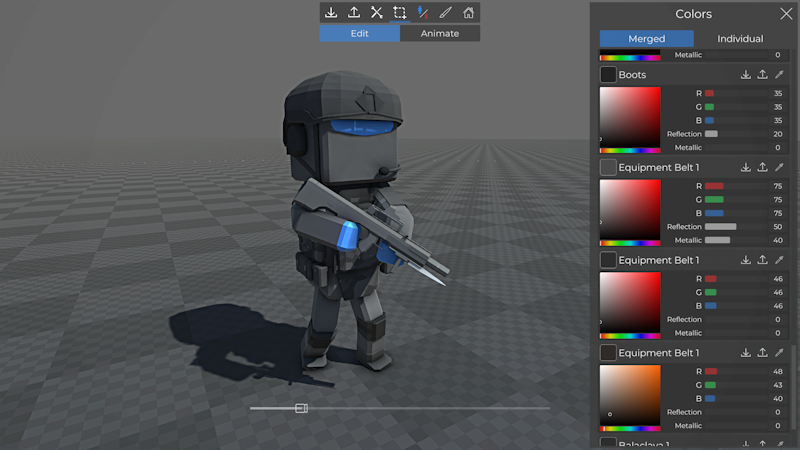
Merged material editing
There is a new button in the toolbar of the custom unit creator to improve material editing. Materials from all items of the unit are displayed as a single list and matching materials can be edited as a single entry, preventing you from having to copy paste colors between items!
Edit modular building materials during placement
When placing a modular object, you can now edit the color before placing it. The game remembers the setting while you keep placing supported objects. Otherwise, you can load the last used settings with a click of a button when you start placing supported objects again.
Object groups
The concept of object groups has been added to the custom battle editor:
Selecting a single object from a group will select the whole group, unless you hold Left Alt while selecting
Object groups can be created or dissolved by selecting objects and using the "Make Group" button in the left toolbar
There is a new editor setting to enable prefabs to be placed as groups automatically. (Editor Settings in the bottom right corner)
Selection filtering
Selection filtering can be used to remove specific types of objects from your current selection or focus it on a specific type of object. When a single object is selected, there are suggestions to add matching objects to your selection.
Embedded prefab and unit editor for custom items
While creating custom items, you can now test them directly in the integrated prefab or unit creator depending on the item type.
Custom ref size objects
You can now load any vanilla or custom object from the game's database as a reference size in the custom item editors!
Burned skin paint for custom units
A new body paint item has been added to add burn marks to units that are similar to those of burned zombies.
Scripted Rendering
There are various new nodes to render primitive 3d objects from scripts. This can be useful for debugging or quickly visualizing something without having to create full custom objects, especially since materials/colors can be updated every frame. Depending on demand, this feature will be extended to support screen space rendering or custom 3d objects
Scripting features
Added Unit/GetMount node to retrieve the siege weapon or animal of a unit as object reference
Added SpawnPointLight / SpawnSpotLight nodes to create scripting lights at runtime
Added GetEquipName to get the database name of an equipment item by id
Added Health/GetMaxHealth to get the max health of a unit or object
Added Array/Clone and Array/Reverse nodes
Added GetGuardPose node
Added QuaternionToEuler and EulerToQuaternion nodes
Added CustomSupport input nodes (missing from previous update)
Added various nodes for scripted rendering
Other features and improvements
Added grenade type 'Scripting' to custom grenades to create grenades that only trigger the scripting event and nothing else
Scripting tags can now be added to units placed in the spawn area for vehicles and game mode spawn lists
Added "Custom object" filter to the editor placement lists
Added a settings panel to enable / disable medical crates
Particle property curves in the custom particle editor can now be negative
Particle systems can now be copy / pasted into sub particle systems in the custom particle editor
Added current color indicator to color picker in the terrain editor
Bug fixes
Fixed missing hover outlines in some cases
Fixed accuracy of equipment on custom corpse units
Fixed that some custom armbands did not work with asymmetric setups
Fixed various issues related to the crosshair settings
Fixed missing weapon sway while not aiming
Fixed incorrect shadows for equipped custom support items
Fixed various settings for custom particle systems
Source
Changelog.gg summarizes and formats this update. How we read updates.