
In this update8
Full notes
Full AI Roguelite update
Read the full published notes in a cleaner layout. The original post stays linked below.
What changed
- Gameplay
- Balance
- Maps
- UI and audio
- Events
- Fixes
AI Roguelite changes
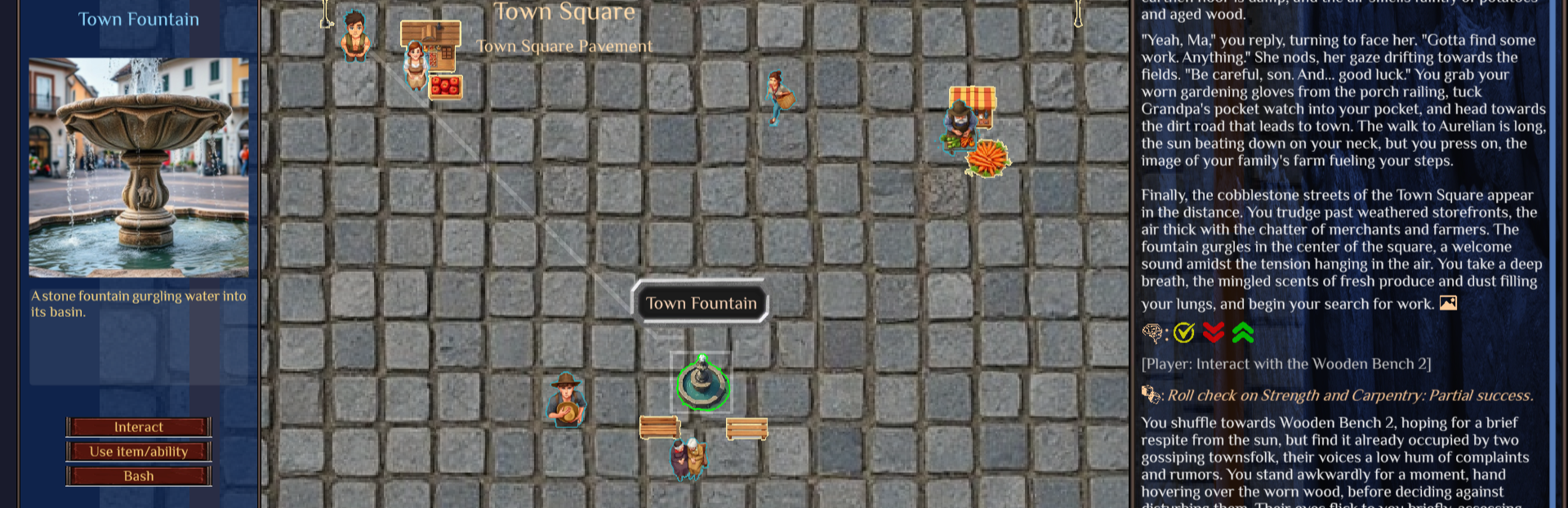
2D grid mode
When visiting a new place, you now have the option of initializing it as a 2D grid.
Sprites
All entities in a grid will have associated sprites. Please note background removal for sprites currently only works on default image gen options (Free and Sapphire). Hold alt to see the nameplates of all entities.
Pathing
The grid may have barriers such as walls, and openings representing doorways. Paths will be calculated to your destination, and relevant info will be passed to the story generator. Interact with a target entity normally, or hold shift to try to move to a specific point. Movement is never guaranteed, and depends on what the story says happened.
When an interaction involves a path, the AI may decide that an entity has a chance of interrupting you.
Sublocations
Sublocations within a grid should be accessible via a forward “portkey” (object which moves you to it), e.g. Stairs leading to 2nd floor. Location change isn’t guaranteed and depends on whether you were successful according to the story. To bypass this system, use the console command "freemove 1" and enter the desired location via the map.
Vehicles and location changes are meant to work seamlessly when switching between grid mode and classic (hierarchical) mode. Please report any bugs using the file feedback button.
Requirements
The new place must be a top-level place that has not been initialized, or is a sublocation within a top-level place that’s already 2D.
Limited to 3 per day per user (with Sapphire users using a more expensive model) because it’s much more expensive than a regular turn.
Official text gen services use models that have been verified to work well enough for grid generation. If you're using a custom endpoint, ensure the model is smart enough to generate a grid.
Caveats
Grid mode is generally available in the Default build channel, but still considered experimental. My original vision has not yet come to fruition because proper event checks for accurate placement would require a good model which is currently too expensive to run for many turns. It is my hope that as LLM costs come down, it will eventually be possible to run the “expensive” turns more frequently.
Improved image generation settings
Added customizability of entity prefixes/suffixes to all image generation modes. In particular, the prompt formatting is now in a "format" rather than "prefix" structure, so the user has more control over the image prompt.
Added background removal for item images, which is currently only available in Sapphire due to costs.
Misc
Fixed Wombo image generation. Note: There’s a known issue where any name/description with quotes will still fail. This fix will be pushed in the near future.
Source
Changelog.gg summarizes and formats this update. How we read updates.