
Full notes
Full Zero-K update
Read the full published notes in a cleaner layout. The original post stays linked below.
What changed
- UI and audio
- Workshop
Zero-K changes
Zero-K is extremely customisable, which is great but risks making the game unapproachable. The problem with customisation is that it asks players to optimise their own experience without necessarily giving them the background required to make an informed choice. In general, an option is useful if players understand it well enough to sort themselves into the various versions of the game implied by the option. Good examples are colour blind modes and language settings, but Zero-K has far more options than these. Another issue is that of overwhelming players with too many options, even if they are all good. Zero-K was designed on the fly, with the UI coalescing out of a hodgepodge of experimentation, so it has been a challenge to make our options reasonable.
Most people stick with the defaults. Of those that touch the settings, many will stay in the shallow end with the language selector and volume controls. But some players will want to dive deep, while others will want to keep the old defaults from when they started playing over a decade ago. To balance these desires we considered players at different levels of customisation, and put gates between them to keep new players from being overwhelmed. Our goal is to make the game work well at all levels, and even to allow players at one end of the spectrum to play with those at the other.
At Level 0 the player can barely read and rarely touches their keyboard. Most of their inputs are either context-sensitive right-click commands or structures selected through the build menu. Small buttons may as well be invisible, which for us includes state toggles and everything in the top left corner of the UI. Zero-K is not the simplest game, so it is not quite designed to work all the way down to Level 0, but we may hit something like Level 0.1, which involves reading the occasional tooltip and learning a state toggle or two.
At Level 1 the player looks around the UI and reads tooltips. This unlocks features such as retreat zones and the anti-bait toggle, plus information about features such as terraforming. People sometimes ask why features like the anti-bait toggle are mostly disabled by default, and the answer is that it only becomes visible at Level 1. Everyone starts at Level 0 and might spend all their time below Level 1, so the game needs to make sense without state toggles. To a player unaware of the anti-bait toggle, units failing to shoot at the enemy looks like a frustrating bug, not something that motivates them to take a close look at all the defaults in the game. Level 1 also includes colour blind mode, language settings, and basic volume controls, as they are directly on the main UI.
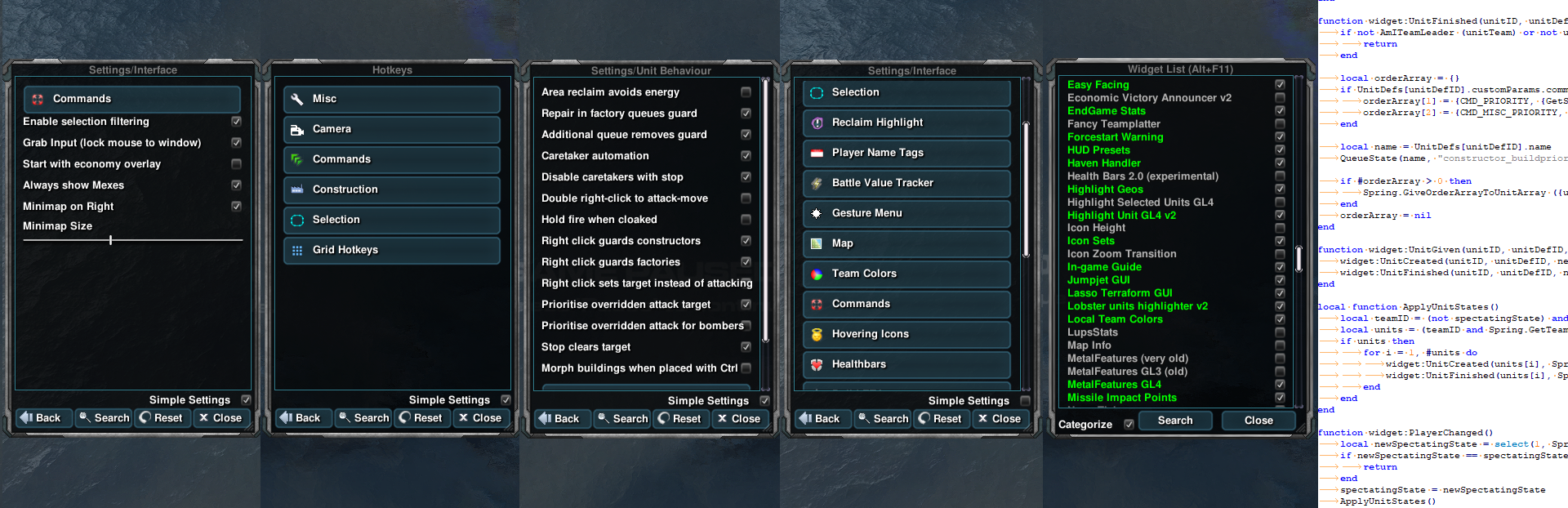
At Level 2 the player has opened the ingame menu. The menu has Simple Settings enabled by default, which removes the vast majority of options. At this level players only see the most important options, as measured by what new players think to look for, such as locking the cursor to the window or picking whether the minimap is on the left or right side of the UI. Level 2 also includes the full hotkey and default unit behaviour menus, so if we were to apply these levels to other games, it would be hard to find a game that allows customisation beyond Level 2.
At Level 3 the player unticks Simple Settings. This is the first level that gives players the power to make their UI objectively terrible. This is achieved by enabling Tweak Mode, via a hotkey or button found in the menu, then moving and stretching their UI. There are also many alternate styles for in-world UI, such as unit selections, which come from a time when many widgets were being written and included. A lot of mostly superfluous bells and whistles, such as the attrition tracker and wind speed display, can be enabled here as well.
At Level 4 the player has fully "voided their warranty", meaning that they can now break things thoroughly enough to be told to reset their settings when they ask for help. This level is reached either by opening the widget list, or toggling Show Advanced Settings in the menu. Most of the advanced settings are boring technical details or debug tools, but it also reveals the hotkey for opening the widget list. This list allows players to toggle widgets on and off, some of which are vital for the UI to function. There are also widgets that exist in Level 4 because they are insufficiently polished or are just too poorly explained to exist at a lower level. Niche widgets with major bugs can end up being relegated to Level 4 until someone fixes them.
At Level 5 the player has found and installed their own widgets. There is no central repository of third party widgets, so it is hard to know what exists at this level. A lot of widgets started out at Level 5 before being included in the game and shifted down to a lower level. Widgets often remain at this level due to obscurity or because there is insufficient interest in polishing them up for inclusion. The goal is usually to drop a widget to Level 3 or below, since the widget list is a bit of a doldrums.
At Level 6 the player is creating their own widgets. We encourage people with anything particularly novel or useful to share it with the community, putting it at Level 5 for others, but have never had to enforce this. Even when widgets are shared, using custom widgets is a far cry from the Level 0 player who mostly just clicks around the default UI, so the challenge for us was to make the game work across all these levels.
In the beginning there was engine behaviour, which offered limited customisation, most of which involved hotkeys or UI colour files. Then lua was added, which triggered an explosion of widgets. Many players would browse the Spring forums and install their own widgets, placing themselves at Level 5. Some got into the open source spirit by rapidly iterating on each others widgets. Complete Annihilation was quick to include the best ones, jamming them in the widget list at Level 4. Levels 2 and 3 did not exist because CarRepairer had not yet created our fancy ingame menu. The result was a mess of disparate bits of UI and widespread use of the widget menu.
To clean up the UI, Licho declared that core developers have to use the defaults, forcing us to operate at a lower level. Any developer that wanted to deviate from the default had to implement an easily accessed option, i.e. something a player could do without voiding their warranty. Personally, I want all my units set to Hold Position, and had a widget to achieve this, but the need to push it down the levels led to the fully general unit default state editor. The ingame menu was created and options were filtered into simple and advanced settings over the years, with the final push involving hiding most of the commands and state toggles.
The settings in the main menu, outside the game itself, were not given a spot in the Levels of Customisation because the main menu is relatively new. I would put them at Level 1 or 2 because they are easily found by someone clicking around the main menu UI. The existence of these settings causes some confusion, but there is a lot to be said for being able to edit hotkeys and settings on the fly ingame, with instant feedback. The main menu mostly contains lobby and graphics settings that are infeasible to change mid-game. The main drawback is that the ingame graphics menu looks a bit empty.
The levels of customisation are also a way to think about the intended audience of features. In general our aim is to push as much UI power to as low level as possible, which is what lets players across all levels coexist in the same battle. The ability to write your own widgets would absolutely break most games and force any halfway serious player into Level 5 or 6. We only get away with it by committing to making the base UI as powerful as possible, which means either incorporating sufficiently powerful UI, writing our own more user-friendly version, or changing the game to make the widget unnecessary. There are rare cases in which widgets were blocked directly, rather than incorporated or rendered irrelevant, but such cases deserve their own posts.
Source
Changelog.gg summarizes and formats this update. How we read updates.