
In this update5
Full notes
Full Tactical Annihilation update
Read the full published notes in a cleaner layout. The original post stays linked below.
What changed
- Gameplay
- Maps
- UI and audio
- Fixes
Tactical Annihilation changes
Commanders, content update 250609 for Tactical Annihilation Demo is now live!
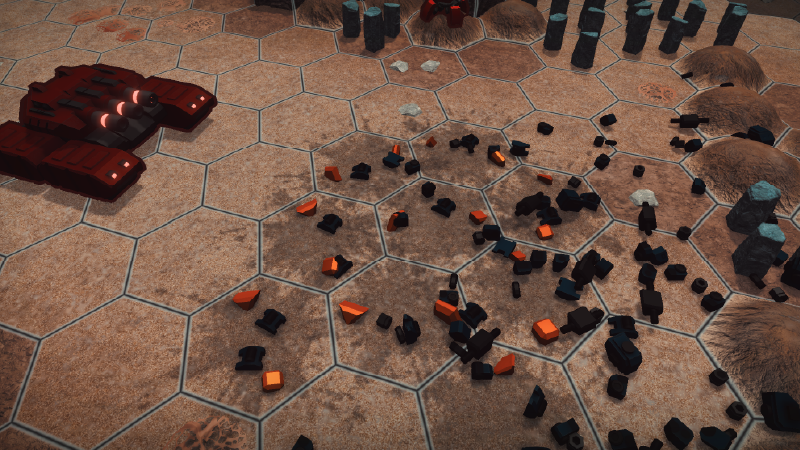
Death Fragments
Units now produce physically simulated death fragments upon destruction.
This effect differs during the Prologue missions.
Note: This is a visual system only, distinct from wrecks (which provides metal resources).
Environment Art Upgrade
Improved lighting design; resource crystals now have enhanced visibility.
Added new ground texture types and transition effects across all environment themes.
New mechanical walls that block direct attacks and ground unit movement (air units unaffected).
Note: Level terrain changes require restarting the mission to take effect.
Divi is Watching
Divi now guides players via light indicators during Prologue missions.
Divi actively observes the battlefield during combat.
General Improvements:
Mission selection and loading screens now display stage background art.
Equipment and chassis stats now appear as icons in unit panels, reducing UI obstruction.
Redesigned danger zone and move/attack range visuals for clearer overlapping display.
End-of-turn prompts now show unit action status and valid tagets for idle units.
Units retain their facing direction after moving/attacking until turn end.
New campaigns unlock all Prologue missions and start from mission selection after the intro.
Multi-unit "Undo Move" icons now only shows one, with quantity indicators.
Enhanced model textures (emissive/normal maps) for multiple units.
Added impact area VFX for the Mega Assault Tank.
Kill markers ("X") are now smaller and less obstructive.
Replaced one player-phase background music.
New campaigns now generate an initial autosave immediately.
Reduced difficulty of Hard Mode in Mission 1-4.
Radar Stations now only show detection range when selected (not on hover).
Action-completed units no longer display attack ranges when selected to avoid confusion.
General Fixes:
Fixed AI Engineers attempting self-repair causing errors.
Fixed uncloseable "Overwrite Save?" confirmation popup.
Fixed Mission 1-4 tutorial stuck when Commander was (accidentally) selected during intro cutscene.
Source
Changelog.gg summarizes and formats this update. How we read updates.