
HomeGamesUpdatesPricingMethodology
Steam News18 February 20264mo ago

Two New Forest Sub-Theme Colors! Shortcut added to swap theme colors, and more!

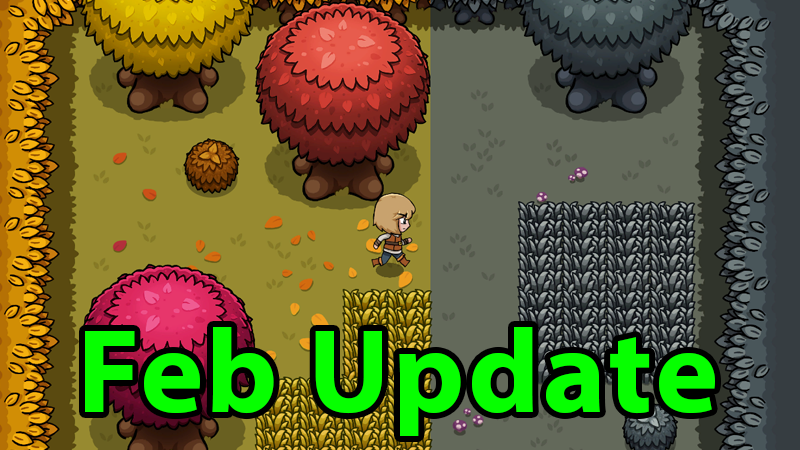
New Forest Sub-Themes A new Forest Sub-Theme was added for the "Dead" Forest! SpoOoOoOoky! A new Forest Sub-Theme was added for the "Autumn" Forest!

Full notes

Full Super Dungeon Designer update

Read the full published notes in a cleaner layout. The original post stays linked below.

What changed

2 fixes3 additions0 changes1 removal
  • Gameplay
  • UI and audio
addedNew Forest Sub-ThemesA new Forest Sub-Theme was added for the "Dead" Forest! SpoOoOoOoky!
addedNew Forest Sub-ThemesA new Forest Sub-Theme was added for the "Autumn" Forest! Check out both themes by selecting the Forest Theme then clicking the sub-theme selector at the bottom of the right menu in Build Mode.
removedShortcut to Replace ThemesSelect a sub-theme (paint brush cursor) and Ctrl+Left Click on a tile to change that tile and all connected tiles of the same sub-theme into the sub-theme you selected! No longer will you need to hand paint each tile to change the theme of a room. Thanks and shoutout to the community for asking for this feature. We'll work it into one of the Tutorials soon as well.
addedLocked Canopy DoorsOops! We missed adding the colored locks to the Canopy Locked Doors, they are there now!
fixedBug Fixes and EnhancementsFixed an issue with the bomb fuse SFX being heard outside of rooms.
fixedBug Fixes and EnhancementsFixed tooltips on the Dirt and Ruin locked doors.

Super Dungeon Designer changes

addedA new Forest Sub-Theme was added for the "Dead" Forest! SpoOoOoOoky!
addedA new Forest Sub-Theme was added for the "Autumn" Forest! Check out both themes by selecting the Forest Theme then clicking the sub-theme selector at the bottom of the right menu in Build Mode.
removedSelect a sub-theme (paint brush cursor) and Ctrl+Left Click on a tile to change that tile and all connected tiles of the same sub-theme into the sub-theme you selected! No longer will you need to hand paint each tile to change the theme of a room. Thanks and shoutout to the community for asking for this feature. We'll work it into one of the Tutorials soon as well.
addedOops! We missed adding the colored locks to the Canopy Locked Doors, they are there now!
fixedFixed an issue with the bomb fuse SFX being heard outside of rooms.

New Forest Sub-Themes

  • A new Forest Sub-Theme was added for the "Dead" Forest! SpoOoOoOoky!

  • A new Forest Sub-Theme was added for the "Autumn" Forest! Check out both themes by selecting the Forest Theme then clicking the sub-theme selector at the bottom of the right menu in Build Mode.

Shortcut to Replace Themes

  • Select a sub-theme (paint brush cursor) and Ctrl+Left Click on a tile to change that tile and all connected tiles of the same sub-theme into the sub-theme you selected! No longer will you need to hand paint each tile to change the theme of a room. Thanks and shoutout to the community for asking for this feature. We'll work it into one of the Tutorials soon as well.

Locked Canopy Doors

  • Oops! We missed adding the colored locks to the Canopy Locked Doors, they are there now!

Bug Fixes and Enhancements

  • Fixed an issue with the bomb fuse SFX being heard outside of rooms.

  • Fixed tooltips on the Dirt and Ruin locked doors.

Source

Steam News / 18 February 2026

Open original post

Changelog.gg summarizes and formats this update. How we read updates.