
Full notes
Full Statecraft: Corrupted Democracy update
Read the full published notes in a cleaner layout. The original post stays linked below.
What changed
- UI and audio
- Gameplay
Statecraft: Corrupted Democracy changes
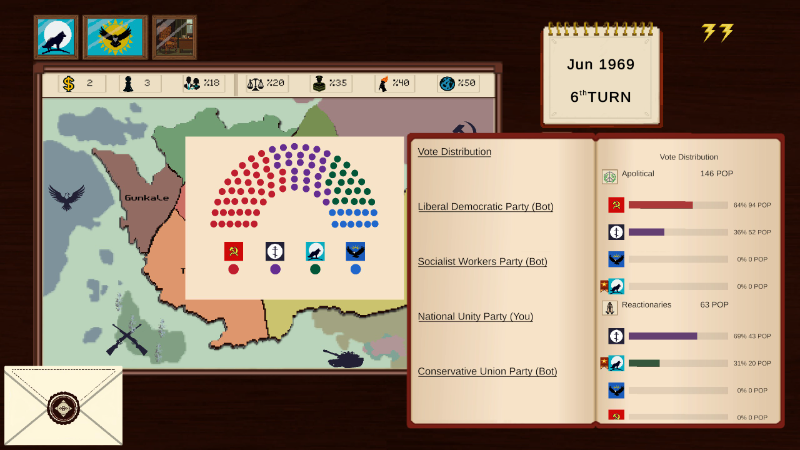
Steam post imageThx for all the feedback since launch! I realized the math behind the elections was a bit too hidden, making it hard to plan your moves. So, I just pushed a quick update to make things much clearer.
New "Vote Distribution" Panel! No more guessing why you lost an election. This new UI shows exactly how votes are split among the 5 interest groups. You can see the actual POP sizes and party relations. The key thing to remember is that it's all about relative relations—even if your relation is 80, if a rival has 90, they steal the majority of those votes. This panel visualizes the race so you know exactly who to focus on.
Advisor Letters To help with the learning curve, I added 3 new advisor letters that will pop up in your inbox (supported in all 6 languages):
Welcome: A quick reminder to check your inbox for incoming tips and crises.
Vote-split warning: Triggers if support in your main interest group drops below 60%. It also teaches you how to use the "Despair the Majority" action to break your rivals' grip on your voters.
Region tabs reminder: Pops up if you haven't checked the Culture/Religion tabs by turn 13, where your unique party actions are hidden.
QoL & Bug Fixes
Console Shortcut: You can now open the developer console by simply pressing'C'(as an alternative to the previous key). This should make it much easier to access without messing with complex keybinds or virtual keyboards.
Achievements: Making a typo in the console no longer disables achievements. They will only turn off if you successfully execute a valid cheat command.
Thanks again for playing and leaving reviews. Let me know what you think of the new UI!
Source
Changelog.gg summarizes and formats this update. How we read updates.