
In this update7
Full notes
Full Soulmask update
Read the full published notes in a cleaner layout. The original post stays linked below.
What changed
- Gameplay
- Store
- Performance
Soulmask changes
Chieftains,
We’re aware that some of you have been unable to claim the Egypt DLC, Soulmask: Shifting Sands, normally.
We began investigating the issue immediately and contacted Valve for assistance as soon as possible. We sincerely appreciate Valve’s prompt support in helping us resolve the problem.
Please first make sure your game has been updated to version 1.0.0. During the first month after launch, all players who own Soulmask 1.0.0 will automatically receive the Egypt DLC, which will be added directly to their Steam library.
You can quickly check in your Steam Library to see whether the Egypt DLC has been successfully added.
If it still does not appear, please try restarting Steam first.
Below is a quick FAQ. If you have any other questions about the DLC, feel free to click the link and contact us through the Discord feedback treat for further assistance.
Click here
Q: How can I get the Egypt DLC, for free?
Please note: you do not need to add Soulmask: Shifting Sands to your cart separately. You only need to purchase the base game Soulmask, and the DLC will be granted automatically.
Q: I already purchased Soulmask before. How do I get the DLC for free?
As mentioned above, you can try the following steps:
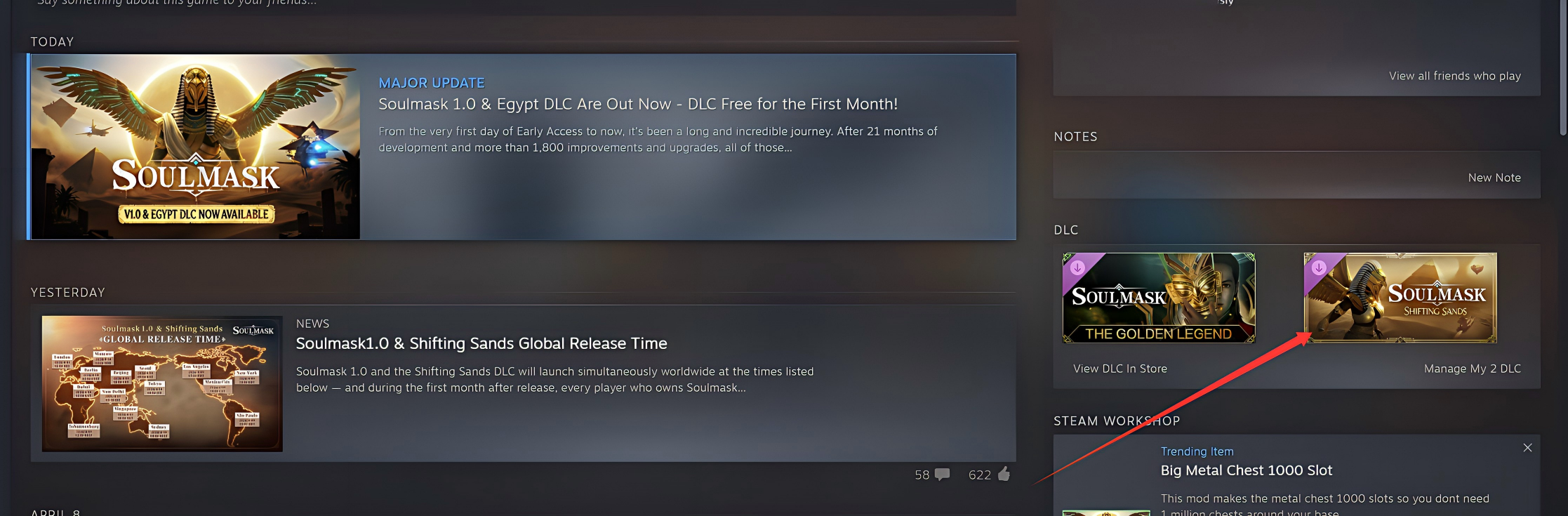
Open the Steam client and go to the Soulmask page in your Library.
Check the DLC section to see whether the icon for Soulmask: Shifting Sands is displayed.
If it is there, the DLC has already been activated successfully, and you can enter the game and start playing right away.
Q: I successfully claimed the DLC, but my game suddenly crashes!
If your game crashes when launching, please try unsubscribing from all Mods in the Steam Workshop and completely removing all Mod files from the game’s root folder on your PC by following these steps:
In your Steam Library, right-click Soulmask, then select Manage → Browse local files.
In the game directory, open the folder named WS, then open the Mods folder.
Delete all folders and files inside the Mods folder.
Q: How long can I play it after receiving it? Is it only available for one month?
No. Once you receive it, it will remain in your library permanently.
Q: I still can’t get the DLC right now. What should I do next?
We sincerely apologize for the inconvenience. We are working urgently to resolve this issue, and you can join the feedback treat above for further updates and guidance.
Source
Changelog.gg summarizes and formats this update. How we read updates.