
In this update9
Full notes
Full Slice Overdrive update
Read the full published notes in a cleaner layout. The original post stays linked below.
What changed
- UI and audio
- Gameplay
Slice Overdrive changes
Today's update is a big one, under the hood and in full view! Following on the back of part 1 by making the levels easier to categorise before playing, Suggested Tags has now been added. Also in this update the level editor gets a big overhaul and all of the audio in the game gets reworked.
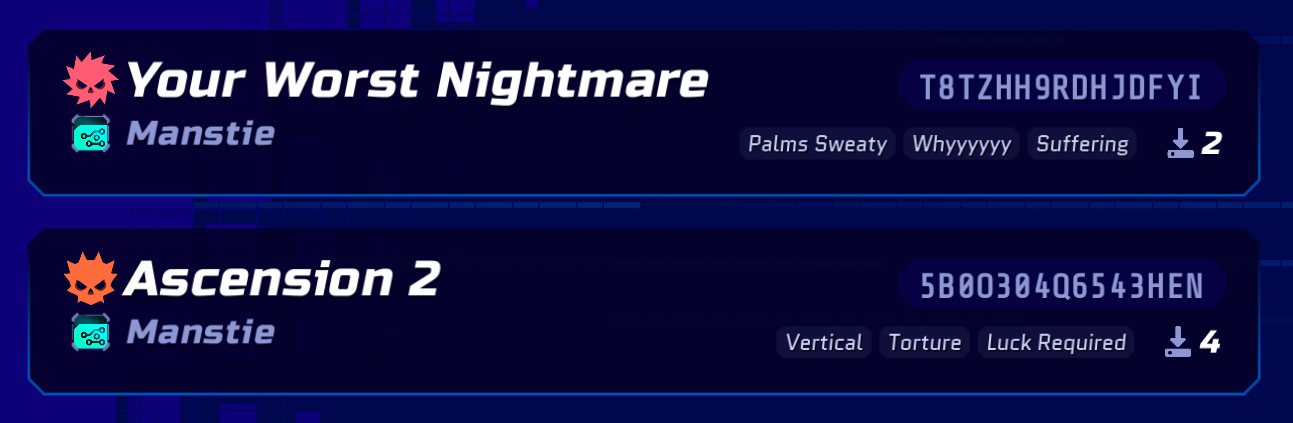
Suggested Tags
*Manstie's levels are no joke...
Each level now has up to 3 tags displayed that can summarise the gameplay - these are user voted so every person can help categorise your really hard level into funny tags
You can now select tags when creating a level, or when viewing someone elses level
Sorting with tags will be coming in a far future update (once more levels have been tagged)
Level Editor Immersion
Level Editing is no longer "paused", which means Backgrounds and Weather play along while building so you can experience the immersion...ooh nice
You can now hide the grid in the level editor for good vibes
New Pieces
Added a rotatable "Corridor" piece (with slightly more leeway in the hitboxes) for really tight level design
Added a rotatable Corridor "Dead-End" piece for fun and visual harmony
Tidied up the angled corners of the 'Corner" piece to match
Audio Overhaul
All of the menu (and intro) sound effects have now been moved into a dedicated UI slider, leaving SFX slider to handle game sounds
Menu has been updated with many missing hover/focus/pressed sfx
Portals now have a Level Complete soundscape to add some excitement (a rough experiment for a future uplift)
Gameplay sound effects have been updated including enemies, player movements
Gameplay Pause and Level Editor Pause Menu Overhaul
Previously pressing pause would hide the game world or level editor - now, you will see through the details to the blurred background, keeping the vibe alive (it helps also avoid confusion from the visually similar Level Details pages)
Level Complete screens also have a transparent background now to connect it to the level instead of sending you away to a blue background paradise...
Empty List States and Error Messages
Added some simple error states and Empty states for when there is nothing in the lists or the lists haven't loaded (shoutout to Cloudflare going down to help me test it!)
Snappier Menus and Loading
Previously loading the level editor took a fair bit as it rebuilt the UI each time - this has now been cleaned and sped up loading all levels, including some knock-on wins for playing others levels!
Reduced calls and simplified data fetching to make menus better all around
Deaths Counted Again in Level Editor
There was an earlier change that removed deaths from your local levels entirely, so that when you published it stated 1 completion and 100% clear rate (yeh right!) - so this has been updated to enable deaths again, resetting when you change something in the level (aka make a new version)
Player Fixes and FX
There was a bug in which the player wouldn't visually land when double jumping...so now this works!
Added landing particles so that landing feels more satisfying because everyone loves particles
Phew! That's it for this update. Enjoy slicing!
Source
Changelog.gg summarizes and formats this update. How we read updates.