
In this update5
Full notes
Full Shoot Pro Wrestling 2 update
Read the full published notes in a cleaner layout. The original post stays linked below.
Repeated intro
Hello, Jason here again. I just want to quickly run through some of the new features added in Update 0.21 of Shoot Pro Wrestling 2.
What changed
- Gameplay
- Events
- UI and audio
- Balance
- Fixes
Shoot Pro Wrestling 2 changes
This update mostly brings in a few quality of life improvements that people have been asking for, but it's good to get them out of the way with a quick update before I move on to adding bigger things.
Nations mean more
The first two additions in 0.21 are intended to make different nations and countries mean more, rather than just being another set of venues to run.
Firstly, AI companies will now only run events in their own home country. This is somewhat of a stop-gap solution to prevent local indie companies apparently hopping all over the world with shows. It also now gives different countries their own "wrestling scene" with unique companies.
I say this is a stop-gap solution because eventually a mechanic will be added in to allow larger AI companies to run international shows if they can afford it. In the future, I'll also add a function to ensure that the USA always has at least 2 or 3 AI companies based there, as that's likely to be the region where most players will want to play.
NOTE: This change only affects AI companies. Player-led companies can still run international events with no restrictions (although additional costs for international travel may be added very soon).
Secondly, for the nation updates, wrestlers will now demand a higher wage if they're being offered a job outside of their home country. On average, an international wrestler will want 25% more than a home-grown wrestler, but this mechanic will be refined over time.
Book Card Screen
Steam post imageThere are three new additions to the Book Card screen.
Firstly, rows will now be highlighted blue to show which wrestlers are currently booked on the selected card. Please note that the highlighting only updates when you click the "Save Changes" button to confirm your choices.
Secondly, to the left of each wrestler's name you'll see a new icon with an "i" in a white circle. Hovering your mouse cursor over this icon pops up a window containing that wrestler's skill stats. The window will stay open for as long as you hover your cursor over the icon.
In a similar way, if you hover your cursor over a wrestler's "Win Streak" value, you'll open a pop-up window containing their 20 most recent matches, as well as a few career win/loss stats.
These two new pop-up windows should help you make choices more easily when booking matches.
Wrestler Profile Page
Just a couple of quick additions to each wrestler's profile page.
Firstly, in the "Info" panel at the right of the screen, you can now see a wrestler's ethnicity. Previously, the only way to tell a wrestler's ethnicity (apart from if the name gave it away) was to auto-generate a portrait picture and see from that.
Although ethnicity only plays a visual role in the game at the moment, it may become more of a factor in later updates, so having this information to hand is useful for people who like to add their own custom images for their wrestlers.
Secondly, on the Wrestler Profile Page, what was previously just a list of their last 5 matches has now been expanded to a scrollable list of their last 20 matches.
In future updates, a separate page will be added that lists their full match history throughout their career.
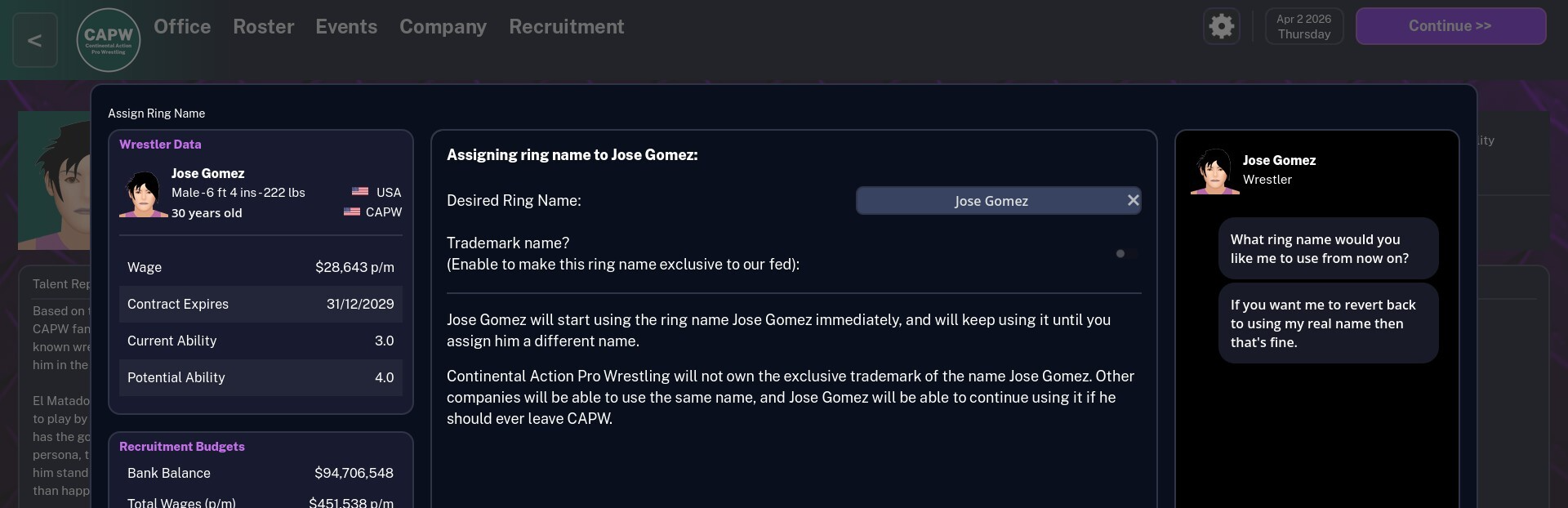
Steam post imageThe final change related to a wrestler's profile is that you can now revert a wrestler back to using their real name after having previously told them to use a custom ring name. All you need to do is leave their real name in the text box when clicking the "Check Name" button.
This was a bit of an oversight on my part when I added the original ring name mechanic, as their was no way to take a ring name off them again.
In addition, you can give a new ring name to a wrestler who is already using a ring name. Just enter and check the new ring name in the same way you did with their previous ring name.
Events Overview Screen
Steam post imageThere are a couple of new additions just to start filling up the Events Overview screen.
Firstly, in the top right, a list of your top average event ratings sorted by region. In some cases (like in my screenshot), you may not see significant differences between regions. However, after your company starts to mature, and you run more events, you may see that the fans in different regions respond differently to your shows, and you may be able to identify regions that are more favourable to your particular style of wrestling.
Secondly, at the bottom right of the screen, you'll see a list of the top 5 events that your company has run in the current year, based on the average 5-star rating of the overall event.
Note that for both of these tables, although you only see values displayed to the nearest quarter of a star, each event is actually rated to a higher level of accuracy than that. Therefore, the tables are displaying a true ranking order, even if all the values are displayed as 2.5, for example.
What's coming next?
Now that some of the most pressing quality of life changes have been addressed, I really want to get stuck into the match engine. These tweaks to the match engine are the only things that are really stopping me adding tag teams, outside interference, and feuds, so I really want to get them taken care of.
Of course, some other little things might be added too, but getting the match engine together, with event ratings and attendances fine-tuned, is really the top priority before I can start bolting new features on.
So, until next time, thank you for your ongoing support and feedback, and I'll see you soon.
Jason
Source
Changelog.gg summarizes and formats this update. How we read updates.