
In this update6
Full notes
Full Shoot Pro Wrestling 2 update
Read the full published notes in a cleaner layout. The original post stays linked below.
What changed
- Gameplay
- UI and audio
- Events
Shoot Pro Wrestling 2 changes
Hi, Jason here with some more news for you. I've just made Update 0.2 live, and it brings changes to the titles system.
Title Histories
By clicking on a Title on the Roster screen, you can now view the full history for that title.
Don't worry, your title histories have been saved in the background since you started playing the game (even though you couldn't see them). So, with Update 0.2, you now view the histories that were hiding back there.
Vacate and Delete Titles
On each title history screen, you'll also see buttons to either vacate a title or delete it completely. Just be warned that deleting a title completely removes it from the database along with all its history, so only delete a title if you're really sure you don't need that history.
If the history doesn't matter to you, there's no harm in deleting a title, as you can always resurrect it later, in name only, using the next new feature...
Add New Titles
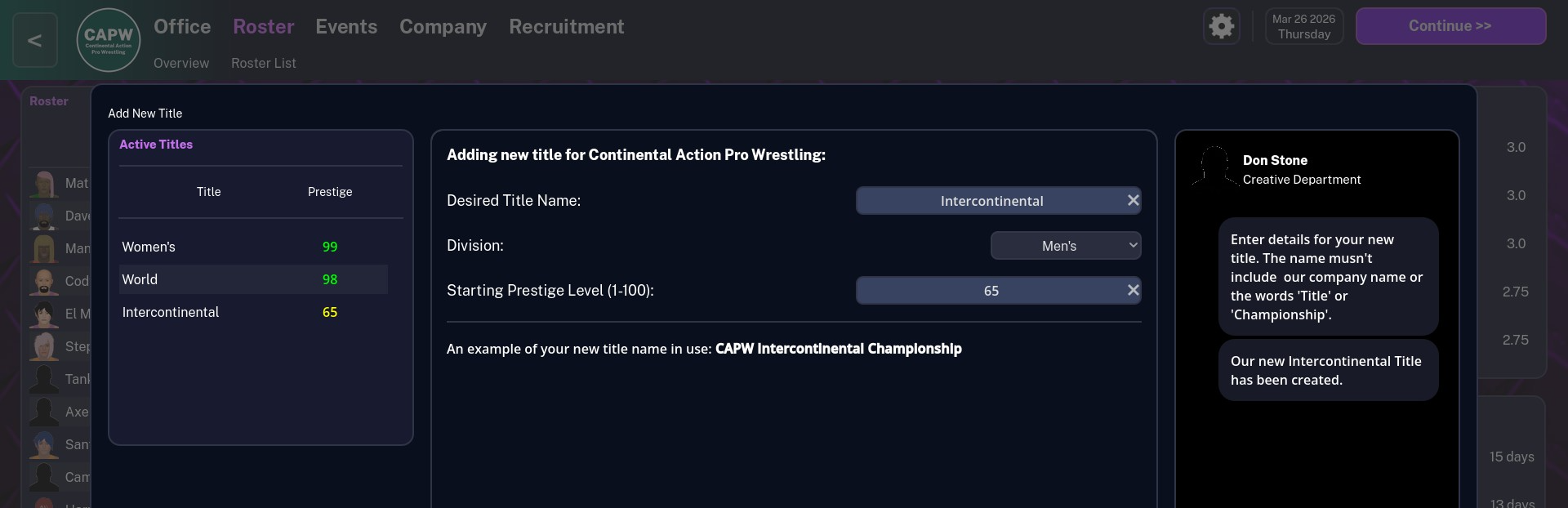
At the top of the Titles List on your Roster screen, you'll now see an "Add Title" button that will open up the following window
From the Add New Title window you can now add new titles to your company using whatever names you want.
Each title must be assigned to a division using the Division drop-down menu. Currently, you only have the choice of a men's and a women's division, but this will be expanded with tag teams once they're added to the game.
The ultimate goal in future updates is for you to be able to add your own divisions based on weight as well as gender, so you can set up that cruiserweight division you've always wanted.
As Title Prestige is dynamic and varies based on the buzz level of the wrestlers you have competing for it, the Starting Prestige Level you set here acts as a sort of guide so that this title will sit where you want it in your titles list.
Recruitment Screen
The Recruitment screen has received a little bit of an update to make it more user friendly.
The major update is the addition of a country filter menu, to help cut the unemployed list down into more manageable chunks.
In addition, values for a wrestler's Current Ability and Potential Ability (based on a 5 star scale) have been added to the main list to make it easier to spot talent without having to click on every individual profile.
Note that a wrestler's Potential Ability is something that will come into play when the Training and Progression update arrives. At the moment, the only figure you really need to worry about is their Current Ability.
Average Event Ratings Chart
Finally, just a little addition to the Events screen in the form of a chart showing you the average rating of your last 10 events (on a 5 star scale), plus an average value taken across all 10 of those events.
It's only a small addition, but it's nice to be adding some more detail to the Events screen.
Thanks for your support
Once again, thanks for your support with Shoot Pro Wrestling 2 during this early access period, and thanks for the helpful feedback.
Jason Webb
Source
Changelog.gg summarizes and formats this update. How we read updates.