
Full notes
Full Shell of a King update
Read the full published notes in a cleaner layout. The original post stays linked below.
What changed
- Gameplay
- Balance
- UI and audio
Shell of a King changes
The 52nd weekly update for 'Shell of a King' is here. As always, if you find any bugs, especially game-breaking ones please let me know via the official discord! I can always revert to an earlier update if something breaks!
1.2k Change List:
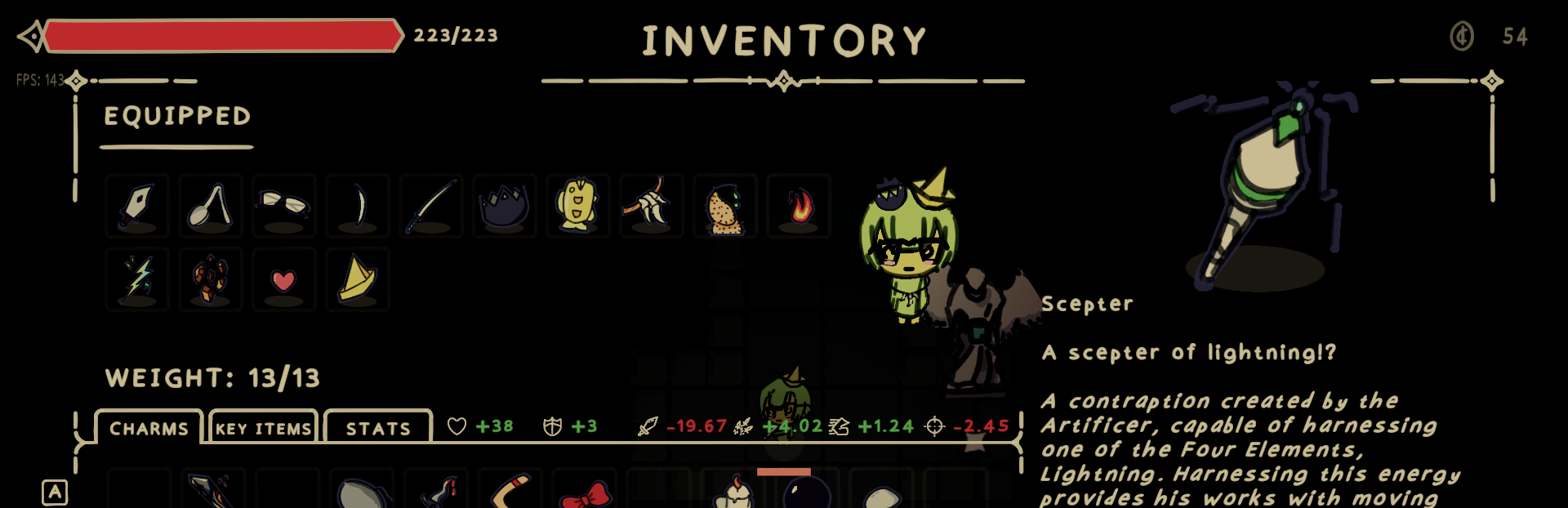
Complete redesign and overhaul of the inventory, splitting up Charms, Key Items, and Stats/Levels into separate tabs. The Player now displays in the inventory to show how your loadout makes the player look!
Convert all Settings Menus to a 'dark mode' and clean up formatting for both PC and Steam Deck
Pause menu buttons get a new look to match the Main Menu format
The Dialogue box is now 'dark mode' as well, I will be coloring the NPC icons so the contrast isn't too jarring
Make the Grand Library password entry also 'dark mode'
Player and Boss health bars get a new look
All settings/options are now available to edit while in the Main Menu
Reformat the alignment of HUD elements to be more consistent
HUD elements get a new look to match new UI
Add new game cursor image, will likely change this in the future
Add sounds to all sliders, toggles, dropdowns, and buttons in the Settings Menus
Add sounds for opening Inventory, Map, and Settings Menus
Add 'Zacksly' to an attributions section in the credits for the new GamePad button icons
Split up the Game Options menu into separate Game Options and Graphics menus
Overhaul of gamepad navigation, still needs some improvement
Pressing 'Back' or 'Escape' in the Main Menu and Settings Menus now navigates backwards
Bold and capitalize most standalone text, such as area names, boss names, settings, timer text, etc
Resetting Gamepad Controls now resets the joystick modifier sliders
'Activatable' keybinds now display as 'Active'
Greg items now display price currency as a cent rather than 'g'
Gregs Hat now displays as Greg's Hat
Queens Sacrifice now displays as Queen's Sacrifice
Reformat the charm equip tutorial to accommodate the new inventory
Remove outlines from Tool Tips and Area Names for a cleaner look
Removed the 'View Lore' hotkey as it is no longer in use
Removed the 'Escape' hotkey from the GamePad menu as it can result in softlocks
Various Internal Changes
Source
Changelog.gg summarizes and formats this update. How we read updates.