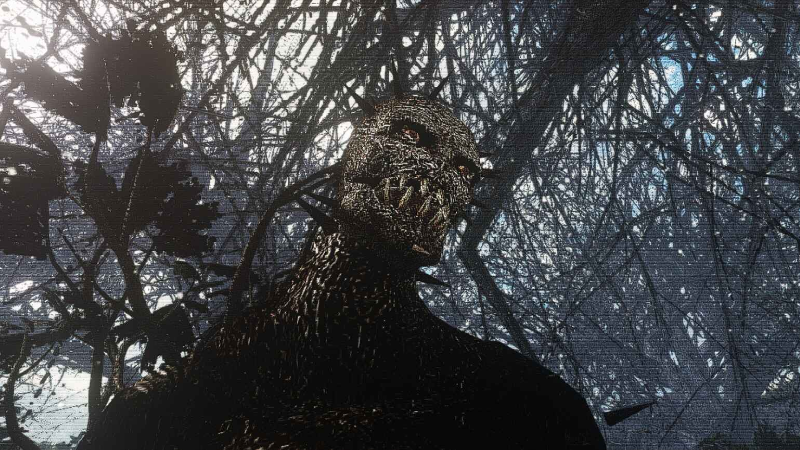
WIP Improvements to in-game textures, content shown is subject to change: And yes, as you may have seen, Gary got an upgrade.
Full notes
Full Rogue Planet 1 update
Read the full published notes in a cleaner layout. The original post stays linked below.
What changed
0 fixes0 additions5 changes0 removals
Gameplay
Maps
changedWIP Improvements to in-game textures, content shown is subject to change:
changedAnd yes, as you may have seen, Gary got an upgrade. Here is a sneak peek in level 2:
changedI've gone through the effort of sharpening many various textures of a lot of the GameGuru models, mostly being the ones of models you will be constantly seeing throughout my game. Naturally models like the low poly cityscapes of the background aren't really in need of that when they're in the skybox 3 miles away. However, models like the trees, walls, buildings, and the enemies are. So while every model may not get this treatment, the focus should help many in game models and assets look better and more detailed while maintaining their original resolution as to not increase the requirements for those on lower end hardware.
changedWhile I was poking through the textures of a lot of models, I was running a few experiments and found I was able to improve the shading and details of many of the textures in GameGuru by opening the .dds texture files of a model, increasing the sharpness of the color and normal maps, or other texture maps, if the models even had any (which in my testing, 9/10 models did not even have a basic ambient occlusion, specular, or metallic map, which leads to some models looking better than others in the engine due to the unfinished PBR support.)
changedAnyways, enough of that. More coming soon, take care and stay tuned!
Rogue Planet 1 changes
changedWIP Improvements to in-game textures, content shown is subject to change:
changedAnd yes, as you may have seen, Gary got an upgrade. Here is a sneak peek in level 2:
changedI've gone through the effort of sharpening many various textures of a lot of the GameGuru models, mostly being the ones of models you will be constantly seeing throughout my game. Naturally models like the low poly cityscapes of the background aren't really in need of that when they're in the skybox 3 miles away. However, models like the trees, walls, buildings, and the enemies are. So while every model may not get this treatment, the focus should help many in game models and assets look better and more detailed while maintaining their original resolution as to not increase the requirements for those on lower end hardware.
changedWhile I was poking through the textures of a lot of models, I was running a few experiments and found I was able to improve the shading and details of many of the textures in GameGuru by opening the .dds texture files of a model, increasing the sharpness of the color and normal maps, or other texture maps, if the models even had any (which in my testing, 9/10 models did not even have a basic ambient occlusion, specular, or metallic map, which leads to some models looking better than others in the engine due to the unfinished PBR support.)
changedAnyways, enough of that. More coming soon, take care and stay tuned!
WIP Improvements to in-game textures, content shown is subject to change:
And yes, as you may have seen, Gary got an upgrade. Here is a sneak peek in level 2:
I've gone through the effort of sharpening many various textures of a lot of the GameGuru models, mostly being the ones of models you will be constantly seeing throughout my game. Naturally models like the low poly cityscapes of the background aren't really in need of that when they're in the skybox 3 miles away. However, models like the trees, walls, buildings, and the enemies are. So while every model may not get this treatment, the focus should help many in game models and assets look better and more detailed while maintaining their original resolution as to not increase the requirements for those on lower end hardware.
While I was poking through the textures of a lot of models, I was running a few experiments and found I was able to improve the shading and details of many of the textures in GameGuru by opening the .dds texture files of a model, increasing the sharpness of the color and normal maps, or other texture maps, if the models even had any (which in my testing, 9/10 models did not even have a basic ambient occlusion, specular, or metallic map, which leads to some models looking better than others in the engine due to the unfinished PBR support.)
Most of what I found out about the various models and the textures on them was rather interesting. The actual textures were either taken from real life photos, presumably on a camcorder due to the very low resolution, and very haphazardly wrapped around the various low poly models, leading to the typical issue of most gameguru games where everything looks like moldy mashed potatoes and 144p YouTube videos from 2006, and/or exported to an incredibly blurred resolution that looked like someone smeared grease on them. I was able to fix them by pressing four buttons in Paint .net and got these results.
So hopefully one of their updates that take 7 months to fix 1 bug can take some notes so games on this engine look more like windows 8 instead of XP.
The Devil is in the Details, GameGuru. You know you don't deserve me. ːujelː
Anyways, enough of that. More coming soon, take care and stay tuned!