
In this update15
Full notes
Full PLAYNESE: Master Japanese update
Read the full published notes in a cleaner layout. The original post stays linked below.
What changed
- Performance
- Gameplay
- UI and audio
- Events
- Maps
- Balance
PLAYNESE: Master Japanese changes
From the Developer
This week's update is major and packed, focuses on expanding study tools, adding new mini-games, improving performance and introducing several quality-of-life improvements across PLAYNESE.
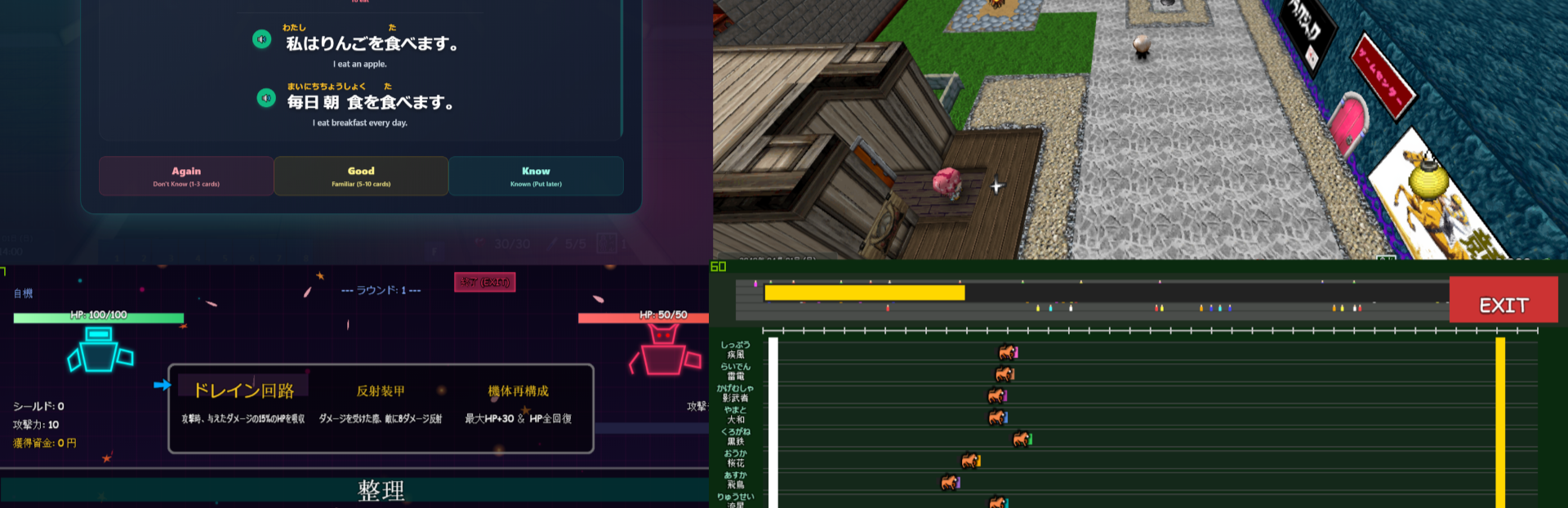
The biggest addition this week is the launch of the new Anki Study Deck system, designed to help players review Japanese using spaced repetition directly inside the game just like the phone / pc app.
New Anki Study Decks
What is Anki?
Anki is a flashcard system that uses spaced repetition to help you remember information long-term.
Instead of reviewing every card every day, Anki schedules reviews based on how well you know each card, showing them again right before you're likely to forget them. This makes studying much more efficient and helps build long-term memory.
PLAYNESE now includes its own growing collection of Anki-inspired study decks. Don't confuse this with the other system which is a screen idle Anki feature.
To access them:
Press F to open your Inventory and scroll to the bottom.
Currently Available
Complete Hiragana Deck
Complete Katakana Deck
JLPT N5-N1 decks are currently being developed and will continue expanding over future updates.
Please note that all cards, examples, and voice files are created manually to help ensure accuracy. Because of this, building the full JLPT collection will take time, but the goal is to eventually include complete study material for every JLPT level, and keep updating them.
Features
Complete Hiragana and Katakana decks
Progress tracking displayed as a percentage
NEW indicator for first-time cards
LEARNING indicator for cards already studied
Undo button (1 card only for now)
Font size increase and decrease options
Reset Deck option to restart progress
Future voice file support planned as you can see (green buttons)
As always, additional improvements will be made based on player feedback.
Two New Mini-Games
Two brand-new mini-games are now available in the evolved Castle area Game Center, inspired by childhood games. Choose your Japanese level from Hiragana, Katakana, N5 to N1 and enjoy!
Horse Racing
Steam post imageBet your Japanese currency and race against competitors while answering Japanese quizzes.
Correct answers increase your speed
Incorrect answers slow you down
Win races to earn larger rewards, but difficulty increases
Mecha Battle
Steam post imageChoose your Japanese level and battle another robot in a quiz-based combat system.
NOTE: Additional 2 mini-games are already completed internally and will be released as more Japanese study content is added.
In-Game Zoom System
Steam post imageA new zoom system has been added.
Players can now:
Zoom in and out using the mouse wheel
Zoom while in First Person Mode (Not perfect yet but possible like the old Doom game feeling)
Adjust viewing distance even more [POV] using the Options menu is also possible
Indoor maps automatically return the camera to a comfortable default distance, while still allowing further zoom adjustments. Now you can look around corners and above roofs for treasures.
Additional improvements may be added based on feedback.
Card Art Rework
All card artwork has been reworked, and I already made many new cards to be added later on based on Japanese themes / history.
Big Performance Improvements
A new Performance Mode has been added and is now enabled by default.
Changes include:
Shadows disabled by default
Far events / art load properly when getting closer
Improved performance on lower-end systems
Better overall frame stability
If your PC runs the game smoothly, you may disable Performance Mode in the Options menu.
Please note that some larger maps may still require additional optimization during development. Basically it's my fault, not your pcs :)
Blackjack Update
The Blackjack mini-game has received a major visual and audio upgrade.
New Features
New jazzy Blackjack music track
Dealer now reacts with over 50 different emoticons
New casino spotlight table effect
Improved card shadows and depth effects
Enhanced table visuals and borders
Menu Visual Improvements
The pause menu and options menu now include:
New animated particle effects
New vignette overlay effects
These additions help improve the overall atmosphere and presentation.
Writing Practice Improvements
The writing canvas has been redesigned.
New features include:
Kanji practice guide lines, improved writing area layout
Japanese-themed buttons and interface improvements
Designed to better support kanji balance.
Battle Transition Expansion
The number of battle transitions has increased dramatically.
Previously 1 to now 20 unique battle transitions
A random transition will be selected each time a battle begins.
Time & Date Improvements
The in-game clock system has been expanded.
New Features
Full date and time now displayed
Real calendar progression
Leap year support
Game starts on:
2040/04/01 (Sunday)
Sleeping now advances time directly to:
07:00 AM the following day
Improvements & Fixes
Deck Editor
Deck editing interface simplified
Only Edit is displayed while editing decks
Music Room
Increased default song volume by 10%
Environment
Added colorful walls outside the Game Center (May change again)
Improved Game Center background music
Audio
Added 30+ additional sound effects and music tracks throughout the game
Other Notes
Development continues on additional JLPT study content, Kanji Tower floors, mini-games, NPCs, stories, and quality-of-life improvements.
Thank you to everyone who continues reporting bugs, sharing suggestions, leaving reviews, and supporting PLAYNESE throughout development.
Every review and piece of feedback helps shape the future of the game.
See you again in next week's update! :)
ライト = Light 🎮
Source
Changelog.gg summarizes and formats this update. How we read updates.