What changed
0 fixes4 additions1 change0 removals
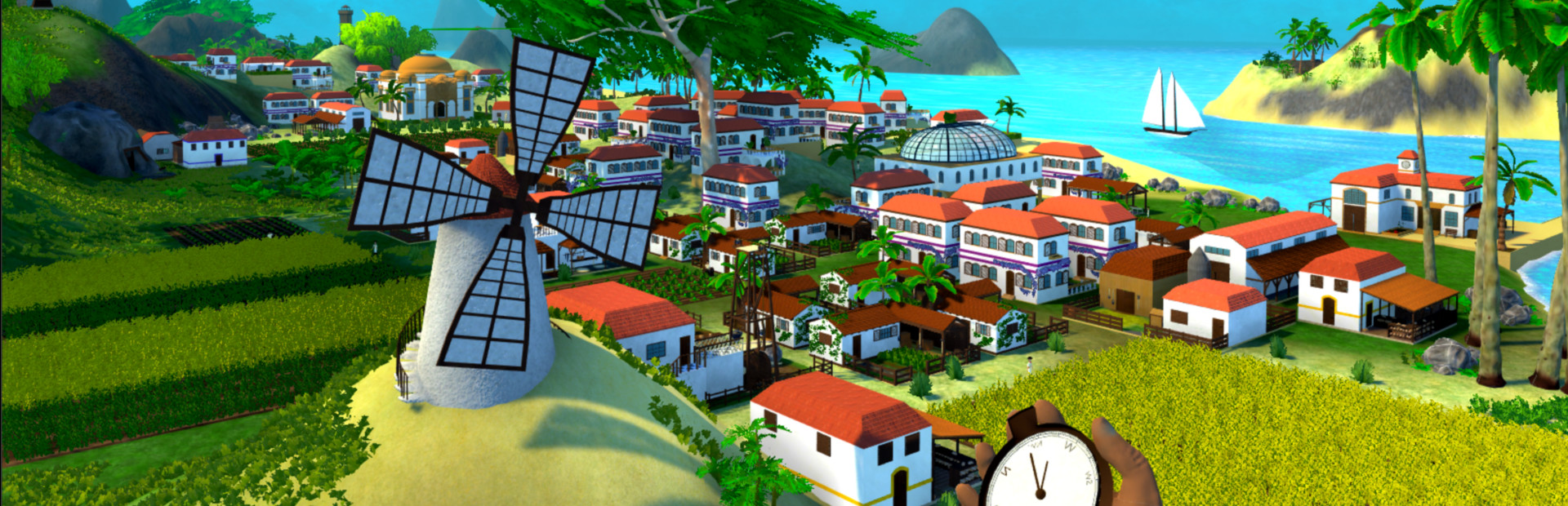
addedHi everyone,Between Thanksgiving and some travelling, my work over the last weeks has been fairly slow. However, I just finished the new model for the windmill (see today’s image), so let me walk you through it.
changedHi everyone,The previous windmill was one of the few buildings that I had actually added a small animation to already (the rotating blades), so of course the new one also has rotating blades. However, with building interiors being a thing in the new models, I went a little further than that, and added some gears, drive shafts, and finally a basic grindstone to the model. As a result, you will now be able to see a lot more moving parts as this building is operating than in any previous one, which should really help create more of an atmosphere of a living village.
addedHi everyone,While the turning gears are more animations than we’ve had so far, there is more I want to add in the future. For one, the building currently doesn’t (yet) have any sounds attached to it. With individual moving pieces, it should be possible to add fitting sounds in various locations, giving a much better soundscape than some of the generic building sounds we had before. I am also planning to use the current animations as a basis for future ones, and I am hoping that I will be able to add some villager animations in the future, e.g. the workers feeding grain into the millstone.
addedHi everyone,Finally, I have added some meshes to the model of the windmill that are meant to work with the new building script when it is finished. For example, there are meshes that are meant to only be shown as intermediate steps during construction, and to be deactivated again during a later part of the construction. This allows me to play around with new visuals, such as adding (and removing) cranes during construction, or having parts be constructed in an order that would have been impossible so far.
addedHi everyone,Similarly, the model has a number of optional meshes that are meant to be activated at random. So instead of each building looking the exact same, some buildings will have different ornaments randomly assigned to them. Considering that building construction is one of the oldest parts of the code, moving things over to the new (still unfinished) script has been a little challenging, but I am making good progress.
Path to Prosperity changes
addedBetween Thanksgiving and some travelling, my work over the last weeks has been fairly slow. However, I just finished the new model for the windmill (see today’s image), so let me walk you through it.
changedThe previous windmill was one of the few buildings that I had actually added a small animation to already (the rotating blades), so of course the new one also has rotating blades. However, with building interiors being a thing in the new models, I went a little further than that, and added some gears, drive shafts, and finally a basic grindstone to the model. As a result, you will now be able to see a lot more moving parts as this building is operating than in any previous one, which should really help create more of an atmosphere of a living village.
addedWhile the turning gears are more animations than we’ve had so far, there is more I want to add in the future. For one, the building currently doesn’t (yet) have any sounds attached to it. With individual moving pieces, it should be possible to add fitting sounds in various locations, giving a much better soundscape than some of the generic building sounds we had before. I am also planning to use the current animations as a basis for future ones, and I am hoping that I will be able to add some villager animations in the future, e.g. the workers feeding grain into the millstone.
addedFinally, I have added some meshes to the model of the windmill that are meant to work with the new building script when it is finished. For example, there are meshes that are meant to only be shown as intermediate steps during construction, and to be deactivated again during a later part of the construction. This allows me to play around with new visuals, such as adding (and removing) cranes during construction, or having parts be constructed in an order that would have been impossible so far.
addedSimilarly, the model has a number of optional meshes that are meant to be activated at random. So instead of each building looking the exact same, some buildings will have different ornaments randomly assigned to them. Considering that building construction is one of the oldest parts of the code, moving things over to the new (still unfinished) script has been a little challenging, but I am making good progress.
Hi everyone,
Between Thanksgiving and some travelling, my work over the last weeks has been fairly slow. However, I just finished the new model for the windmill (see today’s image), so let me walk you through it.
The previous windmill was one of the few buildings that I had actually added a small animation to already (the rotating blades), so of course the new one also has rotating blades. However, with building interiors being a thing in the new models, I went a little further than that, and added some gears, drive shafts, and finally a basic grindstone to the model. As a result, you will now be able to see a lot more moving parts as this building is operating than in any previous one, which should really help create more of an atmosphere of a living village.
The moving blades and internal millstone/gears
While the turning gears are more animations than we’ve had so far, there is more I want to add in the future. For one, the building currently doesn’t (yet) have any sounds attached to it. With individual moving pieces, it should be possible to add fitting sounds in various locations, giving a much better soundscape than some of the generic building sounds we had before. I am also planning to use the current animations as a basis for future ones, and I am hoping that I will be able to add some villager animations in the future, e.g. the workers feeding grain into the millstone.
Finally, I have added some meshes to the model of the windmill that are meant to work with the new building script when it is finished. For example, there are meshes that are meant to only be shown as intermediate steps during construction, and to be deactivated again during a later part of the construction. This allows me to play around with new visuals, such as adding (and removing) cranes during construction, or having parts be constructed in an order that would have been impossible so far.
Half-finished blades: An intermediate step in construction
Similarly, the model has a number of optional meshes that are meant to be activated at random. So instead of each building looking the exact same, some buildings will have different ornaments randomly assigned to them. Considering that building construction is one of the oldest parts of the code, moving things over to the new (still unfinished) script has been a little challenging, but I am making good progress.
Until next time!