
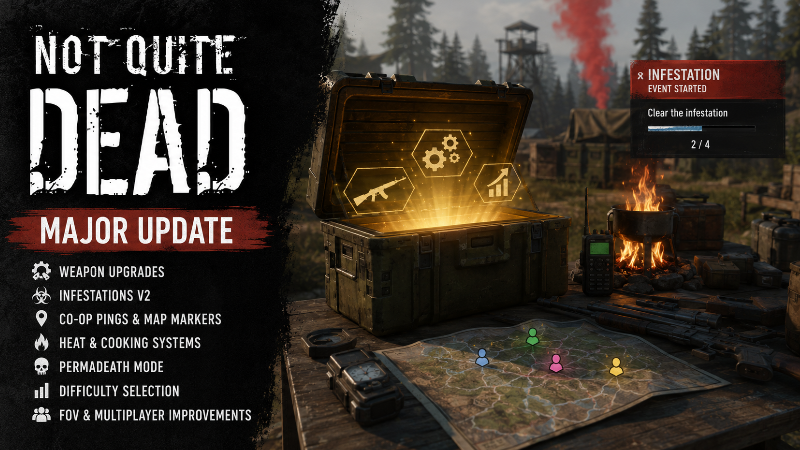
In this update13
Full notes
Full Not Quite Dead: Open World Survival update
Read the full published notes in a cleaner layout. The original post stays linked below.
Repeated intro
Hello survivors!
What changed
- Performance
- Gameplay
- UI and audio
- Balance
- Server
- Maps
Not Quite Dead: Open World Survival changes
The last two weeks have been some of the busiest development weeks Not Quite Dead has had so far. Since July 16, I’ve focused on improving progression, co-op communication, world events, survival systems, customization options, and the overall stability of the game.
A lot of this work happened behind the scenes, but the result is a game that now feels much more complete, responsive, and ready for longer survival runs.
Here is everything that has changed.
Persistent Weapon Upgrades
Weapons can now be upgraded through a complete persistent progression system.
Upgradeable weapons can reach up to six upgrade levels. Each level improves the weapon and is saved directly with that specific item, meaning upgraded weapons retain their progression when stored, transferred, dropped, or loaded again later.
The item tooltip now displays:
The current upgrade level
The maximum upgrade level
The weapon’s effective damage
The correct upgraded statistics
Upgrade costs use Weapon Parts and weapon-specific components depending on the weapon category.
The entire system is server-authoritative and works correctly for both the host and connected clients.
Improved Cooking and Refinery Processing
Campfires, furnaces, and other processing stations have received a major multiplayer rework.
Processing is now controlled by the server through synchronized timers rather than relying on local Tick-based logic.
Players can now see a proper countdown directly on items being processed. Multiple processing slots can run at the same time, and their progress remains synchronized between the host and remote clients.
This includes:
Server-authoritative processing
Multiple active processing slots
Synchronized countdowns
Correct host and client inventory updates
No permanent Tick-based processing
Heat Sources
Active campfires and furnaces can now warm nearby players.
When a heat-producing structure is active, players inside its radius receive a temperature bonus. The system uses the strongest nearby heat source instead of stacking several bonuses together.
The heat system also handles players who are already standing near a campfire when it becomes active, preventing situations where the player had to leave and re-enter the area before receiving warmth.
Reusable Zombie Zones
Zombie spawning zones have been improved so they can now be reused throughout a session.
Previously, a zombie zone completed its initial spawn sequence and destroyed itself. It can now remain active, track the zombies it created, clean up safely when players leave, and reactivate later.
The system now supports:
Tracking living zombies created by the zone
Cleanup after players leave
Cleanup cancellation when a player returns
Protection for zombies currently fighting a player
Protection for zombies near or visible to another player
Respawning only the missing zombies
Preserving normal lootable corpses
No permanent world scans or Tick logic
This makes the world feel more consistent while avoiding unnecessary full zombie waves every time an area is revisited.
Infestation V2
The original infestation system was rebuilt from the ground up as a new Blueprint-only system.
This was one of the biggest additions during this development period.
Infestations can now appear as global world events. When at least one infestation zombie successfully spawns, every player receives a notification and can see the infestation on the minimap and Big Map.
Availability
When a new infestation becomes available:
Infestation New infestation available
A marker appears on the minimap and Big Map so players can decide whether they want to travel to the event.
Event Start
The event officially begins when the first infestation zombie is killed.
Players receive a large notification:
INFESTATION EVENT STARTED
An objective tracker then appears:
Clear the infestation
The tracker includes both a progress bar and an exact counter such as:
2 / 4
Nearby Zombie Markers
When players approach the event area, living infestation zombies receive individual Screen markers. These markers are removed when:
The player moves too far away
The zombie dies
The event ends
The zombie Actor is removed
Normal zombies are not affected.
Completion Reward
After every infestation zombie has been eliminated:
INFESTATION EVENT FINISHED
The objective tracker and event markers are removed, and the server creates one shared military reward chest.
All connected players see and interact with the same authoritative chest and replicated inventory.
The system also supports several infestations running at the same time without mixing their progress, markers, zombies, or rewards.
Temporary Co-op Ping System
Players can now communicate through a fully replicated temporary ping system.
The default key is H, and it can be changed from the Input Settings menu.
Pressing Ping performs a trace from the center of the player’s current view.
If the trace hits terrain or a structure, the game creates a fixed-location ping.
If the trace hits a replicated Actor, such as a zombie, crate, NPC, or vehicle, the marker follows that Actor.
Every allied player sees the ping through:
A Screen marker
A minimap marker
A Big Map marker
Pings last for 20 seconds.
Each player can have one active ping at a time. Creating another ping replaces only that player’s previous ping without removing pings created by teammates.
The system works both on foot and while driving.
Co-op Players on the Big Map
The Big Map now displays the location of every connected teammate.
The local player still uses the existing directional [c]MI_Marker_Player[/c] arrow, which shows both position and facing direction.
Other players appear as colored teammate markers:
Blue
Green
Pink
Yellow
The system supports up to four players, and every client agrees on which color belongs to each player.
Hovering over a teammate marker displays their player name.
The markers use lightweight, globally replicated position beacons, meaning teammates remain visible on the map even when they are far beyond the normal replication distance of their Character.
Vehicle possession is also supported, so the marker follows the player’s current controlled vehicle or character location.
Difficulty Selection
Pressing Start Game in the lobby now opens a new difficulty-selection screen before the match begins.
The current options are:
Easy
Coming Soon
Normal
Recommended
This is currently the standard and only playable difficulty.
Hard
Coming Soon
Normal difficulty uses the current game balance. Easy and Hard will receive their own gameplay modifiers later.
Permadeath
Players can now enable an optional shared Permadeath mode when creating a new run.
The menu clearly explains how it works in both solo and multiplayer.
Solo
A permanent player death ends the run.
Co-op
If any human player dies permanently, the entire shared run ends for everyone.
Players who are only downed can still be revived. The wipe only triggers when a player reaches the confirmed fully dead state.
When a Permadeath run ends:
Ordinary respawning is blocked
The normal Knocked Out interface is hidden
Every player receives the Permadeath Game Over screen
Run-specific save data is deleted
Tutorial completion is preserved
Graphics, audio, FOV, and input settings are preserved
Character customization is preserved
The host and clients return to the lobby together
The Permadeath setting becomes locked after the run begins, preventing players from disabling it later to avoid a dangerous situation.
The fresh-run reset system is also receiving final validation to ensure a deleted Permadeath run can never reuse an old cached position or inventory. Steam post image Steam post image Steam post image
FOV Setting Repair
The Field of View setting has been restored after an earlier rollback broke its connection to the camera system.
The FOV option now:
Supports values from 70 to 110
Saves automatically
Works from the lobby and pause menu
Applies only to the local player
Is restored after respawning or reconnecting
Remains independent for each co-op player
Weapon aiming and sniper scopes still use their temporary zoom values. Leaving aim correctly returns the camera to the player’s selected FOV instead of a hardcoded default.
Multiplayer and Stability Work
A large amount of development time was also spent improving replication, cleanup, and stability.
This included:
Preventing duplicated markers and notifications
Correctly initializing replicated presentation on remote clients
Safe marker cleanup during EndPlay
Better vehicle and local-player detection
Preventing client-side gameplay spawning
Exact server-authoritative death tracking
Safe run-save deletion
Preventing autosaves from recreating deleted Permadeath runs
Coordinated host/client travel back to the lobby
Removing several Accessed None situations
Additional two-player and four-player PIE testing
The new systems avoid permanent Tick logic, unnecessary polling, replicated widgets, and unsafe Multicast spawning wherever possible.
What’s Next?
With many of the larger technical systems now complete, the next development phase will focus more heavily on the player’s progression through the world.
The planned early-game flow currently looks like this:
Complete the tutorial
Customize your survivor
Spawn in the southern region
Gather wood, stone, and fiber
Craft your first axe
Explore the nearby ruined town
Meet the trader
Repair your first vehicle
Establish a base
Discover radiation protection
Complete your first infestation
Begin the journey toward the center of the map
The goal is to give players a clear sense of progression without removing the freedom to explore, build, loot, or take on optional world events.
There is still plenty of balancing and polish ahead, but Not Quite Dead has made a huge amount of progress over these last two weeks.
Thank you to everyone following the project, wishlisting the game, sharing feedback, and supporting development.
More soon!
Source
Changelog.gg summarizes and formats this update. How we read updates.