
In this update6
Full notes
Full MMORPG Tycoon 2 update
Read the full published notes in a cleaner layout. The original post stays linked below.
What changed
- Gameplay
- Maps
- UI and audio
- Balance
- Fixes
- Server
MMORPG Tycoon 2 changes
Hi folks!
This is another update that got a bit bigger than I expected! Let me tell you about it.
Districts
You can now place "districts" in your world. Districts let you create and define areas within your world.
Districts work a little like monster zones in that you paint them down onto the ground. Once painted, you can select them like any other object to modify them. Note that they are only selectable while the Terrain action bar tab is active; they're hidden (apart from their effects on the map) in all other modes.
Currently, there are three kinds of districts:
Normal Districts:
Normal districts are very simple. They let you mark down a region and give it a name, which optionally can be made visible on the map when you're looking at that part of the world. You can also give them a description, if you want!
You can also recolor the ground within the district, including adding or removing grass within that area.
These simple district types can often be useful for delineating small villages, for changing the ground color to make farms, or just for general organization.
As an "advanced" option, you can also mark a normal district as an obstruction, basically turning it into one large invisible wall which will prevent your players from entering! If you're showing the district's title you can also change the title's size, placement, and color from the advanced options page of its information window.
Flat Districts:
Flat districts are very much like normal districts, with one exception; the area inside the district has its ground completely flattened. This is great for making larger towns where you want the area to feel more urban, with all the buildings built precisely on the same level.
Once a flat district is created, you can then select it and raise it up or down (within limits!), as well as modify how smoothly it blends out into the naturally undulating terrain outside the district. Note that the game will try to keep things working approximately sensibly; if you use flat districts to make steep cliffs, the game will try to treat those cliffs as barriers and stop players from walking up and down them. If you want that to work differently for a particular flat district, you can overrule the game and tell it whether or not to allow players to walk on its sides or even on its top.
As with normal districts, flat districts can optionally have their ground recolored, and have grass added or removed, however you wish!
Lake Districts
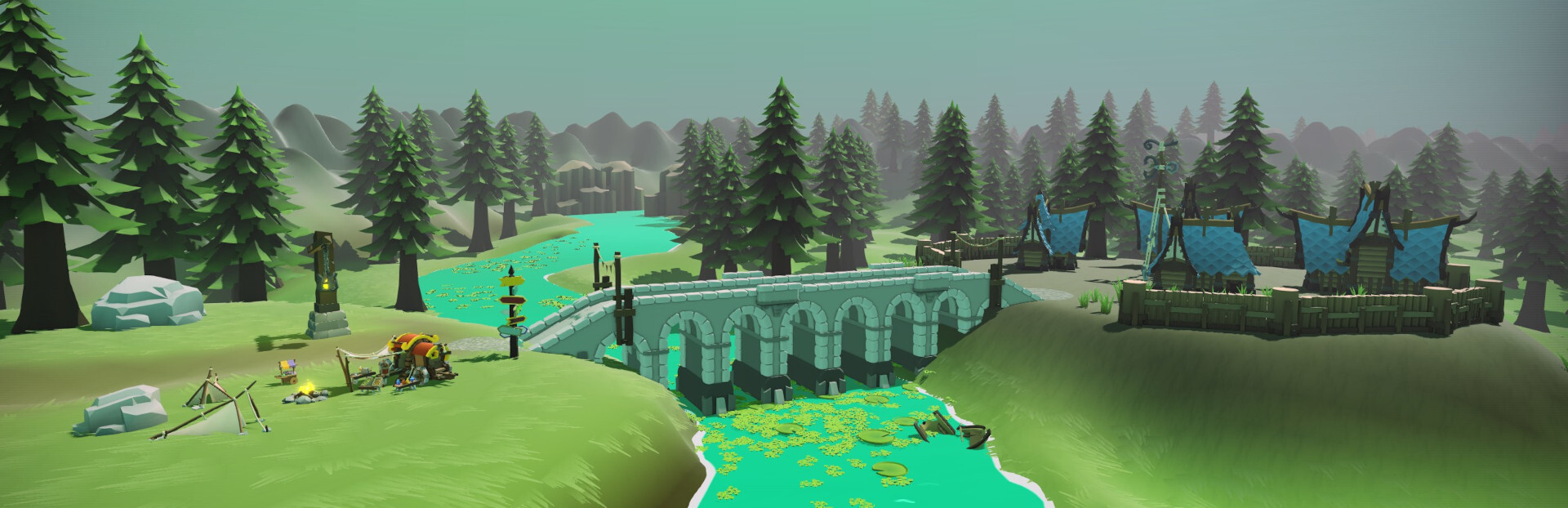
Moving on from flat districts, lake districts let you paint down areas of water. As with flat districts, lake districts are always approximately flat, but will build a small lip of land around the body of water, and will fill it with water.
If you wish to make rivers that flow downhill, you can connect multiple lake districts together at different altitudes, and the water will automatically connect up, even making waterfalls if the change in height between districts is high enough!
As with flat and normal districts, lake districts can optionally recolor their ground, and they can also change the color of water inside the lake district!
There are a lot of advanced options for lake districts; play around with those to see what else you can do!
By default, lake districts will mark their water areas as obstructions to players, and if their sides are steep then those will be marked as obstructions as well, but as above you can override both of those choices if you want it to work differently!
Since I feel that all these district types are so useful for organizing towns and customizing regions, we have them available for all players from the very start of the game; they don't need to be researched or developed; You'll find them over on the right side of your "Terrain" action bar right from the very start of the game.
Bridges
So with all these new waterways, it's now particularly important to be able to let players get across them, and so we've added bridges to the game!
Bridges are a new technology you can now research from very early in the game. By default, there are four bridge types available, but there are many more of them hidden away in various art packs! Bridges work very much like roads, but can only be entered at either end, and can extend across un-walkable areas, like most rivers!
Other new stuff:
There's a bunch of other new stuff in this build! Here are some of the more interesting bits:
Visible Obstructions
When you're in an editing mode, we now preview where there are obstructions that players won't be able to walk through. This can be handy when you're placing a building, so you can be sure that you're placing it somewhere where players will be able to reach it!
These visible obstruction layers are hidden when you're in "Inspect" mode or when you've hidden the UI to take a screenshot, and they also can be disabled globally from within the View Options window (accessible via the gear icon near the top right corner of the screen)
Global Region Lighting
In previous builds, lighting was global; when the camera was inside one region, that region's lighting applied to the whole world, even different regions which were somehow visible (say, through a mountain pass).
Now, we can apply region lighting no matter where the camera is - bright regions are now always bright, and dark regions are always dark, regardless of where the camera is located.
Related to this, the controls for editing region lighting have been improved, and we've made it much simpler to select regions and tell when they're selected!
New Custom Rules
Ever since the Progression Update, we've offered a dozen or so "Custom Rules" which can be applied to individual games to change the way they play.
In this update, we're adding several new custom rule options for automatically unlocking more types of tech, most notably subscriber-facing game features (such as Instant Messaging, PVP Duels, etc), for unlocking debug aids (searchable server logs, anticheat software, etc), and for unlocking ingame bonuses (Increased Inn capacity, etc).
As always, these rules can be enabled or disabled at any time, for any save, so you can add them to old saves if you wish, or remove them if you change your mind. There's no need to start a new game to use them, unless you want to!
Bug fixes & minor improvements:
Improved the 'Spinner' UI widget (which is used for editing most numbers in our UI), to make it easier to use. You can now click+drag anywhere on the widget to easily change values, instead of repeatedly clicking on the up/down arrow buttons, or instead of using the keyboard to type in a new value.
Fixed some bugs around detecting wall-wall intersections.
Fixed possible incorrect awarding of 'Quest Master' achievement.
Fixed water to correctly be illuminated by point lights.
Fixed elite monsters in multi-level regions sometimes being given access to combat abilities which were higher-level than the monster.
Fixed mouse interactions with multi-region network fibers, in the network view.
Fixed an engine bug which was sometimes causing negative numbers with a decimal point to sometimes be displayed as positive numbers.
Fixed a whole bunch of small rendering glitches where various objects would sometimes briefly appear at the far southwest corner of the map.
Fixed a performance issue when making text selections inside extremely large text edit boxes.
Improved placement of player names over players on flight paths.
Improved placement of party members when the party is traveling together on a flight path.
So that's this update! I hope everybody enjoys all these new tools and features! We have two more big content updates planned for before the end of the year, and I'm turning my attention toward the next big feature updates. As always, huge thanks to everyone who tested this build while it was in the public test branch, as well as to everyone who has submitted bugs, feedback, and ideas!
Okay, two more pieces of administrative trivia to get through. First, huge thanks to everyone who filled in our community survey a few weeks ago. We got far more responses than we expected, and we'll deliver some results once we've finished tabulating numbers and figuring out what it all means! And second, Leanne tells me that I should encourage everyone to come visit our Discord if you want early looks at what's coming next, or if you just want to share your creations or see what other people have been making!
We'll talk more soon!
-T
Source
Changelog.gg summarizes and formats this update. How we read updates.