
In this update11
Full notes
Full Megastore Simulator update
Read the full published notes in a cleaner layout. The original post stays linked below.
Repeated intro
Hello everyone!
What changed
- Performance
- Store
- Balance
- Gameplay
- Fixes
- UI and audio
Megastore Simulator changes
This week’s update is mainly focused on statistics, and it also includes one of the biggest performance optimization passes so far.
As your megastores keep growing, I knew you would eventually need more than just “it looks busy, so I guess business is good.” You need to track your growth, analyze what is working and what is not, and decide on your next upgrade based on actual store data.
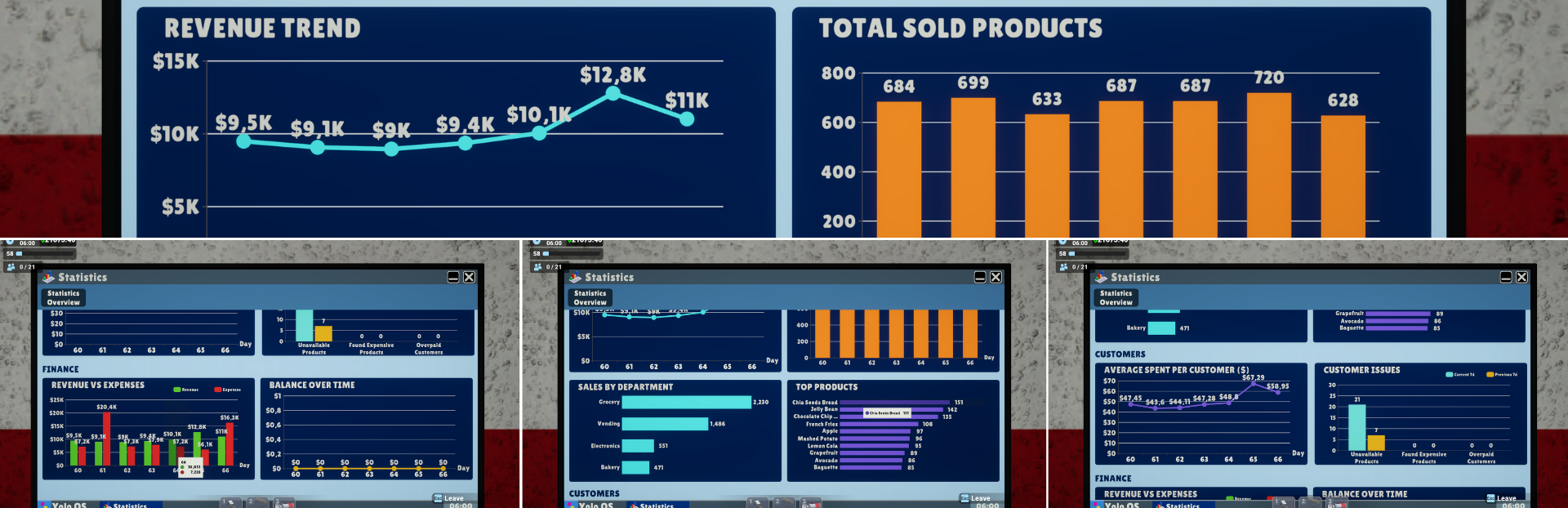
So, inspired by real-world analytics tools, I have added a new Statistics Overview window that lets you analyze your store with multiple charts, key summary cards, and time filters.
The goal was to create a useful analytics screen where you can understand almost everything about your store’s performance and how it changes over time, while still keeping it readable and fitting with the game’s style.
New Statistics Overview Window
New Statistics Overview Window
A new Statistics Overview window has been added to the in-game computer. As your store grows, it becomes harder to understand everything just by looking around. Which departments are performing best? Are customers spending more than before? Are your expenses growing faster than your revenue? The new Statistics Overview screen is designed to help you answer these questions more clearly. You can now analyze your store data with different time filters:
Last Day
7 Days
30 Days
The screen includes 8 charts and 4 key information cards, grouped into four main sections:
Executive Summary
A quick overview of your recent store performance compared to the previous time period.
Revenue
Profit
Customer count
Sold products
Sales
A breakdown of how your store is performing in sales.
Revenue trend over time
Total sold products
Sales by department
10 best-selling products
Customers
A look at customer behavior and store-related issues.
Average spent per customer
Customer issues compared to the previous period
Finance
A clearer view of your store’s financial flow.
Revenue vs expenses
Balance over time
Together, these tools should make it much easier to track your store’s growth, understand where your money is coming from, see where it is going, and decide what needs your attention next.
Important Notes About Statistics Data
Some statistics may not appear immediately, especially on existing save files.
“No Data” or “Not Enough Data” is normal when there is not enough history for the selected time filter.
Charts will continue to fill in naturally as you keep playing.
The seafood item reporting has been fixed in this update.
Previous seafood sales reports may not be fully accurate. Lobsters should still be correct, but some other seafood items may appear as 0 in older reports.
From now on, seafood sales will be counted correctly as you continue playing.
Major Performance Improvements
This update also includes a major optimization pass across several areas of the game. Optimizations have been made in:
UI performance
CPU usage
Rendering
Graphics performance
Physics performance
In-game computer and statistics-related UI Some players may see a noticeable FPS improvement, especially in larger stores. Depending on your system and save file, FPS gains of around 50–60% may be possible in some cases. There are still more areas I plan to optimize, but this update should already make the game feel smoother for many players. Any feedback regarding performance and visual quality is very welcome.
Arabic Support Improvements
Arabic language support has also been improved. This includes added translations, fixes, and improvements to make the language support more complete and usable.
Coming Soon
A second Statistics screen is already in progress. This next screen will focus on product-based analytics. You will be able to view daily, weekly, and monthly sales data for each product, and open individual daily sales graphs for specific products. It will be similar to the Price Management screen, with features such as:
Department filters
Product sorting
Sorting by best-selling products
Product-based sales tracking
This screen should make it much easier to understand which products are performing well and which ones may need price adjustments or better placement. I am also working on the Generic Box system, which should be available soon. After that, the next major focus will be the walk-in fridge / cold storage system.
Here is a sneak peek of the upcoming walk-in fridge:Steam post image
Thank You
As always, thank you so much for your support and feedback. I continue to follow all feedback on Discord, so if you want to share suggestions, report issues, or discuss upcoming features, feel free to join the Discord server.
If you are enjoying Megastore Simulator, leaving a Steam review is one of the best ways to support the game and help it reach more players. Thank you again for all the support. Stay tuned for more updates!
Source
Changelog.gg summarizes and formats this update. How we read updates.