
In this update11
Full notes
Full Megastore Simulator update
Read the full published notes in a cleaner layout. The original post stays linked below.
Repeated intro
Hello everyone,
What changed
- Gameplay
- Store
- Balance
- Maps
- Fixes
- Compatibility
Megastore Simulator changes
Update 0.4.4 is now available, bringing the long-awaited Finance & Loan System, the new Platform Cart, and many important quality-of-life improvements and bug fixes.
There is a lot packed into this update, from easier early-game progression to better warehouse tools and several fixes that should make your store run more smoothly. Keep reading for the full details; your future forklift might be waiting somewhere below.
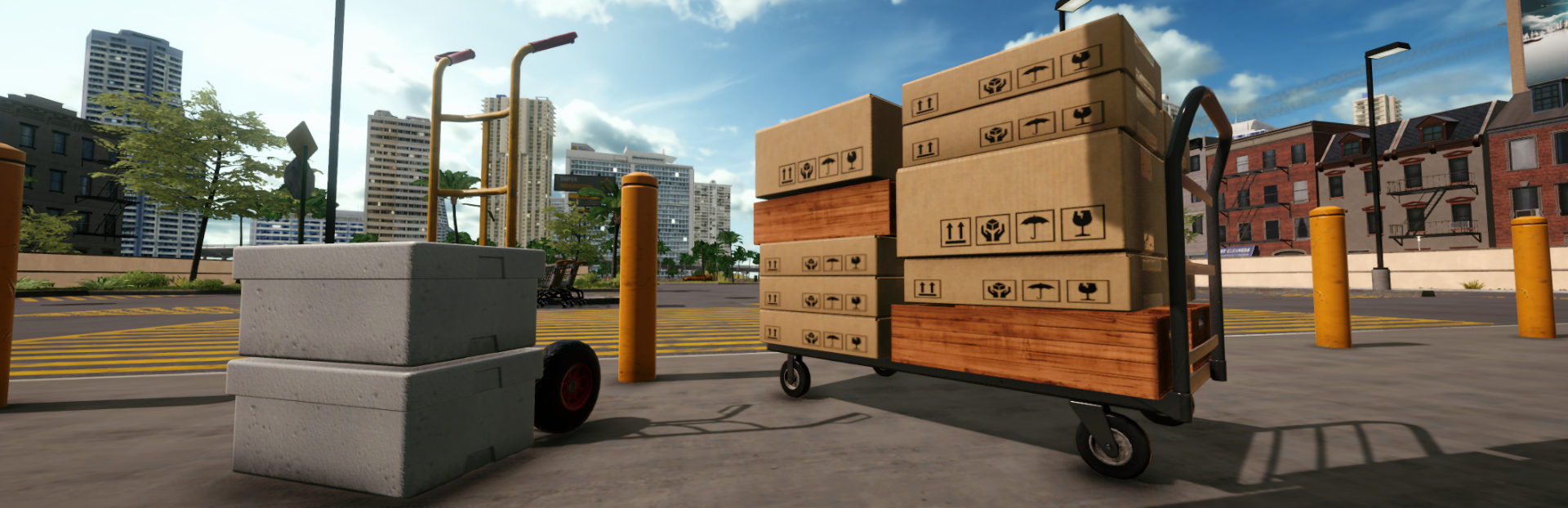
New Platform Cart
The Platform Cart has been added.
This is a new warehouse tool designed for carrying larger amounts of boxes more efficiently.
Compared to the Hand Truck, the Platform Cart has:
2x capacity for Wide and XL boxes.
4x capacity for all other box types.
It can carry up to 28 boxes at once!
A new cart shake animation has also been added while moving the Platform Cart, giving it a better sense of weight and movement.
You can now transfer boxes between the Hand Truck and the Platform Cart in both directions.
The Platform Cart can also unload empty boxes directly into the trash, making bulk disposal much easier.
New Finance & Loan System
A new Finance system has been added to the game, introducing business loans, credit score, risk evaluation, automatic payments, penalties, and early payoff options.
This system gives players more flexibility while expanding their store, especially during the earlier stages of progression.
Your recent profits now affect how much loan support your business can receive. As your store becomes more profitable, the available loan amount can increase over time.
Credit Score & Interest Rates
Your credit score now affects the interest rate of your loans.
A higher credit score gives you better loan conditions with a lower interest rate, while a lower credit score increases the finance fee you pay over time.
Current daily interest rates:
| Credit Score | Daily Interest Rate |
|---|---|
| Excellent | 0.6% |
| Good | 0.8% |
| Fair | 1% |
| Low | 1.5% |
| Poor | 2% |
Equipment loans also use the interest rate based on your current credit score.
Business Loans
You can now apply for business loans through the new Finance window.
Your business loan limit is determined by your store level and recent profits.
The minimum business loan amount is $5,000, and the maximum business loan amount is $200,000.
The loan limit increases in steps of $1,000 as your business grows.
Even if your profits go down, your loan limit will not be reduced. It will only increase when your average profit grows enough to raise the limit.
Forklift & Reach Truck Loans
Forklift and Reach Truck loans have been added.
These loans use the same automatic payment and installment system, but they are tied to specific equipment purchases.
This should make it easier for players to access bigger warehouse equipment earlier, without needing to wait through the full grind before improving warehouse logistics.
Vehicle Loan Details
Forklift and Reach Truck loans are available with selectable terms from 7 to 90 days.
Vehicle loans require a 20% upfront payment.
The remaining amount can be paid over a 7 to 90-day term.
Vehicles purchased with a loan cannot be sold until their payments are fully completed.
If you already own the related vehicle, you will not be able to take that vehicle loan.
If you sell the related vehicle later, the loan option can become available again.
Equipment loans use the interest rate based on your current credit score.
Loan Risk Evaluation
Business loan applications include a risk evaluation.
The bank checks your average profit over the last 5 days, excluding furniture expenses, to estimate whether the daily payment is affordable for your business.
If the daily payment is too high compared to your recent average profit, the bank may consider the loan high risk and decline the application.
Since this is a new system, older saves will not have enough profit history at first. Until you have played several in-game days after the update, the risk evaluation will appear as Unknown.
While the risk is Unknown, you can still take a business loan without this evaluation being applied.
Automatic Loan Payments & Penalties
Loan payments are automatically attempted at the beginning of each new day.
This is designed to give players an early warning if a payment fails, so the payment can still be made manually on the same day.
Employee salaries are paid before loan payments, so your workers will not leave because of a loan payment being charged first.
If a loan payment fails, you will receive a pop-up notification at the start of each day until the issue is resolved.
Payments that remain unpaid for more than 3 days will reduce your credit score.
Each overdue day also adds a 2% late penalty.
Early Payments & Full Payoff
Loans can be paid normally through installments, but you can also make early payments.
Paying installments early reduces the amount of unpaid interest, shown in the game as the finance fee.
You also have the option to fully pay off a loan early. This is cheaper than paying every remaining installment over time, but it does not mean you only pay back the principal amount.
Some fixed costs are still included, while unpaid future finance fees are reduced.
You can only have one active business loan at the same time.
End-of-Day Loan Report
The end-of-day report now also includes loan information.
You can now see how much was paid toward loans during the day.
Loan funds received are also shown separately as loan income, so they are easier to distinguish from regular store earnings.
Finance UI & Controller Support
The overall Finance UI color theme has been updated to better match the rest of the game.
Controller support has been added for the new finance features.
The loan amount selector in the Finance window now increases and decreases in steps of $100.
Translations for the new Finance system have also been added for all supported languages.
Placement Improvements
A new Cancel option has been added for placements.
This works for both:
First-time placement from a box.
Changing the position of already placed objects.
Boxes and pallets are excluded from this cancel behavior.
Gameplay & Quality-of-Life Improvements
Reduced the chance of customers giving $100 and $50 banknotes for low checkout prices.
Restockers now show up to 3 missing products in their speech text when the required boxes are not available in the warehouse.
This should make it much clearer which products are missing instead of only showing a generic message.
Made ceiling textures slightly brighter to give the store a cleaner retail look.
Important Fixes
Fixed an issue where unloaders and restockers could get stuck on pallet racks.
This could cause unpredictable worker behavior and was caused by workers being able to take a reserved empty pallet, freezing their workflow.
Fixed an issue where restockers were saying “No boxes in the warehouse” when all shelves were already above the restock threshold.
Fixed the floating boxes issue that could happen when restockers or unloaders picked boxes from vertically stacked boxes.
Made restocker box disposal logic safer to help prevent any mixed box issues.
Fixed an issue where customers could have active objects on their bags as a side effect of low FPS.
Fixed a condition that could make the cursor invisible. Ending the day while the price window is open is now prevented.
Fixed an issue where the pallet jack could clip through walls while the player was sitting on it.
Fixed an FPS drop that could occur when starting computer table placement.
Fixed an issue where the wrong save slot could be shown as the last played save.
Fixed a softlock where players could be unable to exit the computer window.
Fixed an issue where sign colors were not being saved.
Fixed a rare bug where the End Day UI would not appear, causing the player to be unable to end the day.
What’s Next
This update also introduces part of the technical foundation for the upcoming Statistics Update.
From now on, your end-of-day statistics will be saved for the last 30 in-game days. This will allow the next update to show detailed graphs and long-term business data.
With the upcoming Statistics Update, you will be able to track things like:
Profit growth over time.
Expense growth over time.
Daily product sales.
Product-based sales graphs.
More detailed store performance history.
The infrastructure for this system is already included in this update, and the full Statistics Update is coming soon.
The Generic Box feature is also planned to arrive together with the Statistics Update, so you can expect both of these features soon.
After that, the next major update will be the Cold Storage Area.
Cold Storage will come with its own separate expansion line, independent from the regular warehouse expansions. As you purchase Cold Storage expansions, your walk-in fridge area will grow.
The Cold Storage system will include:
An expandable walk-in fridge.
Special box shelves for the walk-in fridge.
Regular box shelves for normal store areas.
New storage requirements for certain refrigerated products.
Before the Butcher and Deli updates arrive, seafood items and some other products will require proper storage inside the walk-in fridge.
After the Cold Storage update, the next major department updates will be Butcher and Deli.
Thank you again for all your support. Stay tuned for the next updates — bigger systems and major new features are already on the way.
Source
Changelog.gg summarizes and formats this update. How we read updates.