
In this update10
Full notes
Full Megastore Simulator update
Read the full published notes in a cleaner layout. The original post stays linked below.
What changed
- Gameplay
- Balance
- Store
- UI and audio
- Performance
- Fixes
Megastore Simulator changes
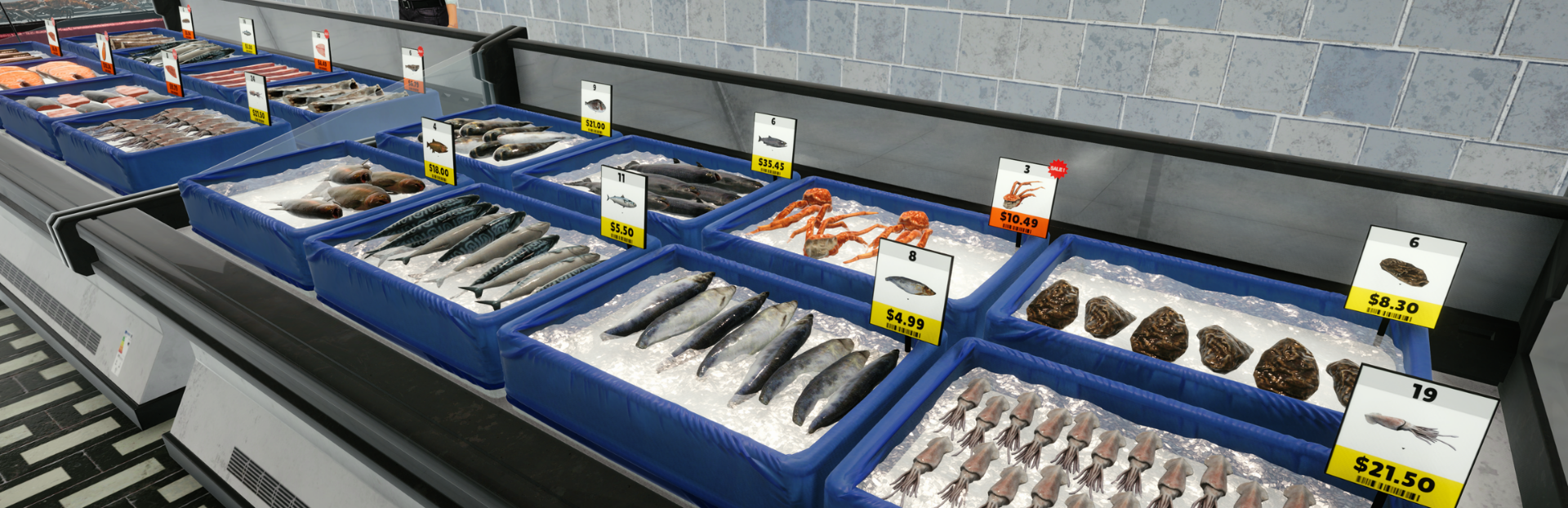
The Seafood Section is now available in the game.
This is a major new addition that introduces a completely new department, new products, new furniture, new employee behaviour, and a brand new preparation mechanic designed specifically for seafood service.
The section currently includes 34 seafood products, 18 licenses, and 2 dedicated furniture types: the Lobster Tank and the Fish Stand.
A New Seafood Department
The Seafood Section is built around two different types of selling experiences.
The first is the Lobster Tank, a live aquarium where lobsters can be displayed and sold alive. As expected, the lobsters are quite lively — but fortunately, their claws are taped, so things should stay under control.
The second is the Fish Stand, an iced display stand where seafood products are presented and served to customers. This is where one of the biggest new mechanics in the update comes in: seafood preparation.
Customers no longer always receive products directly from the shelf. Depending on the item, seafood may now need to be prepared, chopped, packed, and served before the sale is completed.
New Chopping and Packing Mechanic Steam post image
The Fish Stand introduces a brand new gameplay flow.
Some products, such as pre-prepared seafood or count-based items like shrimp, can be served directly by packing the requested amount and handing it to the customer.
Other products, including whole fish and crabs, require preparation before they can be sold. These products are brought to the chopping board, where they are cleaned and processed before being packed for the customer. In general, the head and tail are removed, and the remaining part is sliced and prepared for sale.
If you choose to serve customers yourself, you can interact with the Fish Stand much like sitting at a checkout. When a customer places an order, the requested product is automatically brought to the chopping board in front of you. You can then hold the interaction to continue chopping, and once the preparation is complete, finish the process by packing the product and serving it.
For products that do not require chopping, the process is simpler: you directly pack the requested amount and hand it over.
Not every seafood product is prepared in the same way. The number of cuts can vary depending on the size and type of the product, which gives the system room to grow over time with additional preparation styles.
One of the most important parts of this feature is that it was implemented in a reusable way from the start. The system behind chopping and preparation was designed so it can later be extended for departments such as Deli and Butcher, where different cutting and preparation mechanics will also be needed.
Fish Staff Clerk
To support this new system, the Fish Staff Clerk has been added. Steam post image
This employee can take care of the full service flow at Fish Stands, including preparation, packing, and serving customers. A single clerk is also capable of managing multiple Fish Stands, moving to whichever stand currently needs attention. This makes it possible to run a larger seafood area efficiently without assigning one employee to each stand individually, and saves on employee capacity.
Restockers are able to refill both the Fish Stand and the Lobster Tank, while the actual service and preparation side is handled by either the player or the Fish Staff Clerk.
New Insulated Box
A new delivery container, the Insulated Box, has also been added with this update.
This is an ice-filled insulated box designed to keep seafood cold during transport. Its size is close to the Square Box, but it is specifically intended for chilled products and cold-chain logistics.
At the moment, all seafood products are delivered in Insulated Boxes. In the future, similar boxes may also be used for other departments that require temperature-sensitive deliveries, especially the Deli and Butcher departments.
Looking further ahead, insulated products are planned to become part of a broader cold-chain system. Once refrigerated and cold storage areas are introduced, these boxes will play a more important role in how chilled goods are stored and managed inside the store.
New Customization for the Seafood Area
To better match the look and atmosphere of the Seafood Section, this update also adds:
1 new wall customization
1 new floor customization
These additions are intended to help the seafood area feel more visually distinct and more consistent with the rest of the megastore’s department themes.
New Modular Produce Shelves
Alongside the seafood additions, the update also expands produce furniture based on previous player feedback.
Many players wanted smaller and more modular produce shelf options, so 2 new modular produce shelves have been added. These shelves can be combined in different ways to create circular islands, extended rectangular islands, and other larger produce layouts that fit the overall megastore style more naturally.
Because these modular units can work together in different arrangements, they offer much more freedom when building smaller produce islands.
Built for Expansion
Although the Seafood Section is already functional, it also represents the foundation of a larger system.
The preparation mechanics introduced here are meant to support future department expansions, especially Deli and Butcher, where similar but more specialized product handling will be needed. In that sense, this update is not just a new department, but also the first step toward a broader category of service-based fresh food systems in the game.
Improvements
Added a Clear All button to the hand scanner
Added a keybind option for clearing the hand scanner cart
Added several new filters to the products window:
Storage Type
Off-Shelf Stock Filters (In Stock / Out of Stock / Low Stock)
On-Shelf Stock Filters (In Stock / Out of Stock / Low Stock)
Low stock here means that less than one box of stock remains for the corresponding product
Added tutorials for the Fish Staff Clerk and Fish Stand workflow
Chopping can be continued by holding the interaction
Placement on the second floor has been made easier and faster
Clothing items received major optimization improvements and some visual polish
Scanner beep sound volume has been reduced slightly for a less harsh repeated sound
Missing storage type text for some clothing items has been added
Bulk discount information window visuals have been improved
Handtruck position is saved, it will respawn wherever you left
Reduced the Reach Truck’s torque by 20% so it no longer accelerates too quickly, while keeping its maximum speed unchanged at 14 km/h
Adjusted the Reach Truck’s steering so it no longer reaches maximum turning strength too quickly, giving you finer control
Bug Fixes
Fixed a restocker issue that could cause unstable behaviour, including disposing of non-empty boxes
Fixed employee capacity not updating on time
Fixed the misaligned crate position on the corner produce shelf
Fixed the hotkey bar staying disabled when a box was deleted from the player’s hand after colliding with trash
Fixed two unrelated grocery products appearing in the clothing section
Fixed incorrect customer product take positions and rotations on produce corner shelves
Fixed furniture being placeable on top of the player
Fixed the hand truck clipping on the escalators
Fixed the ghost box issue; missing boxes should now return to the front door on each load, where applicable
Fixes being able to take boxes from the warehouse through by preventing
Fixes the toolbar stays disabled after placing a box on a hand truck by hand
Continued Focus on Quality and Improvement
Over the coming week, the main focus will be on quality-of-life improvements, polish, and bug fixing.
The goal is to refine this new system quickly, improve the overall experience across the game, and address the most important player needs so the game reaches a state that the overwhelming majority of players can feel happy with. After that, development will continue with new features, department additions, and reworks for existing areas.
As always, player feedback remains a major part of that process, and it continues to directly shape what gets improved next.
Thank you for continuing to support the game and help shape each new update.
Source
Changelog.gg summarizes and formats this update. How we read updates.