
In this update6
Full notes
Full Leonardo's Island update
Read the full published notes in a cleaner layout. The original post stays linked below.
What changed
- Gameplay
- Balance
- Maps
Leonardo's Island changes
Hi everyone! New update for the Demo is ready.
Overview:
While placing beams, planks, rope, and other items using drag and drop, you can cancel the placement by pressing the X key.
Base building and stairs construction now display the amount of resources required.
Stairs construction popup remains open, allowing you to continue placing additional stairs or close it if needed.
Added the ability to place "details" items on tables and inside shelves.
Now you can stack planks on top of each other!
The Kite can now be placed not only on terrain but also on wooden items.
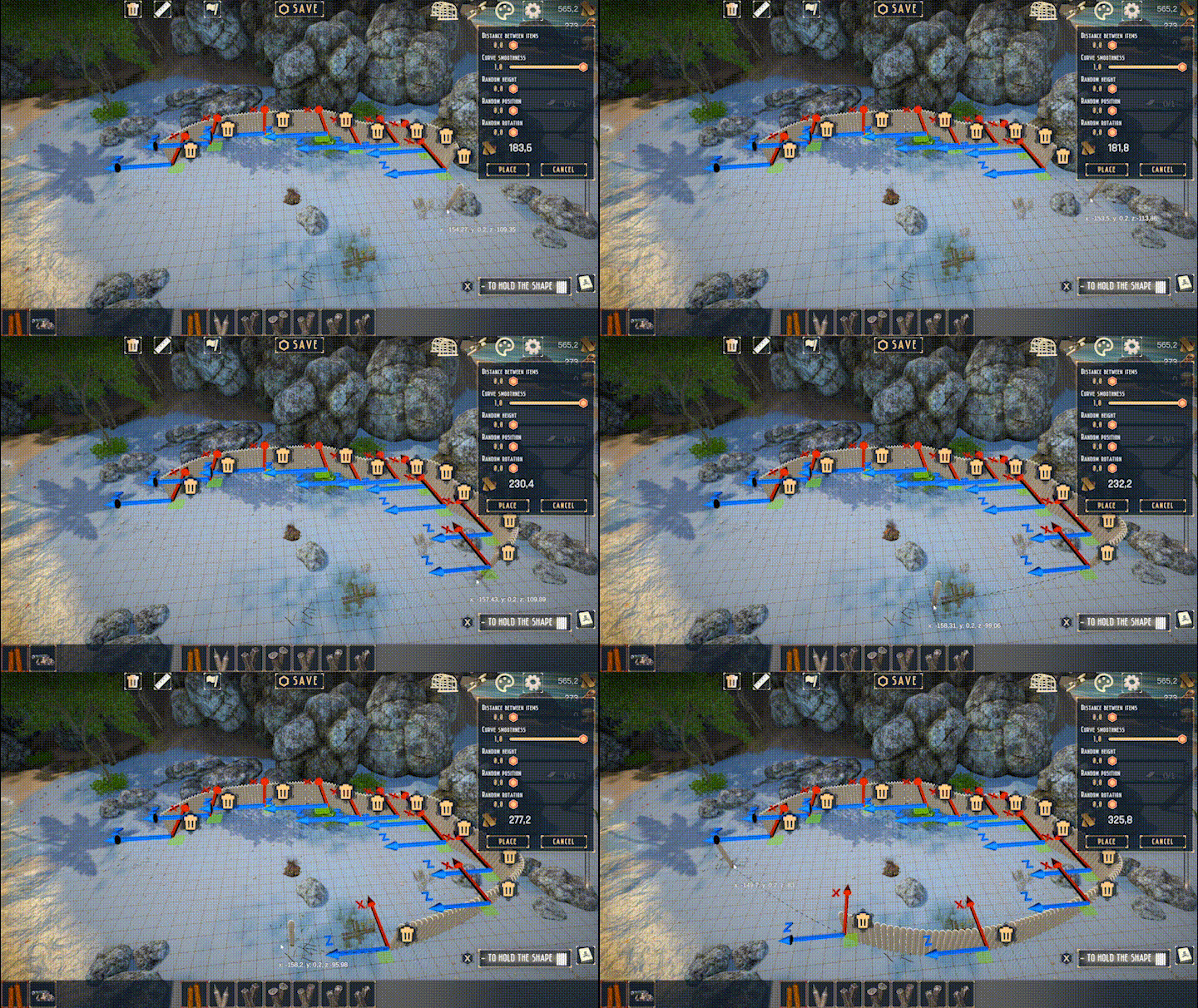
Mass placement of fences on the terrain now features extended logic.
Updated the appearance of hints in the bottom-right corner.
Camera movement update.
Rotation logic updated: while placing an item, you can now press the R key to rotate it.
Removed the custom cursor, reverting to the default system cursor.
Mass placement of fences
Press M to enter mass placement mode with the fence item selected. Click on points of the terrain to create a curve and adjust it by moving the handles. You can hold the current curve by pressing X. After pressing X, the curve created before will retain its shape, while the new curve will remain editable.
"Details" items on tables, benches, inside shelf
Kite placement
Now you can place the kite on wooden items. If you want to build something very high, place the kite on top and glide down!
Planks placement
Now you can place planks on top of each other plank.
Rotation of items
Camera movement
Can now be controlled not only with the mouse but also using W,A,S,D for movement and Q,E for rotation.
If no critical bugs are discovered, I will now focus on:
New graphics.
Update to the main character's story: it will be completely different from what is currently known
Instead of one big island, there will be three smaller islands where you can build your base in the style of flying castles.
You'll be able to not only cut down trees but also plant new ones.
Farming vegetables will help maintain the population of certain animals, which in turn will assist you with construction.
Expansion of resource management, including trading with merchant ships.
You'll be able to equip your ships with cannons, introducing naval battles. Trade or rob—it's your choice.
New battle mechanics for defending your base.
Enjoy the building experience in the Demo!
Source
Changelog.gg summarizes and formats this update. How we read updates.