
HomeGamesUpdatesPricingMethodology
Steam News28 March 20206y ago

Legendary Knight V0.2.2 Update

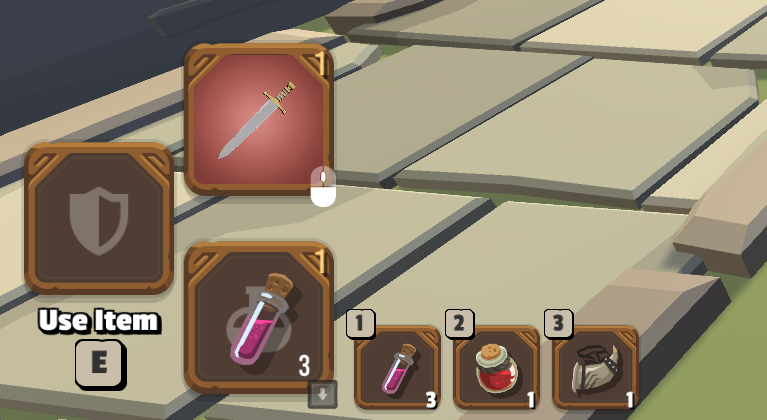
Legendary Knight V0.2.2 Updates (2020-03-28): Use items with number keys Damage effect Default control adjustment This update is about controls Use items with number keys (Thx nado) Now you can use items with number key

Full notes

Full Legendary Knight - 傳奇騎士 update

Read the full published notes in a cleaner layout. The original post stays linked below.

What changed

0 fixes0 additions3 changes0 removals
  • Balance
  • UI and audio
changedDamage effect
changedDamage effect Damage effects now appear with every attack. Players can see the damage caused by each attack more clearly.
changedDefault control adjustment (Thx Orbnotacus) We have adjusted a few default control in this version: - Scroll wheel to change weapons (replace left / right arrows) - Scroll wheel button to use strong attack (replace num 1) - Q to open command panel (replace Space) - Space to roll (replace Q)

Legendary Knight - 傳奇騎士 changes

changedDamage effect
changedDamage effect Damage effects now appear with every attack. Players can see the damage caused by each attack more clearly.
changedDefault control adjustment (Thx Orbnotacus) We have adjusted a few default control in this version: - Scroll wheel to change weapons (replace left / right arrows) - Scroll wheel button to use strong attack (replace num 1) - Q to open command panel (replace Space) - Space to roll (replace Q)

Legendary Knight V0.2.2 Updates (2020-03-28):

  1. Use items with number keys

  2. Damage effect

  3. Default control adjustment

This update is about controls

  1. Use items with number keys (Thx nado) Now you can use items with number keys. The idea is to allow users to stick their hand on the mouse so that they don't have to control anything with arrow keys. Hope this feature will help.

  1. Damage effect Damage effects now appear with every attack. Players can see the damage caused by each attack more clearly.

  2. Default control adjustment (Thx Orbnotacus) We have adjusted a few default control in this version: - Scroll wheel to change weapons (replace left / right arrows) - Scroll wheel button to use strong attack (replace num 1) - Q to open command panel (replace Space) - Space to roll (replace Q)

Source

Steam News / 28 March 2020

Open original post

Changelog.gg summarizes and formats this update. How we read updates.