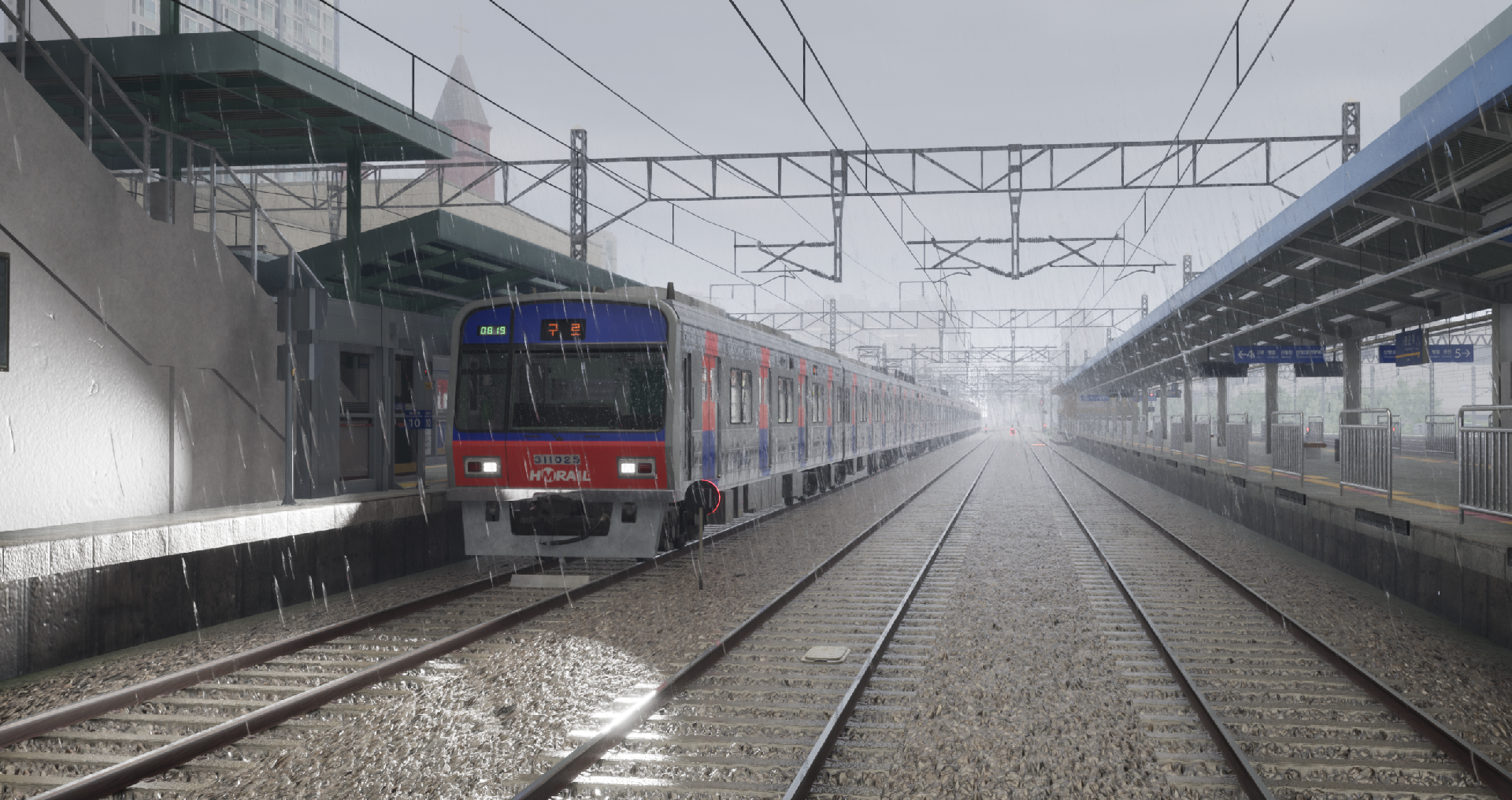
Hello, This update finally introduces weather. Weather Steam post image Eight types of weather environments have been added, ranging from clear skies to cloudy skies, light rain, heavy rain, and fog.
Full notes
Full Hmmsim Metro update
Read the full published notes in a cleaner layout. The original post stays linked below.
Repeated intro
Hello,
What changed
1 fix3 additions1 change0 removals
Gameplay
UI and audio
addedSteam post image Eight types of weather environments have been added, ranging from clear skies to cloudy skies, light rain, heavy rain, and fog. Various weather conditions have been applied to the default scenarios, and you can also set your preferred weather in custom scenarios.
addedInterior Volume An effect has been added that reduces external noise when inside the train. A new interior volume option has been added to the settings, allowing you to adjust the effect.
addedAdditional Settings Gamma and cab exposure settings have been added. The cab exposure setting allows you to adjust the issue of outdoor scenery appearing too bright when viewed from the cab.
changedCustom Scenario The previous "Timetable Mode" has been renamed to "Custom Scenario." The operating mode and starting mode, previously found in the settings, can now be configured directly within the custom scenario menu.
fixedMiscellaneous The default camera movement keys have been changed to W, S, E, D, and you can customize them in the settings. Since the camera keys no longer overlap with other keys, you can control the train even in external or free camera views. The issue where some cars of a moving train would shake has been fixed. The issue where door sound effects would cut off when switching views has been fixed. The issue where left/right door directions were reversed when using an Arduino controller has been fixed.
Hmmsim Metro changes
addedSteam post image Eight types of weather environments have been added, ranging from clear skies to cloudy skies, light rain, heavy rain, and fog. Various weather conditions have been applied to the default scenarios, and you can also set your preferred weather in custom scenarios.
addedInterior Volume An effect has been added that reduces external noise when inside the train. A new interior volume option has been added to the settings, allowing you to adjust the effect.
addedAdditional Settings Gamma and cab exposure settings have been added. The cab exposure setting allows you to adjust the issue of outdoor scenery appearing too bright when viewed from the cab.
changedCustom Scenario The previous "Timetable Mode" has been renamed to "Custom Scenario." The operating mode and starting mode, previously found in the settings, can now be configured directly within the custom scenario menu.
fixedMiscellaneous The default camera movement keys have been changed to W, S, E, D, and you can customize them in the settings. Since the camera keys no longer overlap with other keys, you can control the train even in external or free camera views. The issue where some cars of a moving train would shake has been fixed. The issue where door sound effects would cut off when switching views has been fixed. The issue where left/right door directions were reversed when using an Arduino controller has been fixed.
This update finally introduces weather.
Weather
Steam post image Eight types of weather environments have been added, ranging from clear skies to cloudy skies, light rain, heavy rain, and fog. Various weather conditions have been applied to the default scenarios, and you can also set your preferred weather in custom scenarios.
Wipers
Steam post image On rainy days, raindrops appear on the front window, and you can wipe them off using the wipers. You can assign a wiper hotkey in the settings.
Wheel Slip & Slide
Steam post image Wheel slip and slide have been implemented, requiring caution when operating trains in rainy weather. Using high acceleration or strong braking may cause slip or slide, activating the anti-skid system. You can check slip or slide status in TGIS.
Interior Volume An effect has been added that reduces external noise when inside the train. A new interior volume option has been added to the settings, allowing you to adjust the effect.
Additional Settings Gamma and cab exposure settings have been added. The cab exposure setting allows you to adjust the issue of outdoor scenery appearing too bright when viewed from the cab.
Custom Scenario The previous "Timetable Mode" has been renamed to "Custom Scenario." The operating mode and starting mode, previously found in the settings, can now be configured directly within the custom scenario menu.
Miscellaneous The default camera movement keys have been changed to W, S, E, D, and you can customize them in the settings. Since the camera keys no longer overlap with other keys, you can control the train even in external or free camera views. The issue where some cars of a moving train would shake has been fixed. The issue where door sound effects would cut off when switching views has been fixed. The issue where left/right door directions were reversed when using an Arduino controller has been fixed.