
HomeGamesUpdatesPricingMethodology
Steam News27 July 20205y ago

Update #2 - Better Choice Arrow UI

One of the things we love about Early Access is watching people play Happy Grumps on Twitch and YouTube.

Full notes

Full Happy Grumps update

Read the full published notes in a cleaner layout. The original post stays linked below.

What changed

0 fixes4 additions6 changes0 removals
  • UI and audio
  • Store
  • Gameplay
changedOne of the glaring mistakes that became obvious over the weekend was the Choice Arrow UI. Players click on these arrows to talk with certain NPCs and chose directions to move from room to room. But it had these problems:
addedThe arrows sometimes point to NPCs like the Shopkeeper, but you could not click directly on the Shopkeeper - just the arrow itself. This was misleading because it looks like you should be clicking on the NPC. I planned on updating this before Early Access launch, but I failed to anticipate just how confusing this would be to new players. Yikes! Sorry about that!
changedThe arrows did not have hover state. This led to further confusion and, at times, made it appear that the UI was completely unresponsive.
changedA good UI gives vital clarity and is simple to use. And making a good UI is hard to pull off, no matter what project or size of team. Drew and I come from a web development background, so we know what it is like to spend countless hours agonizing over buttons.
addedTo address the issues, we've got a new update live today on Steam. Here is the quick rundown:
changedUpdated the choice arrows to have larger click boxes

Happy Grumps changes

changedOne of the glaring mistakes that became obvious over the weekend was the Choice Arrow UI. Players click on these arrows to talk with certain NPCs and chose directions to move from room to room. But it had these problems:
addedThe arrows sometimes point to NPCs like the Shopkeeper, but you could not click directly on the Shopkeeper - just the arrow itself. This was misleading because it looks like you should be clicking on the NPC. I planned on updating this before Early Access launch, but I failed to anticipate just how confusing this would be to new players. Yikes! Sorry about that!
changedThe arrows did not have hover state. This led to further confusion and, at times, made it appear that the UI was completely unresponsive.
changedA good UI gives vital clarity and is simple to use. And making a good UI is hard to pull off, no matter what project or size of team. Drew and I come from a web development background, so we know what it is like to spend countless hours agonizing over buttons.
addedTo address the issues, we've got a new update live today on Steam. Here is the quick rundown:

One of the things we love about Early Access is watching people play Happy Grumps on Twitch and YouTube. Not only is it exciting to see people have fun with our game, but watching people play helps us see where we need to improve the game.

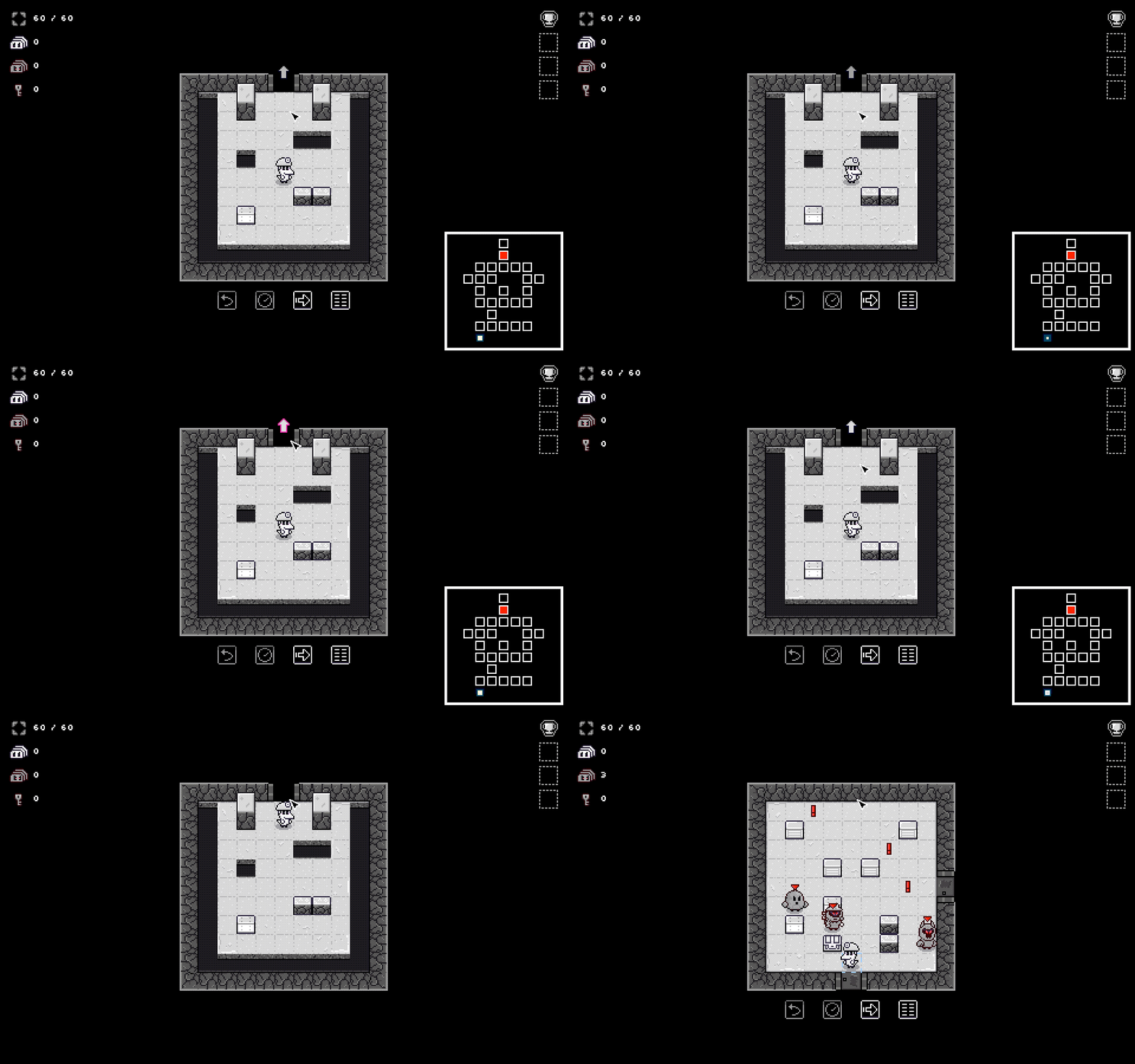
One of the glaring mistakes that became obvious over the weekend was the Choice Arrow UI. Players click on these arrows to talk with certain NPCs and chose directions to move from room to room. But it had these problems:

  1. The click boxes for the arrows were too small

  2. The arrows sometimes point to NPCs like the Shopkeeper, but you could not click directly on the Shopkeeper - just the arrow itself. This was misleading because it looks like you should be clicking on the NPC. I planned on updating this before Early Access launch, but I failed to anticipate just how confusing this would be to new players. Yikes! Sorry about that!

  3. The arrows did not have hover state. This led to further confusion and, at times, made it appear that the UI was completely unresponsive.

A good UI gives vital clarity and is simple to use. And making a good UI is hard to pull off, no matter what project or size of team. Drew and I come from a web development background, so we know what it is like to spend countless hours agonizing over buttons.

To address the issues, we've got a new update live today on Steam. Here is the quick rundown:

  • Updated the choice arrows to have larger click boxes

  • Updated choice arrows to have a hover state so it is easier to see when they are clickable

  • Updated choice arrows to also trigger when you click on the object they are attached to - such as clicking directly on the shopkeeper

  • Also removed an unnecessary click function to deselect grumps when clicking outside of the game board. This was causing confusion to new players.

Special thanks goes today to Twitch streamer "Esty8nine" and player "LordGek" for helping us spot these issues.

And thanks again to everyone for hanging in with us as we keep on improving Happy Grumps.

We are excited to keep adding updates.

  • Glenn & Drew

Source

Steam News / 27 July 2020

Open original post

Changelog.gg summarizes and formats this update. How we read updates.