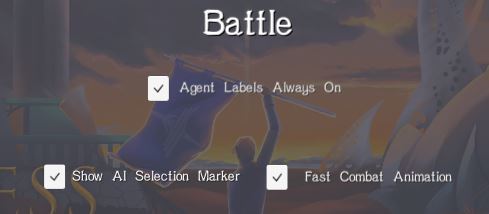
New game version! ADDED: -You can now enable 'fast animations' in the options menu. This makes battle combat animations be about twice as fast, for quick and breezy killing.
Full notes
Full Godless Tactics update
Read the full published notes in a cleaner layout. The original post stays linked below.
What changed
2 fixes2 additions0 changes0 removals
Gameplay
UI and audio
addedNew game version!
addedADDED: -You can now enable 'fast animations' in the options menu. This makes battle combat animations be about twice as fast, for quick and breezy killing. SECRET TIP: Even with this option turned off, you can hold down the Space bar to increase animation speed as well.
fixedFIXED: -Prevented a random crash that can occur during the AI turns on the world map, caused by mysteriously missing data. What causes the data to go missing? You are asking too many questions. -You can no longer click on the End Turn button while a unit you've just given an order to is moving. Required some quick mouse work to actually do, but it caused all kinds of glitches. Now nothing happens. -Same as above, but with the Camp Menu button in battles. -In the Options menu, if you cancelled your changes, it didn't actually cancel your changes to the AI marker toggle in the Battle tab. Now it will!
fixed"FIXED": -I have implemented some new stuff behind the scenes that I believe will dramatically reduce instances of the game randomly soft-locking. The issue is caused by the game engine lagging while the mouse is moving between UI elements - sometimes it thinks it is still over the UI when it isn't, preventing you from selecting units or giving orders. While this needs more testing, I believe it is now much less likely to happen. We shall see. Remember, if this happens to you, press Ctrl+U, this usually solves it right away.
Godless Tactics changes
addedNew game version!
addedADDED: -You can now enable 'fast animations' in the options menu. This makes battle combat animations be about twice as fast, for quick and breezy killing. SECRET TIP: Even with this option turned off, you can hold down the Space bar to increase animation speed as well.
fixedFIXED: -Prevented a random crash that can occur during the AI turns on the world map, caused by mysteriously missing data. What causes the data to go missing? You are asking too many questions. -You can no longer click on the End Turn button while a unit you've just given an order to is moving. Required some quick mouse work to actually do, but it caused all kinds of glitches. Now nothing happens. -Same as above, but with the Camp Menu button in battles. -In the Options menu, if you cancelled your changes, it didn't actually cancel your changes to the AI marker toggle in the Battle tab. Now it will!
fixed"FIXED": -I have implemented some new stuff behind the scenes that I believe will dramatically reduce instances of the game randomly soft-locking. The issue is caused by the game engine lagging while the mouse is moving between UI elements - sometimes it thinks it is still over the UI when it isn't, preventing you from selecting units or giving orders. While this needs more testing, I believe it is now much less likely to happen. We shall see. Remember, if this happens to you, press Ctrl+U, this usually solves it right away.
New game version!
ADDED
-You can now enable 'fast animations' in the options menu. This makes battle combat animations be about twice as fast, for quick and breezy killing.
SECRET TIP
Even with this option turned off, you can hold down the Space bar to increase animation speed as well.
FIXED: -Prevented a random crash that can occur during the AI turns on the world map, caused by mysteriously missing data. What causes the data to go missing? You are asking too many questions. -You can no longer click on the End Turn button while a unit you've just given an order to is moving. Required some quick mouse work to actually do, but it caused all kinds of glitches. Now nothing happens. -Same as above, but with the Camp Menu button in battles. -In the Options menu, if you cancelled your changes, it didn't actually cancel your changes to the AI marker toggle in the Battle tab. Now it will!
"FIXED": -I have implemented some new stuff behind the scenes that I believe will dramatically reduce instances of the game randomly soft-locking. The issue is caused by the game engine lagging while the mouse is moving between UI elements - sometimes it thinks it is still over the UI when it isn't, preventing you from selecting units or giving orders. While this needs more testing, I believe it is now much less likely to happen. We shall see. Remember, if this happens to you, press Ctrl+U, this usually solves it right away.