Hey Rampagers! We've been blown away by your support at launch, It really means a lot to us here at Gamebreaking Studios!
Full notes
Full Dungeon Rampage update
Read the full published notes in a cleaner layout. The original post stays linked below.
Repeated intro
Hey Rampagers! We've been blown away by your support at launch, It really means a lot to us here at Gamebreaking Studios! It's been a lot of fun seeing everyone re-exploring the game and figuring out the meta with the new gem economy. This hotfix has two components to it: 1. Some fixes to the server. We've been noticing that occasionally individual game servers have been crashing, leading to the game freezing for <5% of active players. So far we've scaled up the number of servers so that it affects fewer players each time it crashes. We've been spending our time since launch trying to track it down and have a few theories. This hotfix rolls out a fix for one of our main theories. These server crashes are extra fun to debug because we hadn't seen them ever before launch, neither on the demo nor with our private playtests. If you have any ideas on what triggers it or have noticed any correlation please report it on our Discord! 2. We're defaulting the game to "Performance" quality mode, so that the game runs smoother for those having issues. This mode means you lose things like damage floaters, zoom in on some of your attacks, and a few other pretty effects. You can change it with the Options menu available in game to the "Quality" setting to restore these features. With "Performance" mode some players observed FPS going from 8 to 30, and from 30 to 60 fps! These graphics mode settings are new since the private playtests, and we hope that they help a lot of you! It's definitely a challenge tackling performance on a Flash game from 2011 that's scaled from 600 pixels tall to 1080p (or more!). Still having a lot of issues? Try running the game windowed at its original resolution, it runs super smooth then. Steam post image
What changed
1 fix1 addition0 changes0 removals
UI and audio
Server
fixedHey Rampagers! We've been blown away by your support at launch, It really means a lot to us here at Gamebreaking Studios! It's been a lot of fun seeing everyone re-exploring the game and figuring out the meta with the new gem economy. This hotfix has two components to it: 1. Some fixes to the server. We've been noticing that occasionally individual game servers have been crashing, leading to the game freezing for <5% of active players. So far we've scaled up the number of servers so that it affects fewer players each time it crashes. We've been spending our time since launch trying to track it down and have a few theories. This hotfix rolls out a fix for one of our main theories. These server crashes are extra fun to debug because we hadn't seen them ever before launch, neither on the demo nor with our private playtests. If you have any ideas on what triggers it or have noticed any correlation please report it on our Discord ! 2. We're defaulting the game to "Performance" quality mode, so that the game runs smoother for those having issues. This mode means you lose things like damage floaters, zoom in on some of your attacks, and a few other pretty effects. You can change it with the Options menu available in game to the "Quality" setting to restore these features. With "Performance" mode some players observed FPS going from 8 to 30, and from 30 to 60 fps! These graphics mode settings are new since the private playtests, and we hope that they help a lot of you! It's definitely a challenge tackling performance on a Flash game from 2011 that's scaled from 600 pixels tall to 1080p (or more!). Still having a lot of issues? Try running the game windowed at its original resolution, it runs super smooth then. Steam post image
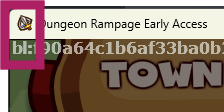
addedTo get this update you'll have to restart your game and make sure it recognizes the update! You'll see a [c]bl:[/c] in the top left corner when you are up to date (And then the next update will have a [c]gr:[/c], we are adding a blue-green deployment system so updates are hopefully less disruptive. If you are out of date you're games will start getting empty, and then after ~4 hours the old servers will shutdown)
Dungeon Rampage changes
fixedHey Rampagers! We've been blown away by your support at launch, It really means a lot to us here at Gamebreaking Studios! It's been a lot of fun seeing everyone re-exploring the game and figuring out the meta with the new gem economy. This hotfix has two components to it: 1. Some fixes to the server. We've been noticing that occasionally individual game servers have been crashing, leading to the game freezing for <5% of active players. So far we've scaled up the number of servers so that it affects fewer players each time it crashes. We've been spending our time since launch trying to track it down and have a few theories. This hotfix rolls out a fix for one of our main theories. These server crashes are extra fun to debug because we hadn't seen them ever before launch, neither on the demo nor with our private playtests. If you have any ideas on what triggers it or have noticed any correlation please report it on our Discord ! 2. We're defaulting the game to "Performance" quality mode, so that the game runs smoother for those having issues. This mode means you lose things like damage floaters, zoom in on some of your attacks, and a few other pretty effects. You can change it with the Options menu available in game to the "Quality" setting to restore these features. With "Performance" mode some players observed FPS going from 8 to 30, and from 30 to 60 fps! These graphics mode settings are new since the private playtests, and we hope that they help a lot of you! It's definitely a challenge tackling performance on a Flash game from 2011 that's scaled from 600 pixels tall to 1080p (or more!). Still having a lot of issues? Try running the game windowed at its original resolution, it runs super smooth then. Steam post image
addedTo get this update you'll have to restart your game and make sure it recognizes the update! You'll see a [c]bl:[/c] in the top left corner when you are up to date (And then the next update will have a [c]gr:[/c], we are adding a blue-green deployment system so updates are hopefully less disruptive. If you are out of date you're games will start getting empty, and then after ~4 hours the old servers will shutdown)
To get this update you'll have to restart your game and make sure it recognizes the update! You'll see a [c]bl:[/c] in the top left corner when you are up to date (And then the next update will have a [c]gr:[/c], we are adding a blue-green deployment system so updates are hopefully less disruptive. If you are out of date you're games will start getting empty, and then after ~4 hours the old servers will shutdown)