
HomeGamesUpdatesPricingMethodology
Steam News25 February 20264mo ago

Dosa Divas Demo Update! Perfect Blocks, Hard Mode, Features and Bug Fixes

Thanks for checking out the demo and the feedback. We're glad you're enjoying it and the feedback helps us improve the demo and full game as we get closer to release on April 14h.

Full notes

Full Dosa Divas update

Read the full published notes in a cleaner layout. The original post stays linked below.

What changed

5 fixes1 addition6 changes0 removals
  • Balance
  • UI and audio
  • Gameplay
  • Fixes
  • Store
changedWe changed the wording around Perfect Blocks and how to achieve them more often. The previous wording on the demo described watching for the STAR icon during an enemy attack. The STAR was there to show the timing window when you can block and not the timing for PERFECT BLOCKS. Blocking during the time the STAR icon is on screen will get you a Partial Block and take partial damage.
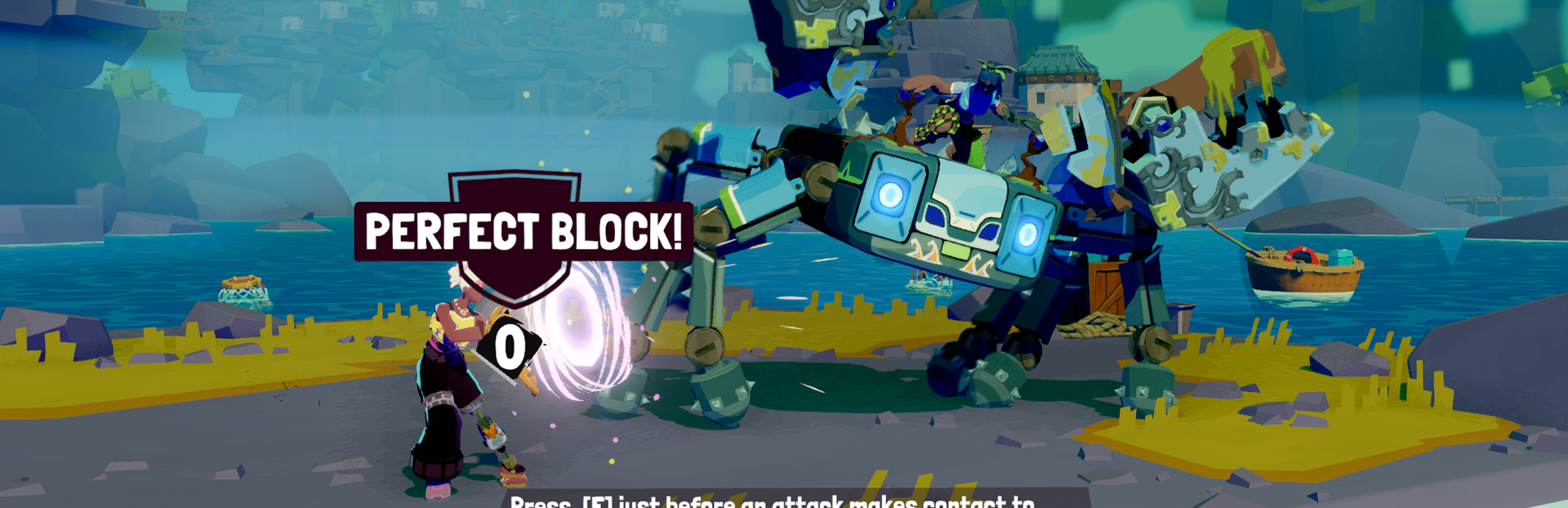
changedThe updated wording is Press (Key/Button) just before an enemy attack makes contact for a PERFECT BLOCK and take no damage. Depending on enemy and their animation, that contact could be an object they throw or it could be a punch or a kick. The important part is to watch the animation timing and press Block button right before contact.
addedAdded new cooking dialogue that changes depending on dish and flavors used
changedadjusted camera on some attacks for better Healthbar visibility
changedChanged the amount of in-world ingredient spawns for better balance
changedUpdated balance on Hard Difficulty to be more challenging

Dosa Divas changes

changedWe changed the wording around Perfect Blocks and how to achieve them more often. The previous wording on the demo described watching for the STAR icon during an enemy attack. The STAR was there to show the timing window when you can block and not the timing for PERFECT BLOCKS. Blocking during the time the STAR icon is on screen will get you a Partial Block and take partial damage.
changedThe updated wording is Press (Key/Button) just before an enemy attack makes contact for a PERFECT BLOCK and take no damage. Depending on enemy and their animation, that contact could be an object they throw or it could be a punch or a kick. The important part is to watch the animation timing and press Block button right before contact.
addedAdded new cooking dialogue that changes depending on dish and flavors used
changedadjusted camera on some attacks for better Healthbar visibility
changedChanged the amount of in-world ingredient spawns for better balance

Thanks for checking out the demo and the feedback. We're glad you're enjoying it and the feedback helps us improve the demo and full game as we get closer to release on April 14h.

Reminder that Save games will carry over from demo to full game if you choose to continue from where you left off in the demo.

Perfect Blocks

We changed the wording around Perfect Blocks and how to achieve them more often. The previous wording on the demo described watching for the STAR icon during an enemy attack. The STAR was there to show the timing window when you can block and not the timing for PERFECT BLOCKS. Blocking during the time the STAR icon is on screen will get you a Partial Block and take partial damage.

The updated wording is Press (Key/Button) just before an enemy attack makes contact for a PERFECT BLOCK and take no damage. Depending on enemy and their animation, that contact could be an object they throw or it could be a punch or a kick. The important part is to watch the animation timing and press Block button right before contact.

We hope this clarifies Blocking and there's also reminder during an attack as well.

Other Changes

  • Added new cooking dialogue that changes depending on dish and flavors used

  • adjusted camera on some attacks for better Healthbar visibility

  • Changed the amount of in-world ingredient spawns for better balance

  • Updated balance on Hard Difficulty to be more challenging

  • Updated Objectives and description text

  • Fixed Issue in Audio Settings for better volume controls including Horn Volume

  • Fixed issue with Samara portrait missing a proper Surprise expression

  • Fixed an issue with NPC thought bubbles to make room for longer names

  • Fixed an issue with when feeding NPCS the food item was not removed from inventory

  • Fixed an issue with rotating Goddess in Body Shop also going into Cooking mode when using a controller

We'll continue to look at feedback and adjust.

Thank you,

Outerloop

Source

Steam News / 25 February 2026

Open original post

Changelog.gg summarizes and formats this update. How we read updates.