
In this update2
Full notes
Full Deep Corp update
Read the full published notes in a cleaner layout. The original post stays linked below.
What changed
- Performance
- Maps
- Gameplay
- Fixes
- Server
Deep Corp changes
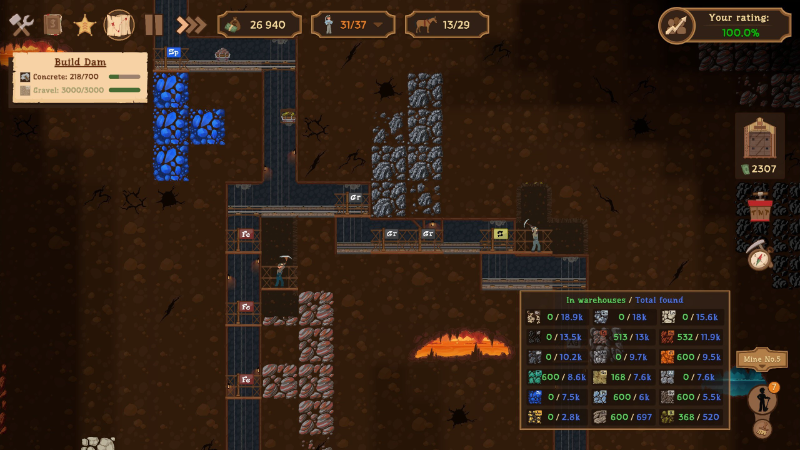
With a small team and limited resources, we’re constantly faced with the question of what to prioritize: optimizing and fixing minor issues, or adding new content and features. We strive to strike a balance so we can delight as many players as possible. Today’s update is mostly about fixes and optimization. But the next one, according to our plans, should bring something new. The most noticeable change is the updated interface. We’re working to make it look great and be user-friendly. What do you think? Work is still ongoing, so you can expect further tweaks in future updates.
Steam post image
List of other changes:
Map rendering has been optimized; the game now loads much faster on lower-end PCs;
Mine numbers are now displayed on the map;
The animation of new objective's appearance has been updated;
Added a small animation when hovering over objects on the map;
Clicking on the required product panel above an object now opens the object’s pop-up window;
The mine resource panel has been moved to the bottom right corner;
Fixed bugs with the display of the mine resource panel;
Fixed game crashes on lower-end PCs;
If a player has more than one loan, they are now displayed as a total by default;
Fixed the bug causing the passenger railroad cars icon to be missing on the upgrades screen;
When loading a save at the bottom of the mine, the camera now moves to the nearest visible area of the mine;
The build version has been added to the main menu.
To make sure you don’t miss any updates and to discuss the game with other players and us, join our Discord server: https://discord.com/invite/9eHyYap
Source
Changelog.gg summarizes and formats this update. How we read updates.