
In this update13
Full notes
Full Cropia update
Read the full published notes in a cleaner layout. The original post stays linked below.
What changed
- Gameplay
- Store
- Balance
- UI and audio
Cropia changes
Hi everyone! 👋
First, we would like to apologize for the longer gap between updates. We needed to complete several internal processes before we could move forward. Now that those processes have been completed, we will try to return to a more regular update schedule like before.
During this time, we continued collecting your feedback and reviewing the pain points you shared with us. Many of the changes included in this update are based on those reports, especially regarding employee farming behavior, storage management, clearer information, and controller usability.
Here is what is new in this update:
1. New Employee Farming Behavior
Employees can now assist with more farming activities, reducing some of the repetitive crop management tasks you previously needed to handle yourself.
a. Removing Dead Crops
A new employee task has been added for removing dead crops.
When this task is enabled, employees can help clear dead crops from your farm, allowing the affected tiles to be prepared for planting again.
b. Planting Crops
Employees can now plant crops within designated farming areas.
A new Planter Board item has been added, allowing you to mark a specific area and select which crop employees should plant there.
c. Providing Seeds and Managing Planting Areas
Seeds still need to be provided by the player. They can be placed within the farm area or stored inside the Employee Commodity Storage.
Employees will prioritize searching for available seeds around the farm area first. If seeds are available, they will use them to plant the crop specified on the Planter Board.
The Planter Board can also be upgraded to increase the size of its affected area. If multiple planting areas overlap, employees will choose one of the applicable planting instructions for the overlapping tiles.
d. Updated Watering Priority
Employee watering behavior has also been updated.
Employees will now prioritize watering farm tiles that already contain plants or seeds instead of focusing on empty tiles. This should help them concentrate on crops that currently need attention.
2. Employee Commodity Storage Upgrade
A new upgrade for the Employee Commodity Storage can now be purchased from the Pawn Shop.
This upgrade increases the available storage capacity, giving employees more space to store items collected from their tasks.
The expanded storage can also be used to store other items, making it more useful for organizing farm supplies, seeds, and harvested commodities.
3. Employee Task Information Update
The Employee Menu has received a visual update to make task management clearer.
Each task now displays its work type along with additional information explaining how the task operates. This should make it easier to understand the responsibilities and behavior of each task before assigning it to an employee.
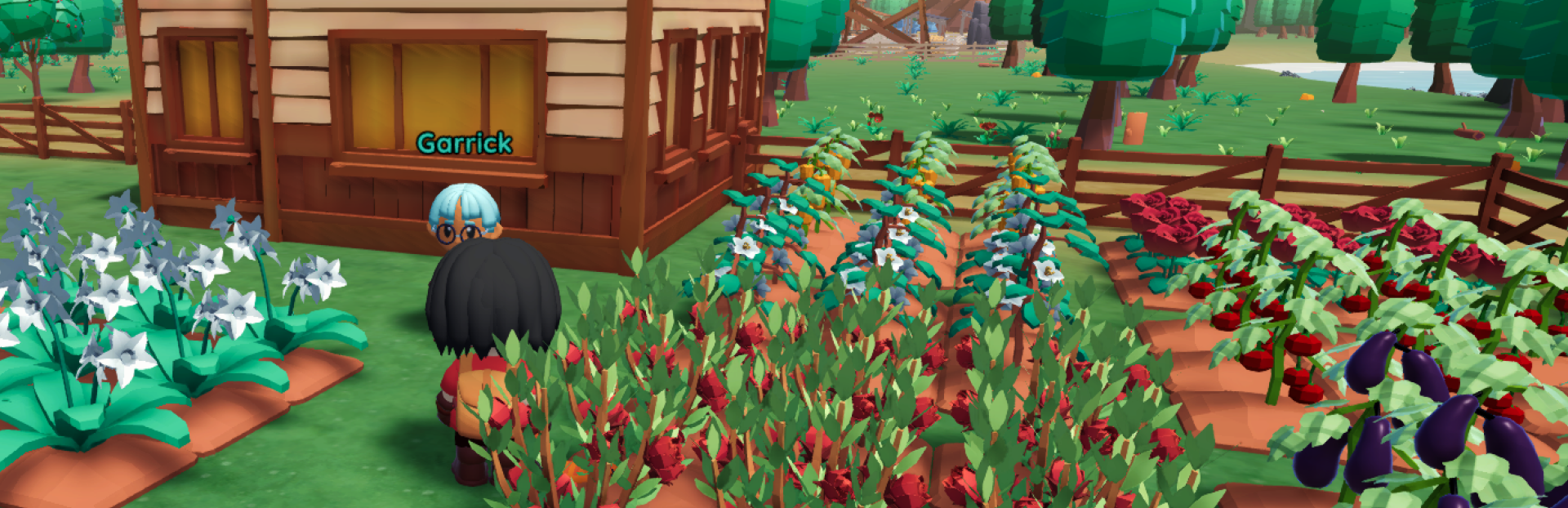
4. NPC Name Display
Important NPCs now display their names above their heads.
If you have not met an NPC before, their name will appear as???. After you meet them, their actual name will be displayed.
This should make it easier to recognize and remember important townsfolk, especially if you have not interacted with them for some time. Some of them will appears as???, even though you already met them, just interact with them again so their name will appears.
Additional Improvements
1. Tool and Object Targeting
Tool-targeting priorities have been updated so the tool you are currently holding will focus on its primary intended action.
For example:
The Hoe will prioritize ground tiles instead of nearby grass.
The Sickle will prioritize grass instead of selecting nearby plants.
This should reduce situations where the game selects a different object or action from the one you intended.
2. Clearer Item and Harvest Information
a. Item Descriptions and Discovery Hints
You can now hover over item in the stats menu to view additional information.
This applies to collectible items, including tools and utensils.
If an item has not yet been discovered, the information will provide a hint about where it can be obtained.
If the item has already been discovered, its regular description will be displayed instead.
b. Crop and Livestock Harvest Information
Crop and livestock information has been updated to show how much time remains before they can be harvested.
Instead of displaying progress as a percentage, the information will now use clearer time-based descriptions such as:
(X) Days
Tomorrow
Ready Now
This should make it easier to plan your daily farming and ranch activities.
3. Controller Improvements
a. Crafting Menu Navigation
The controller experience in the Crafting UI has been improved.
After selecting an item to craft, controller users can now move directly to the Craft button, reducing the number of navigation steps required to begin crafting.
b. Separate Crop Actions
We have updated the Hold A interaction for crops when using a controller.
Previously, harvesting and destroying a crop could conflict because both actions used the same interaction. These actions have now been separated to reduce accidental crop destruction and make the intended action clearer.
4. UI Visual Updates
The visual appearance of the Management Menu and several Storage interfaces has been updated.
These menus should now feel more appealing and visually consistent while keeping their existing functionality clear and easy to understand.
Thank you for your patience and for continuing to be part of Cropia’s journey. We truly appreciate every piece of feedback, report, and suggestion you share with us.
During the time between our recent updates, we continued collecting and reviewing the feedback shared through the Steam Discussions. Many of those suggestions and pain points have already been added to our backlog.
However, it is not possible to include everything we have collected in a single update. We will continue addressing these items gradually through upcoming updates, based on their feasibility and impact on the overall experience.
If you do not see a particular suggestion included in this update, it does not necessarily mean it has been overlooked. Some changes require additional planning, development, and testing before they are ready to be released.
If you encounter any issues or unexpected behavior, please let us know through the Steam Discussions so we can investigate further.
We will keep listening, improving, and growing together with you.
Happy playing! 🌱💛
Source
Changelog.gg summarizes and formats this update. How we read updates.