
HomeGamesUpdatesPricingMethodology
Steam News5 February 20251y ago

Door closing & graphics updates (v7 / demo v14)

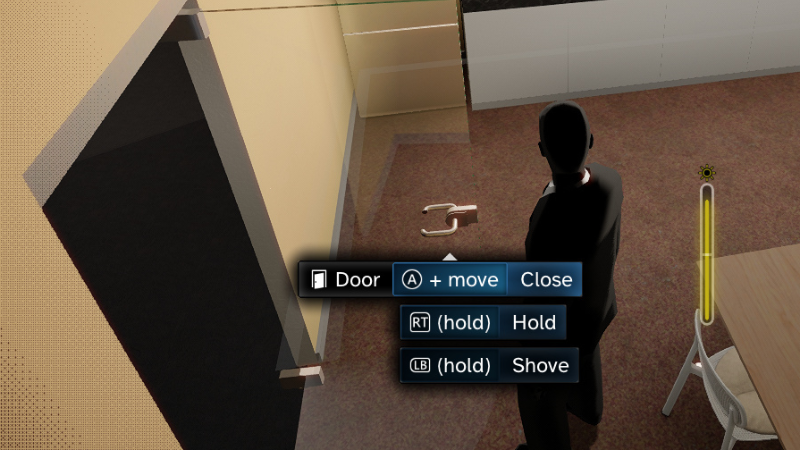
Door quick-close (door control version 4) Activated by pressing the local interaction button ([Space] / 🎮 [A] by default) together with moving in the direction that the character should stay after the door is closed.

In this update2

Full notes

Full corpo/ghost update

Read the full published notes in a cleaner layout. The original post stays linked below.

What changed

1 fix3 additions1 change1 removal
  • UI and audio
  • Gameplay
  • Fixes
changedDoor quick-close (door control version 4)Activated by pressing the local interaction button ([Space] / 🎮 [A] by default) together with moving in the direction that the character should stay after the door is closed.
removedDoor quick-close (door control version 4)As before, can be disabled by setting "Options/Control/Door control version" to version 3 or earlier.
addedVariousAdded the UI background blur effect (existing users need to opt in by enabling "Options/Graphics/Blurred scene UI backgrounds")
addedVariousAdded adaptive exposure - increasing brightness if the image is too dark (can be disabled in "Options/Display/Adaptive exposure")
addedVariousAdded increased camera vignette when zooming in (similar to how real cameras work)
fixedVariousFixed incomplete saving of player character’s door use state

corpo/ghost changes

changedActivated by pressing the local interaction button ([Space] / 🎮 [A] by default) together with moving in the direction that the character should stay after the door is closed.
removedAs before, can be disabled by setting "Options/Control/Door control version" to version 3 or earlier.
addedAdded the UI background blur effect (existing users need to opt in by enabling "Options/Graphics/Blurred scene UI backgrounds")
addedAdded adaptive exposure - increasing brightness if the image is too dark (can be disabled in "Options/Display/Adaptive exposure")
addedAdded increased camera vignette when zooming in (similar to how real cameras work)

Door quick-close (door control version 4)

  • Activated by pressing the local interaction button ([Space] / 🎮 [A] by default) together with moving in the direction that the character should stay after the door is closed.

  • Only available while the door is fully opened (at least nearly 90 degrees), this state is most easily reached by quick-opening the door.

  • As before, can be disabled by setting "Options/Control/Door control version" to version 3 or earlier.

Various

  • Added the UI background blur effect (existing users need to opt in by enabling "Options/Graphics/Blurred scene UI backgrounds")

  • Added adaptive exposure - increasing brightness if the image is too dark (can be disabled in "Options/Display/Adaptive exposure")

  • Added increased camera vignette when zooming in (similar to how real cameras work)

  • Fixed incomplete saving of player character’s door use state

Source

Steam News / 5 February 2025

Open original post

Changelog.gg summarizes and formats this update. How we read updates.