
In this update15
Full notes
Full ConsoleMe update
Read the full published notes in a cleaner layout. The original post stays linked below.
What changed
- Store
- Gameplay
- Server
- Events
- Balance
- UI and audio
ConsoleMe changes
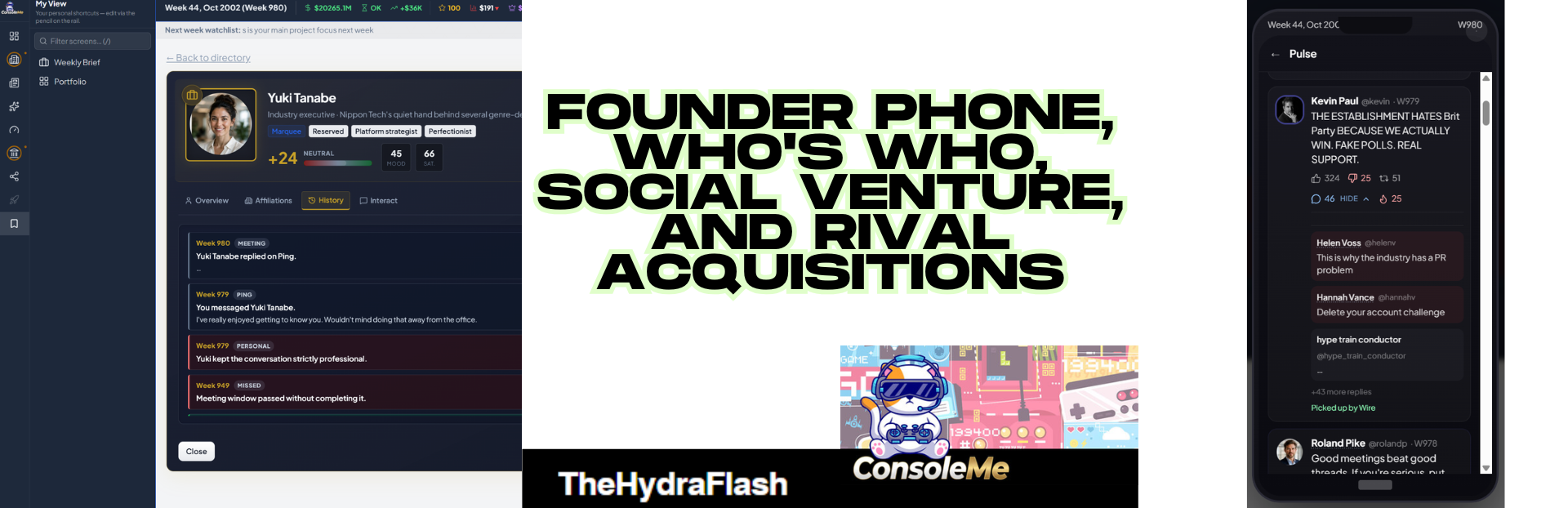
Founder Phone, Who's Who, Social Venture, and Rival Acquisitions
Important: read this together with the navigation update
The recent patches this week ships two changes at once:
A full navigation restructure (workspaces, sidebar, where screens live)
Founder Phone, Who's Who, social venture, and rival acquisitions (everything below)
Before you hunt for old menu paths, read the separate navigation announcement on Steam (store patch notes / news post). That post explains the new layout: workspace icons on the far left, screen list beside them, and what moved where. The click paths in this note use the new navigation only. If something looks missing from the old sidebar, it probably moved workspace.
Quick nav primer (new layout):
Far left: workspace icons (Home, Studio, News & Media, Founder Life, Empire, Politics, Tech, etc.)
Next column: screens for that workspace, sometimes grouped (e.g. Industry & World, Ventures)
Floating dock (over the main game area): Phone and Who's Who (not in the sidebar)
Ctrl+K (or ⌘K on the rail footer): jump to any screen by name
Hey everyone,
This update adds your founder phone, a proper Who's Who directory, a social network venture, and fully simulated rival studios you can actually try to buy. None of this has been in a public build before.
Founder Phone (week 4+)
Open: floating dock on the main game area → Phone (Draggable. Not in the sidebar. Unlocks week 4.)
Inside you get:
| App | What it is |
|---|---|
| Pulse | Your personal social feed |
| Wire | Headlines on your phone |
| Planner | Next 12 weeks at a glance |
| Ping | Private texts with people you've met |
| Your platform | Your own social network app (after you found one) |
Unread badge on the dock when Ping (or similar) has new stuff.
Pulse
Path: floating dock → Phone → Pulse
Feed
Your posts and NPC posts (industry, politics, wider world)
Like or dislike other people's posts
Expand to read replies and comment (quick chips or your own line)
Tap names/avatars for Who's Who cards
Big posts can show Picked up by Wire
Compose
Pick a template from what's happening in your run
Preview, post (limited per week)
Follower count at the top
Ripple effects
Online beef or praise can trigger press interview requests later
Major venture moments (airline, gym, platform launch) can pop a social post prompt (tone + where to post)
Wire (on the phone)
Path: floating dock → Phone → Wire
Tabs: Industry, Statecraft, Market, Sport (sport when relevant).
Tap headlines to expand. If your Pulse posts hit the press, Wire shows how many got picked up.
(Desktop news still lives under News & Media → News → Newsstand and Media Centre.)
Planner (calendar on the phone)
Path: floating dock → Phone → Planner
Next 12 weeks: meetings, releases, expos, contracts, tax weeks, and more. Tap an event to jump where the game allows.
(Full calendar screen: Home → Calendar.)
Ping (private messages)
Path: floating dock → Phone → Ping
Who you can text: people you've had at least one completed meeting with.
Inbox → pick a contact → send from templates (thank them, banter, ask for a tip, flirt if romance is on, etc.). 5 outbound messages per week.
Lunch / coffee invites
If they send something like"Lunch next month? I owe you one":
Path: Phone → Ping → [thread] → Accept — schedule lunch
Opens the meeting scheduler on the phone, restaurant or coffee pre-selected, strong acceptance chance because they asked you. Lands on your calendar when confirmed.
Social Network venture
Found and run your own social platform. Separate from personal Pulse.
Buy and launch
Path: left rail → Empire → Command → Mogul Profile Scroll to Ventures & passion projects → Social Network → founding wizard (name, branding, logo, archetype).
Requirements shown on screen (mogul rank, cash, reputation, calendar year, etc.).
Manage the platform (desktop HQ)
Path: left rail → Tech → Social Network
Dashboard, Audience, Monetisation, Rules, Moderation, Brand.
Your platform on the phone
After launch, a new app tile appears on the phone home screen (your logo + name).
Path: floating dock → Phone → [your platform]
Feed, Trending, Alerts (unread badge on home tile), Post for founder announcements.
Launch announcement
When the platform goes live, you get a venture social post prompt:
Tone: Marketing / Brag / Unhinged
Post to: Pulse, your platform, or both
Same system fires for other venture milestones (airline founded / new route, gym brand founded, club openings, etc.).
Pinned shortcuts: pin a venture from Mogul Profile and it can show under My Ventures at the top of the screen list.
Who's Who
Paths:
Floating dock → Who's Who (week 4+, next to Phone)
Ctrl+K → search "Who's Who"
Profiles: portrait, role, affiliations, relationship, mood, history (meetings, press, Ping, Pulse).
Meetings: regular vs M&A
M&A meeting (buy a rival studio)
Path: floating dock → Who's Who → [rival founder] → Interact → Schedule M&A meeting
Takeover talks. Builds acquisition readiness. Not a casual coffee.
When the week arrives, open from the meeting dock. Negotiation uses gut feel ("Feels promising", "Could go either way"), not percentages.
Regular meeting (rapport)
Path: floating dock → Who's Who → [person] → Interact → Request meeting
Rapport only. Does not count toward buying their studio.
Cooldown: usually 4 weeks before another request with the same person. UI says when they're free again.
From Ping: Accept — schedule lunch when they invited you.
Industry rivals and acquisitions
All major rivals are now fully simulated (cash, staff, projects, health, acquisition readiness).
View rivals Path: left rail → News & Media → Industry & World → Industry Open a studio for cash, health hearts, readiness.
Buy a studio
News & Media → Industry (or Who's Who → founder)
Schedule M&A meeting (not Request meeting)
Negotiate until readiness unlocks a bid
Bid on the Industry studio profile
Formal empire M&A screen (your own deals): Empire → Capital Markets → Acquisitions
New games: 5 full rivals at start, up to 8 living, 14 in the industry roster.
Existing saves: old lightweight rivals upgrade on load. Founders re-link for M&A.
Other empire ventures (context)
After you buy from Mogul Profile, day-to-day screens sit under:
Path: left rail → Empire → Ventures → (Racing Team, Airline Manager, Fitness Chain, etc.)
Social Network HQ is under Tech, not Empire Ventures. (This is because we will expand Tech out in future updates with 'Big Tech' style options)
Personal lifestyle (Founder Life hub, High Roller, wine, yachts, property):
Path: left rail → Founder Life
Quick reference (new navigation)
| I want to… | Go here |
|---|---|
| Open my phone | Floating dock → Phone |
| Open Who's Who | Floating dock → Who's Who OR Ctrl+K |
| Post on Pulse | Phone → Pulse → Compose |
| Read phone headlines | Phone → Wire |
| See next 12 weeks | Phone → Planner (or Home → Calendar for full view) |
| Text someone | Phone → Ping |
| Accept lunch invite | Phone → Ping → Accept — schedule lunch |
| Found social network | Empire → Mogul Profile → buy Social Network |
| Run social network HQ | Tech → Social Network |
| Use platform on phone | Phone → [your platform app] |
| See rivals | News & Media → Industry |
| Buy a rival | Who's Who → Schedule M&A meeting + Industry profile for bid |
| Jump anywhere | Ctrl+K |
Saves
Load as normal. Saves upgrade automatically. Phone threads, people links, promoted rivals, and venture data should carry over.
Again: if a screen moved and you cannot find it, check the navigation announcement on Steam first, then this note for the new features.
Thanks for testing. Week number + what you clicked helps when reporting bugs.
— The Hydraflash
Source
Changelog.gg summarizes and formats this update. How we read updates.