
In this update8
Full notes
Full Aster Pebble and the Case of Bad Bureaucracy update
Read the full published notes in a cleaner layout. The original post stays linked below.
What changed
- Gameplay
- Compatibility
- UI and audio
Aster Pebble and the Case of Bad Bureaucracy changes
Welcome to our latest devlog for our open source fantasy point and click game, Aster Pebble and the Case of Bad Bureaucracy.
We fell a little behind on our devlogs as we recently pivoted to working on getting our Steam page live. Luckily, that's done and our page is now available.
Since we're a little behind, we're going to cover things at a bit of a higher level today, so let us know if there is anything you want us to take a deeper dive on or if you have any questions.
Today, we'll talk about some new environments, a pass of UI refinements, new puzzle mechanics, more controller support work, dialogue system improvements, our new main menu, our initial save system, and some other small but important improvements.
So let's dive in.
New Environments
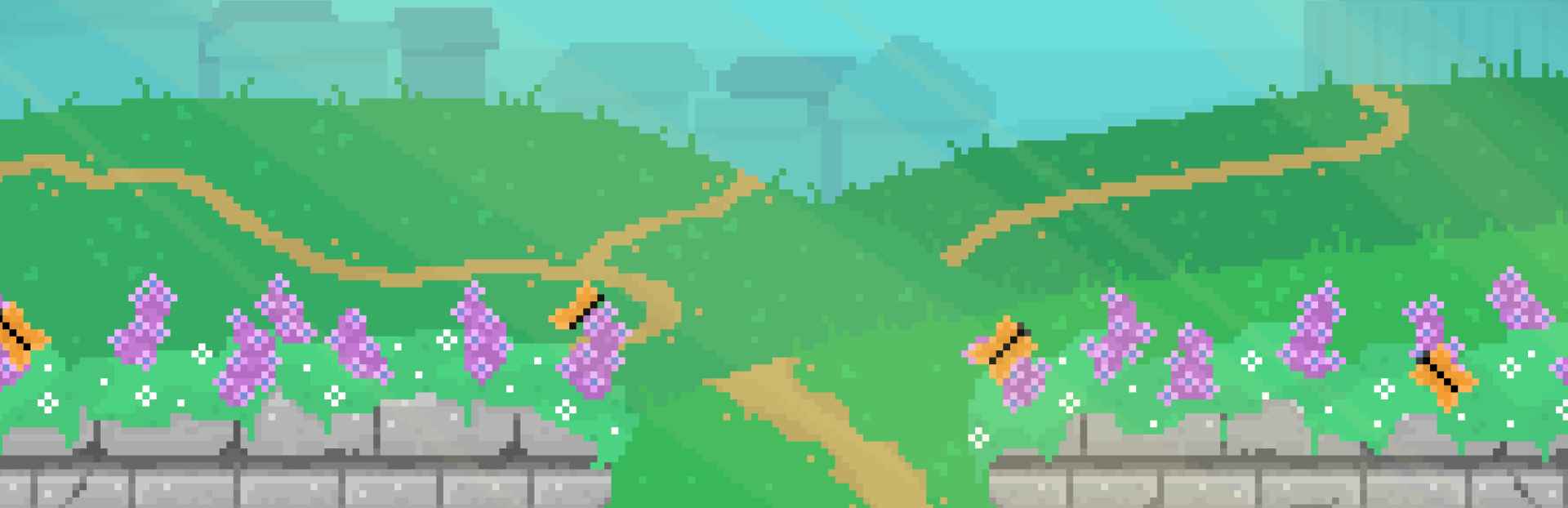
This is the village entrance. This will be the first area you see after leaving the Bureau, so we wanted to be sure it was bright and welcoming, but also gave some hints as to what you might expect from the village through the subtle silhouettes in the background.
We also added a new introductory scene for the game, with Aster making a stop at her local library on the way to her first day at the Bureau. This will give us an opportunity to introduce Aster and give a bit more context for the story, and also, libraries are super cool.
One last environment to show today is Ezorick's house, and also Ezorick himself. Look at that show off.
UI Refinements
For a while, we were using temporary UI for our in game menus, and things like licenses and credits.
We've updated this now to be a notebook themed UI, using things such as sticky notes to navigate between sections.
For things like licenses and credits which aren't in the pause menu, we added a nice wooden table backdrop as well.
We also updated the top UI to give it a more unique feel. We updated the styles of our toast messages, and moved them into the bottom left. By default, toast messages will close after a set time. When this setting is enabled, you can see a masked progress bar is used to show how much time is left.
Toasts can also be clicked, to jump to the relevant section of the notebook.
New Puzzle Mechanics
We've added our first puzzle in, where Aster needs to repair a sticky note to learn a password. It was interesting to figure out a good mechanism for drag and dropping, and snapping pieces into place.
The code for this can be seen here, but basically we just had a list of pieces and target nodes for where we wanted the piece placed, and if the piece is dropped when closer than some distance limit to that target, we snap it into place and increment a correct pieces count.
For a more casual game like this, we also want to be sure everyone can enjoy it even if they are just here for the story and characters, so you are able to skip the puzzle entirely if you so choose.
We want Aster to be able to collect clues and combine them together to come up with new insights, so we added an initial system to facilitate that.
We still need to update this to give better feedback on creating new clues, and also add the ability to review hints about current clues.
Better Controller Support
We continued to work on making the game playable using a controller. We added a new pointer which we use whenever you are navigating menu items with a controller. We also switched to a fully virtual cursor, rather than relying on code moving your real cursor around, to better support some environments such as Wayland.
We also updated this so you can now move the cursor around and trigger clicks with the keyboard, so you could play the entire game without a mouse if you wanted.
The "next" button in dialogues was updated to show the correct icon based on your given controller or selected glyph type as well.
Improvements to Dialogue
We've continued work to try to make creating dialogue a lot simpler, having refactored it entirely at this point. This means a bunch of new helper functions, such as create_monologue, create_dialogue, create_message_branch, and more.
We also simplified a lot of things, by creating "libraries" that we can pull data from, such as an item library, so we don't need to remember any plain text IDs when working in conversations.
Ideally, it should be straightforward to both read and create dialogue for the game, and we've gotten a lot closer to that goal than what we had before.
We added the option to automatically progress dialogue a few moments after it has been spoken. But you can also now click the dialogue box to progress dialogue too. The first click or button press will complete the message if it is still being spoken, though, to ensure lines are not accidentally skipped.
We updated the dialogue border to match the speaker colour by default, which can be disabled, and also added an option to have the full text match the colour of the speaker as well.
We also updated so that options you've picked previously will be greyed out, to make it easier to know which dialogue you have already explored.
New Main Menu
We've also gotten around to setting up our main menu for the game.
You'll notice the background shows the latest area you were in when playing the game, but we've also got new title text, and our studio icon to link out to our site. We think it looks a lot better now.
Initial Save System
We have implemented the initial saving and loading system for Aster Pebble as well.
The main things to note on this are:
We display the last save time in the notebook, before you close the game.
We have an icon now that displays in the bottom right when a save occurs.
Saves are "requested" when a change is made that will need saved, but we only process them when "safe" to do so, e.g. when you've exited a dialogue, changed areas, or closed your notebook. This will hopefully avoid issues of you saving part way through a dialogue and getting into an inconsistent state.
Other Small Improvements
We also added some work on transitions and cinematics. We can now bring in cinematic bars during any sort of cutscene, which will also block attempts to click around or open the notebook. We also have a few different fades and swipe transitions for navigating between different scenes.
This helps everything just feel a bit less jarring.
We added support for hover text for any interactable that will take you to a new area.
And tutorial prompts to show you how to perform some quick actions, like opening the journal or map once they are unlocked.
We wanted to work out versioning for our game earlier than later. For now, we're just using date based versioning vs something like Semantic versioning.
To automate this for creating builds, we created a python script to actually update the string in the Godot .project file, which feels wrong, so if someone knows a better way to do this, please let us know!
We also set up some basic flag experiments, such as a demo text or add to wishlist button appearing only when the demo flag is set, which should come in handy as well.
And that's a wrap on our fourth devlog!
There was a lot to cover since our last devlog, but things are definitely coming together in a good way now.
It's a big relief to have our Steam page finally up, and available for wishlisting.
Source
Changelog.gg summarizes and formats this update. How we read updates.