
In this update15
Full notes
Full Age of History 2: Definitive Edition update
Read the full published notes in a cleaner layout. The original post stays linked below.
What changed
- Performance
- Gameplay
- Security
- UI and audio
- Store
- Maps
Age of History 2: Definitive Edition changes
National Bank - New Unique Building
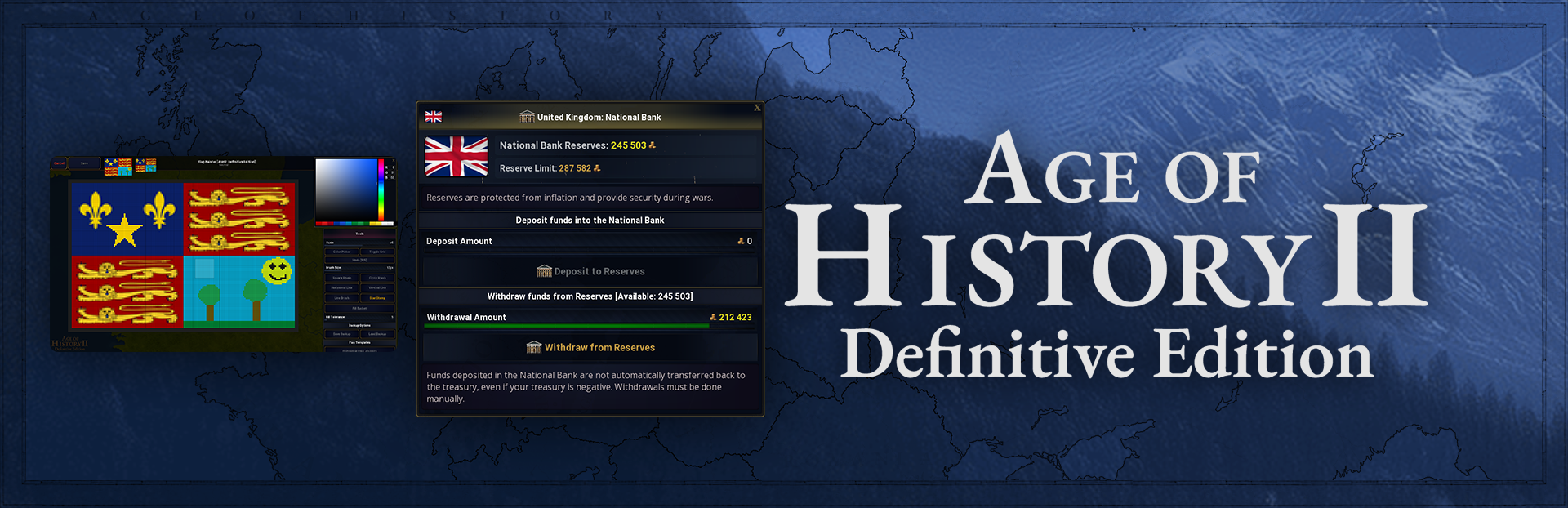
The National Bank allows storing a portion of the treasury as reserves, with full control over deposits and withdrawals.
Reserved funds are not affected by inflation.
These reserves provide financial stability and help maintain strength during wars.
Funds deposited in the National Bank are not automatically transferred back to the treasury, even if your treasury is negative. Withdrawals must be done manually.
The National Bank has a reserve limit based on income and taxation of Civilization
You can open the National Bank menu from the Civilization Decisions menu or from the Budget menu.
National Bank must be constructed, Requirements:
The civilization must control at least 10 provinces
Technology level of at least 0.4
Sufficient gold for construction
Effects:
Unlocks the National Bank system
Increases acceptable taxation level by +1%
Deposit funds into the National Bank
Gold can be freely transferred from the treasury to the National Bank at any time.
Use the slider to set the amount and press "Deposit to Reserves" to confirm.
Gold stored in the National Bank does not count toward the treasury and does not affect inflation.
It can be used as a financial reserve or war chest, providing security in times of war.
Withdraw Funds from the National Bank
Gold can be transferred from the National Bank reserve back to the treasury at any time using the slider and the "Withdraw from Reserves" button.
This allows quick access to stored reserves for wars or economic needs.
National Bank Visibility in Diplomacy
The diplomacy menu now shows whether a civilization has a National Bank
A National Bank icon appears next to the capital name if the building has been constructed
AI National Bank Usage
AI civilizations use the National Bank system and can store and withdraw gold, especially during wars.
Treasury Now Shows Inflation Threshold on Hover
Now hovering over the treasury on the top bar shows: "Inflation threshold: XX Gold"
Inflation starts when treasury exceeds: XX
Flag Painter - Create and customize Civilization flags during the game.
Edit flags directly while playing, without leaving the game.
Flags created in the Flag Painter are only used for that save and will be loaded when loading the save.
A game must be saved at least once to access the flag painter.
Tools
Multiple drawing tools: brush, square, circle, line tools (horizontal & vertical), and a star stamp.
Horizontal Line Tool, draws a straight line across the map from left to right, keeping a constant Y position.
Vertical Line Tool, draws a straight line from top to bottom, keeping a constant X position.
Fill Bucket with adjustable tolerance for controlling how strictly colors are matched.
Grid toggle to help align and structure designs.
Color Picker, right mouse click to pick a color directly from the flag.
Undo & Save Backup
Undo: Allows undoing the last painting action.
Creates a backup of your current changes. Only one backup can be saved. You can return to it later using Load Backup.
Opening the Flag Painter
Open the Flag Painter by right-clicking the flag in the diplomacy menu or using the "Flag Painter" button in the diplomacy/decisions menu.
Send a Spy - New Diplomacy Action
Send a spy to another Civilization to reveal the positions and sizes of all their armies for 5 turns.
The cost of a spy mission depends on your income and the targeted Civilization.
GameValues: gvRelations.json
SPY_COST_PLAYER_CIV_INCOME_MODIFIER: 0.5, SPY_COST_TO_CIV_INCOME_MODIFIER: 1.0, SPY_COST_MIN: 250, SPY_NUMBER_OF_TURNS: 5,
Increased Requirements to See Armies
Increased the required relations to see another Civilization's army.
Now relations must be at least +85 instead of just being friendly.
GameValues: gvRelations.json
MIN_RELATIONS_TO_REVEAL_ARMY: 85,
Army Selection QoL Improvements
The number of selected units is now shown in the bottom-left corner when multiple armies are selected.
Helps track the exact army count when moving or disbanding selected units
Diplomacy Menu Quality of Life Improvements
Diplomacy menu icons now display the number of civilizations in each category next to the icon.
Peace Treaties Now Displayed Directly on the Map
When a Civilization signs a peace treaty with another civilization, it is now displayed directly on the map.
Declaring war on a friendly Civilization
When declaring war on a friendly Civilization, both your neighbors and theirs may send insults.
Declaring war on a friendly Civilization lowers your reputation and makes other Civilizations trust you less.
GameValues: gvRelations.json
WAR_ON_FRIENDLY_CIV_INSULT_CHANCE_100: 65,
Military Upkeep Changes
Army upkeep now gradually increases over time
Armies become more expensive to maintain as the game progresses
Maximum upkeep increase is capped at +150% and is reached around turn 2000
After reaching the cap, military upkeep stops increasing.
GameValues: gvMilitary.json
ARMY_UPKEEP_TIME_GROWTH_PER_TURN: 0.00075, ARMY_UPKEEP_TIME_MAX_MODIFIER: 1.5,
Disappearing Army Fix
Fixed a bug where the lord’s army could turn into the vassal’s army after a joint attack.
This also applies to joint attacks with allies, where army ownership could change.
Nukes restricted to top 14 Civilizations
Nuclear weapons can only be built by the top ranked Civilizations.
You can change the limit
By default, only the top 14 civilizations can build nukes. This number can be changed in the options before starting a game.
New Civilization Provinces Menu
In the diplomacy menu, clicking the number of provinces below a civilization's name now opens a new special menu listing all provinces of that Civilization.
Civilization provinces can be sorted by population, economy, and name. The menu automatically generates pages if the Civilization has many provinces.
You can check where a Civilization has its strongest provinces or where all its provinces are located. Clicking on a province name will center the map on that province. Clicking a province on the map will automatically switch the menu to the civilization that owns it if it differs from the currently selected one. You can also open this menu by right-clicking the "Civilization Territory View" button.
In Game World Editor
Allows you to modify the world during an ongoing game. Change diplomacy, edit borders, transfer provinces, add civilizations, and add or remove players at any time.
Unlike Sandbox Mode, the In Game World Editor does not grant unlimited gold, movement points, or diplomacy points.
Gameplay remains unchanged, only adding new options for modifying the world.
By default, the In Game World Editor is disabled. You can enable it in the options menu when creating a new game.
In the Game World Editor, buttons are available in the player's Civilization decision menu.
Manage Diplomacy
Add New Civilization
Assign Provinces
The "Add New Player" button is at the end of the diplomacy actions menu.
New: Assign Provinces during the game
New Assign Provinces option available in Sandbox Mode and the "In Game World Editor" Mode, allowing you to change borders during the game as you wish.
Console commands
New console command "editor" which enables/disables the In Game World Editor.
New console command "assign" added, which opens the Assign Provinces menu and allows you to change the borders of any civilization during game.
Scenario Editor: Assign Neutral Provinces Only
Added a new option: "Assign Neutral Provinces Only".
When enabled, only neutral provinces can have their civilization changed in the Assign Provinces menu.
Provinces already controlled by Civilizations will be ignored, helping prevent accidental reassignment and making scenario editing more precise.
When assigning provinces, a flag and the Civilization's name will now be displayed in all civilization capitals instead of just flags.
Disband all selected Armies
Added a new option to the army menu that allows you to disband all selected armies in one action instead of individually.
https://www.youtube.com/watch?v=-Lof7r7fdkw
Invest & Build in Foreign Province
Investing in an occupied province is no longer possible.
Invest in Foreign Province
Foreign investments in a province were previously unlimited. Now, each province is limited to 3 active foreign investments.
GameValues: gvInvestForeign.json
LIMIT_OF_INVESTMENTS_IN_A_PROVINCE: 3,
Ranking Menu
Clicking the score in the ranking menu switches to details mode, where each Civilization's population and economy are displayed. Colors have been added to highlight this information in details mode.
Right-clicking a Civilization in the ranking menu now opens a menu with all its provinces.
Hovering over economy and population now displays more information.
Manage Diplomacy
Fixed a bug where, when using "Manage Diplomacy" mid-game and setting relations to "At War!" the AI wouldn't move until the front line changed for the first time.
Now the AI immediately starts attacking.
Difficulty: Legendary
Legendary difficulty has been slightly reduced, players now earn more gold per turn.
Create New Game: New Options
Diseases can now be disabled in the options menu before starting a game.
Remove All Alliances
All alliances will be removed from the current scenario. Reload the scenario to restore alliances.
Fixed Budget Exploit with Negative Gold
Fixed an exploit where investments or goods spending could be set to 100% while the treasury had negative gold.
Now, if treasury gold falls below -2000, pressing the End Turn button will automatically adjust spending to the minimum required levels for goods and investments.
Population Transfer Exploit Fix
Fixed an exploit where "Population Transfer" could be used in occupied provinces.
This is now only possible in owned provinces.
Relocate Population Exploit Fix
Fixed an exploit where "Relocate Population" could be used in occupied provinces.
It is now restricted to owned provinces.
New Setting Options
Lord Flag Overlay for Vassals: On / Off
Flag Waving Animation: On / Off
UI Hide Hotkey: F10
Added a hotkey to hide the interface
Enable "UI Hide Hotkey" in settings to unlock this feature
Press F10 to hide or show the interface
Removed Buttons from Diplomacy Menu
Invest in Foreign Province
Build in Foreign Province
Send Volunteer Army
Send Volunteer Army is available in the army menu, click an army at the top.
Formable civilizations
The game can now load a formable civilization with the same real tag as the civilization but with a different government.
Visual improvement to diplomacy menus
Long civilization names are now shortened so they don't go over the number of provinces.
Diplomacy
Fixed a bug where the player could end a war by sending an insult.
It is now no longer possible to send insults during a war.
Fixed a bug where Civilizations friendly to the AI Civilization weren't updating.
Vassals
Fixed a bug preventing vassals with high liberty desire from declaring independence. Vassals will now declare independence correctly.
Each turn, the game checks a portion of Civilizations. Conquered vassals with no provinces are automatically removed and no longer displayed as vassals.
Eternal War Fix
Fixed a bug where Eternal War had no effect
Wars are now declared correctly at the start of the game
Allies
Allies will no longer send ultimatums demanding your vassalization.
Front Lines
Now front lines will be rebuilt more often. This improves the functionality of the "Move to Front Line" action.
Events
Fixed a bug with copying events when using the new JSON saving system.
Fixed an issue where long event descriptions could become too large and push decision buttons off-screen.
Event descriptions are now scrollable with a height limit.
Fixed a bug where changing a civilization name through events could cause the displayed country name to keep the length of the old name. The name will be updated on the next turn.
Fixed is capital trigger
Mod Compatibility Fix
Fixed a bug where using mods could return the player to the main menu
This could happen when releasing a civilization as a vassal or when adding a new civilization in the editor
UI Text Fixes
Fixed an issue where province action button text (e.g. "Move", "Recruit", "More", "Nuke") could exceed button width in non-English languages. Text is now automatically shortened.
Minor bug fixes
Fixed a visual bug in the scenario editor where the image behind the flag was displayed incorrectly when assigning provinces.
Fixed a visual bug where the menu title background for Build Supply Camp and Abandon Province was not displayed correctly.
Rebels Rework
The Rebels Rework is planned for next update. More information will follow closer to release.
National Bank - GameValues: gvIncome.json
BANK_COST: 0.096, BANK_REQUIRED_PROVINCES: 10, BANK_REQUIRED_TECH_LVL: 0.4, BANK_ACCEPTABLE_TAXATION: 0.01, RESERVE_LIMIT_MODIFIER: 9.25, INITIAL_RESERVES_BONUS: 100, AI_BUILD_NATIONAL_BANK_MIN_TURN: 10, AI_NATIONAL_BANK_DEPOSIT_RATIO_MIN: 0.13, AI_NATIONAL_BANK_DEPOSIT_RATIO_RANDOM_100: 10,
https://store.steampowered.com/app/3381680/Age_of_History_2_Definitive_Edition/
Source
Changelog.gg summarizes and formats this update. How we read updates.