
In this update6
Full notes
Full Which Sausage, Mate? update
Read the full published notes in a cleaner layout. The original post stays linked below.
Repeated intro
Hello folks! I won't be introducing Which Sausage, Mate? here, you have whole Steam description to read about it. Instead, let's get straight to the point.
What changed
- Gameplay
- Compatibility
- Performance
- UI and audio
Which Sausage, Mate? changes
I collect retro handhelds. Own about a dozen of them. I broadly dislike many trends in modern gaming, but I do enjoy capping out the score in original NES Tetris from time to time. So when I was making Which Sausage, Mate?, I kept thinking - this should run on my handhelds. Simple controls, short sessions, pixel art. It's practically made for it. Problem: nobody has ever gotten a modern Unity game running on a 1GB RAM retro handheld console. To the point where even asking about porting Unity game on PortMaster Discord will automatically spawn a bot stating clearly -"Games using Unity can't be ported at this time."
Well, at some point in future, every 'at this time' becomes past. So I grabbed a couple dusty retro handhelds off the shelf, and decided to check how far into the future we actually are already.
Steam post image[c] Anbernic RG34XX (720x480) [/c]
What's PortMaster?
If you're not in the retro handheld world, PortMaster is a free tool that lets you install games on consoles such as Anbernics, Miyoos, TrimUIs, Powkiddys, etc - that comes bundled with many operating systems on those devices. These are cheap Linux-based handhelds (some under $50) that most people use for emulation. PortMaster gives ability to easily manage library of native games (even such as Stardew Valley or GTA Vice City) too - mostly on Godot, SDL, love2D stuff, simple, lightweight engines. Not Unity though.
Unity is a different beast. It's heavy and monolithic in architecture. It expects a real GPU, real RAM, real everything. These handhelds have ARM chips meant for Android phones from 2010's. Getting Unity to even boot requires x86-to-ARM translation, custom shader patching (Unity's GLSL wouldn't compile on mobile GPUs), and a lot of trickery to emulate features that hardware doesn't support natively. Things I know nothing about as a C# Unity gamedev. And that's even before we get into RAM (and compute) limitations of those devices.
Steam post image[c] TrimUI Smart Pro (1280x720) [/c]
Beyond Journey's End
So I've spent a day or two digging. Turns out, some brave souls have been experimenting with Unity on PortMaster, and there was even quite clear path ahead - a Box64 wrapper, that could translate x64 Linux Unity build into ARM64. Well that's easy, right? All I just need to do is now take a Linux build, wrap it with Box64, run on one of my consoles, and... ...And after grueling hours of debugging the weirdest issues, I was ecstatic to see"Which Sausage, Mate?" booting up on my $40 handheld. Done, mission accomplished. Except for two problems:
First, the game would take good 2-3 minutes to boot. And to even boot at all, it had to make swap - "fake RAM" on the handheld SD card, to avoid crashing because out-of-memory limitations. This is problematic not only because it tests patience of anyone trying to run the game to the limits, it also 'trashes' the SD card, that isn't really designed for constant writing to, just like RAM has to.
Second, the game might have booted, but it was working at best in couple frames per second. We are talking about the simplest pixel-art game, rendered without any complex lighting, shadows, physics or other kind of effects, not exactly GTA6. The reason was very simple, all graphics operations were essentially running in software rendering mode. The game was using Linux MESA - a very simple, very compatible graphics mode, that just fills the screen pixel by pixel, using CPU instructions. It works, but it's extremely inefficient, especially by modern standards.
But at this point, I was too far gone into the idea of running my own game on those consoles to just stop. So i started investigating deeper. The question was simple - how to enable modern hardware graphics rendering, on a device that costs as much as fancy burger.
Steam post image[c] Powkiddy RGB30 (720x720) [/c]
Enter core4es
There was someone in PortMaster community not only already asking this very question, but also working on actual solution. BinaryCounter is extremely talented developer behind Westonpack, one of most popular tools used for porting games to ARM Linux, and a PortMaster contributor. BinaryCounter has also been developing for quite some time something called core4es - a piece of software that performs translation between OpenGL Core (the graphics API used by Unity), and GLES (Open Graphics Library for Embedded Systems) used by our little handheld consoles. The only problem? It's very complex software (shader translation between different shading languages is difficult), and still experimental phase of development. But it's a path, right? And it was. After night of debugging, compiling and testing, next day I had finally modern Unity6 URP working on the handheld with hardware accelerated rendering. The game would now run 3x faster - at around 15FPS, sometimes even over 20, making it 'almost' playable. That was it, right? Well, no.
Steam post image[c] Anbernic RG353V (640x480) [/c]
Wall of RAM
Remember the first issue? Yes, the game would now run at playable speed. But it would still boot for over a minute before starting, and worst yet - it took 750MB of RAM to run it. With device that has 1GB of total memory, where a third of it is by default used by operating system, that leaves around 600MB for the game. 150MB short of what game needs. The real kicker? On its own, the game data in memory takes around 120MB. Remaining 0,5GB+? Half of it Unity, second half - the Box64 translations layers around it, not something that can be optimized or trimmed.
If I've invested already so much time and effort into making it work on the handhelds, surely i can solve this issue too, after all, i just need to cut somewhere 150MB of fat, right? So i went on another night of chasing optimizations, and...
I failed to make any significant improvements. There was absolutely nothing i was able to do. I managed to cut the boot time to a bit under a minute, but even at best the game would be still ~50MB short of running without requiring SD-card destroying SWAP use. That was it. That's how far the path goes, and i had to accept the failure.
[c] Anbernic RG351P (480x320) [/c]
The Breakthrough
...that was until Gandalf BinaryCounter arrived at Helm's Deep Discord, holding fresh repository - a completely new, 100% native way of running Unity projects on Linux ARM. There was just simple caveat - it is still work-in-progress. It's a scaffolding for other projects, a brilliant framework, but still a bit away from release. However, if it works on the new framework, it will work fast. The challenge was to just make it work, with software that's not fully tested, missing some pieces, and quite undocumented. To say I was hesitant would undersell it, but it was clear that was the only option. So I sat down, started reading, fixing some issues, filling up some stubs, hitting walls with some bugs, and...
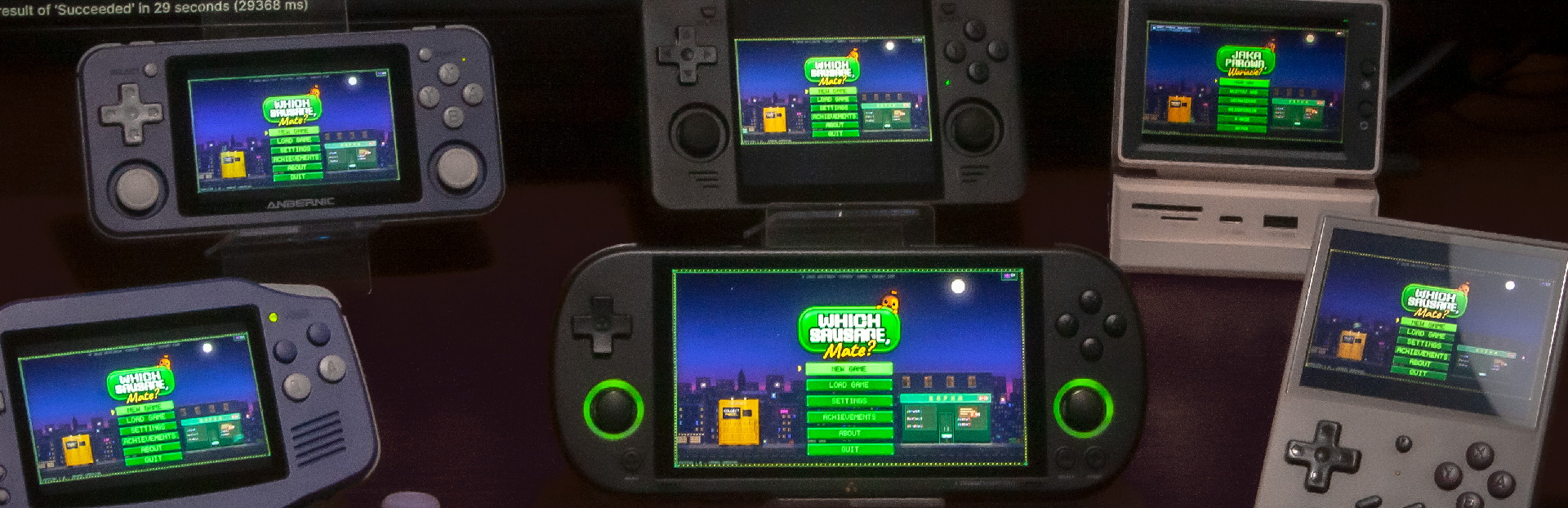
Well, you are reading this post, and have seen the pictures by now. And as you can see, there is now a (very experimental) path for some Unity games to be ported for low-power Linux ARM handhelds.
It's Free on PortMaster
Which Sausage, Mate? will be released for free on PortMaster when it launches on April 2. No sideloading, no catch - install it straight from the PortMaster running on the console. If you have a handheld and want to try it on launch day, it'll be right there in the PortMaster library.
The PortMaster version has the same content - 30-day campaign, 9 endings, 69 achievements, 43 languages, identical gameplay, just optimized for small screens and low-power hardware.
Why free? I made this game for hardware I own and play. The retro handheld community is genuine - without their monumental effort I wouldn't be able to play such masterpieces as The Binding of Isaac or Morrowind on, essentially, modern GameBoys. Now hopefully, with Which Sausage, Mate? release, other developers will be able to use it as a template for more Unity games on PortMaster. And if you like it on your handheld and want to support the project, the Steam version is here.
Huge, huge thanks to BinaryCounter for developing the code that made it possible, and to Kloptops for PortMaster itself - an absolute must-have for any retro handheld gamer. Releasing this project on handhelds wouldn't be possible at all without their hard work and expertise. Support PortMaster!
P.S. Please don't ask the great folks of PortMaster community about porting your favorite Unity games to the platform - the process requires the game to exist in a particular build, is itself very undocumented, experimental and no one can guarantee it will work. We're definitely a step closer to making it a viable path for future games, but if You want to see new ports available on PortMaster, follow the official guides, explore the viability of porting, and if it's possible - contribute to the community yourself!
Source
Changelog.gg summarizes and formats this update. How we read updates.