
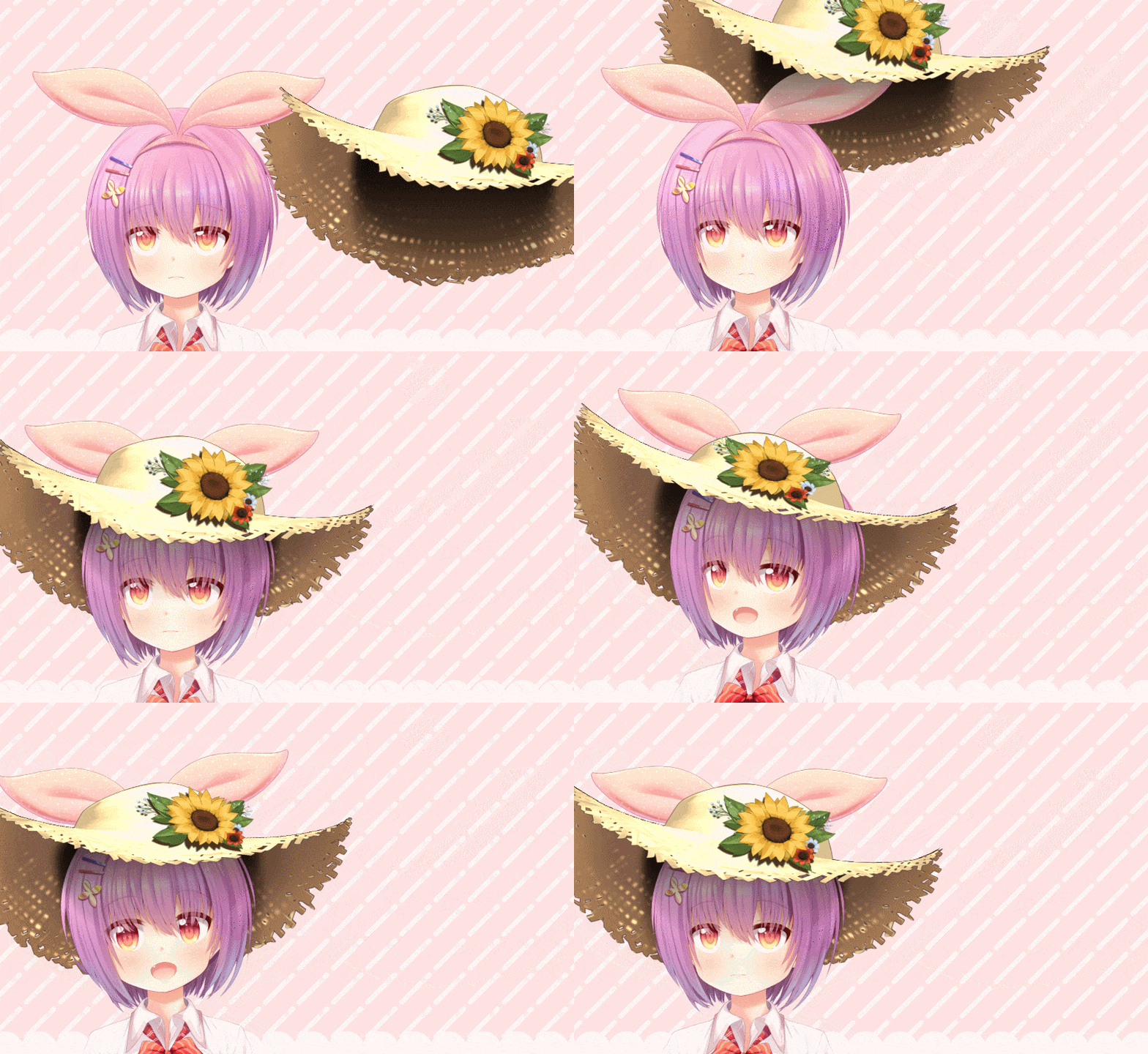
In this update1
Full notes
Full VTube Studio update
Read the full published notes in a cleaner layout. The original post stays linked below.
What changed
- Gameplay
- Fixes
VTube Studio changes
This update adds a lot of changes for Live2D items and the VNet collab feature.
The first big new feature is Split Live2D items!! You can have split Live2D items now with a front and back part, so they're wrapping around the main model and make it look like you're really wearing the item.
Internally this works by splitting the Live2D item at a certain layer into a front/back part and then setting orders within the main model for those parts separately.
VTube Studio comes with a few items that already have this set up so you can play around with them. But, you can also easily set this up for your own Live2D items.
More info: https://github.com/DenchiSoft/VTubeStudio/wiki/Between-Layer-Item-Pinning
Isn't that cool!?
Next, you can now pin stuff to other people during collabs or take their items now. This also works with the split Live2D items. Not much else to explain here. People requested this one a lot!
More info: https://github.com/DenchiSoft/VTubeStudio/wiki/Multiplayer
Also, there are new expression parameter modes! When you create an expression, you can now select between "overwrite" (standard),"add"and"multiply".
"Add" just adds a static value to that parameter at the end (after tracking) and "Multiply" multiplies the Live2D parameter by the set value. The value can also be negative, so you can do a lot of interesting stuff with it, like having hotkeys that invert the tracking.
Oh and there's mocopi tracking in VTube Studio now!!??! It's a bit crazy to use that in 2D models, but the Sony mocopi team reached out and asked if it could be added. They even made a really pretty example model you can use for free.
For more info on that, check this page: https://github.com/DenchiSoft/VTubeStudio/wiki/mocopi
There's even more stuff:
You can now turn expressions on/off WITHOUT making hotkeys for them.
You can now create expressions and expression hotkeys for items super easily.
You can now set ArtMesh recolors for items directly.
You can set fixed positions for VNet collab participants (who's in front).
VNet collab guest model positions will now be remembered when guests leave and re-join (if you control their positions).
There's now detailed upload/download statistics so you can see how far along VNet model upload/downloads are (can sometimes be useful when models take long to upload).
"Alt" is supported as a hotkey now.
You can now turn on pin notifications that show you exactly which layer in your model items pin to.
You can set items to only pin to one specific layer in your model. Useful to actually get those hats to pin to your head and not some weird hair overlay layer (though that can look pretty funny too).
And then there's some more stuff and a bunch of bugfixes.
Finally, there were some adjustments that had to be made to the watermark in VTube Studio so the app stays compliant with the updated Live2D SDK licensing terms. For more information, please check this Tweet: https://x.com/VTubeStudio/status/1930366944441511953
Sorry for the inconvenience.
For a full list of changes, see: https://trello.com/c/l6FuhwFf
And if you have questions, as always, please ask in the Discord: https://discord.gg/VTubeStudio
Source
Changelog.gg summarizes and formats this update. How we read updates.