
In this update15
Full notes
Full VR Realms update
Read the full published notes in a cleaner layout. The original post stays linked below.
What changed
- UI and audio
- Gameplay
- Server
- Events
- Workshop
- Performance
VR Realms changes
Big Update: In-Game Camera, Spatial Voice, 12 Languages & a Rebuilt VR Menu
Three weeks of heavy development, and this is the biggest batch of changes VR Realms has had yet. A brand-new in-game camera for creators, spatial voice chat, a fully rebuilt VR menu, 12-language support, smarter media screens, and a long list of fixes from live playtests. Here's everything.
You can play right now at www.vr-realms.com — jump in, build a world, and bring your own avatar.
The in-game camera — film your world, not your headset
July 28, 2026 · Camera / Media / Project VR footage usually looks rough because it's just the headset feed — warped at the edges, bobbing with every step. The new in-game camera fixes that at the source. Deploy it from the Camera tab in your menu and it becomes your desktop window, so anything you record or stream is a smooth, composed third-person shot while you carry on playing in VR. Park it as a tripod that keeps you in frame, let it drift behind you on a damped follow, or set it orbiting slowly for a reveal. Distance, height and zoom are on sliders, there's a background-blur toggle for that shallow-focus look, and the shutter drops a full-resolution photo straight into your Documents folder. Aimed squarely at creators and streamers — rolling out in the next playtest build.
Proximity voice — hear the room, not the server
July 27, 2026 · Voice / Sessions
Voice chat used to be one flat mix — everyone in the instance arrived at the same volume whether they were beside you or across the map. Now it's spatial. Speakers fade smoothly with distance and get muffled when there's a wall between you, so a busy hub breaks into actual conversations instead of one overlapping crowd. Drift over to a group, talk, and drift away again. It's on by default, with a toggle in Settings if you'd rather have the old flat mix. The falloff range was tuned by ear over a playtest evening to keep small groups intimate without cutting anyone off mid-sentence.
Smarter screens, nameplates with faces, and a hub that runs itself
July 27, 2026 · Media / Social / Hub / Settings / Moderation
The biggest one first: video screens got a lot smarter. Paste a page link from a supported platform — YouTube, Twitch, Vimeo, SoundCloud and friends — and the screen works out the video for you instead of demanding a raw file link. Point one at a JSON playlist and you get a browsable menu on a floating panel, with categories, paging and a breadcrumb trail. Latecomers now join a video at the right moment rather than restarting it — the room shares one timeline, and a pause holds it for everyone. Screens accept links from a known list of platforms by default; anything else needs a per-player opt-in in Settings.
Nameplates now show your Steam avatar beside your name and glow softly while you talk, so it's obvious who's speaking across a busy room. The VR keyboard gained a Paste key next to Emoji — copy a link on your desktop, drop it straight into chat or a screen. World UI is bigger in VR by default, with a UI Size slider in Settings → Comfort (50–200%) that resizes nameplates and notifications live as you drag, and the movement style list finally uses plain-English names like Teleport, Point to Walk and Arm Swing.
Behind the scenes, the hub gained real moderators who can remove a disruptive player — with the decision checked on the server rather than trusted from anyone's game — and the User Agreement was expanded to cover streamed media, voice recording and player-hosted sessions.
Playtest fixes — the wrong-world bug
July 26, 2026 · Workshop / Maps / Networking
A weekend playtest turned up a strange one — clicking the FFA shooting portal kept dropping people into the art gallery instead. The cause was two community maps published under the template's default name, so whichever one your machine had mounted first won every lookup, which is why it hit some players and not others. Map travel now mounts the map you actually picked ahead of anything already loaded, so the portal you press is the world you get. Alongside it: joining a friend who is between worlds falls back to the hub instead of failing silently, graphics and height settings stop re-running their first-time setup on every launch, and a couple of crash-on-exit paths were cleared out.
Two days of fixes — fullscreen that sticks, height that saves, a smarter session browser
July 25, 2026 · Quality of Life / Multiplayer / Settings
A packed two days of polish driven by live two-PC playtests. Your avatar height now saves — set it once and it survives world hops and restarts, and a one-time hint asks new VR players to stand for a moment so your true height is measured (this also squashes the bug where a miscalibrated headset floor made you a giant with huge hands).
Desktop players
the game now starts in fullscreen, remembers your window mode between worlds and launches, and there's a new Fullscreen toggle in Settings.
Also new in Settings
an FPS cap slider (30 to 165, default 90).
The world browser got a major reliability fix — open sessions now show up like they should, joining a friend shows real progress messages (downloading the world, connecting) and quietly retries if Steam is being slow, and VR players no longer get dropped into desktop mode when joining someone's session. Rounding it out: menus and the HUD stay bright and readable in dark worlds, a pinned Go Home card takes you back to your space from anywhere, you can hide a nearby player from the session list (they become a friendly orb), a red banner warns you when a creator updates the world mid-session, and if a host removes you from their world you get a clear notice and a clean trip home. All of it lands in the next playtest build.
Speak your language — the menu now supports 12 languages
July 23, 2026 · Localization / Accessibility
VR Realms now speaks your language. The full in-game menu — worlds, avatars, friends, settings, chat and every notification — can be switched between twelve languages from a new dropdown in Settings: English, Spanish, Arabic, Japanese, Korean, Chinese, Dutch, German, Russian, Italian, Polish and French. Pick your language once and it sticks. We started with the communities we see most across social VR, complete with proper fonts so Japanese, Korean, Chinese and Arabic all render beautifully — right-to-left included. This is just the foundation; more languages (and in-headset typing for non-Latin scripts) will follow. Rolling out in the next playtest build.
Media players, reworked — build your own screens
July 22, 2026 · Media / Workshop / Maps
The TV system got a full rework, and the headline is simple: your mesh can now be the screen. Tag any mesh in your map VRItem.Screen and the video plays directly on it — build a cinema wall, a drive-in, a stadium jumbotron. Every screen also grows a floating control bar just in front of it: play/pause, stop, and a URL button that summons the VR keyboard for typing an address. Creators get two flavors of default channel — VRUrl. auto-plays your stream but leaves players free to retune, while VRUrlLock. pins it and hides the controls entirely. Audio ranges (.Small,.Medium,.Large,.2D, or an exact.30m) now work properly across TVs, screens and jukeboxes — we chased a stubborn engine-level bug where a range tag was silently ignored on a screen that was already playing, and it's fixed for good. Hosts also get a new Host-Only Media toggle in Settings, so a room's playback can't be hijacked mid-movie-night. See the Interactables page for the updated tag reference.
Creator Kit v0.3.4 — your maps just got 25–40% smaller
July 22, 2026 · Workshop / Maps
Creator Kit v0.3.4 is live on GitHub, and it's a free win for every creator: the kit now compresses your builds (Oodle Kraken, the same distribution-grade setting big UE titles ship with). The identical map typically packs 25–40% smaller, so players download your world that much faster when they join — and you're far less likely to bump into the 700 MB size cap.
There's nothing to configure and no downside
decompression is effectively free at load time, and content you've already uploaded keeps working as-is. Just update the kit, hit Build, and re-publish your item to shrink it.
One honest tip while you're in there
if your map is huge, compression is a discount, not a cure — the usual culprit is 4K textures, which VR headsets can't resolve anyway. Bulk-set Maximum Texture Size to 1024 and watch hundreds of megabytes disappear.
The VR menu, rebuilt — and it's a different thing entirely
July 21, 2026 · Menu / Controls / Workshop
The in-VR menu has been rebuilt from scratch, and it's the single biggest change to how VR Realms feels to use. One rail down the side now switches between five full pages — Worlds, Avatars, Friends, Instance and Chat — instead of the old cramped panel. Every list has proper filters, sorting and a search box, and you scroll it the way you'd expect in VR: grab the list and drag it. The Instance page shows exactly who is in your world right now, so hosts can manage a room without leaving it. The whole panel sits where you put it and stays readable at any avatar height, and you can grab its bar with your pointer from across the room to move it rather than walking up to touch it. Rolling out in the next playtest build.
Chat — whispers, a filter you control, and bubbles over your head
July 21, 2026 · Chat / Moderation / Friends
VR Realms now has its own chat, built in rather than bolted on. It lives on its own page in the menu with newest messages at the top, timestamps, and color coding so a busy room stays readable — your messages in blue, everyone else in green, arrivals and departures in orange, whispers in pink. Whispers work the way you'd hope: type /name to start, and you stay in whisper mode with that person until you type /all, or just click someone's name in chat to whisper them. Every message also appears as a speech bubble above the speaker's head, so you can follow a conversation without opening a menu at all. There's a word filter that's on by default and always on in the public hub; if you're hosting your own world you can switch it off in Settings. Emoji are going in now — 88 of them — and arrive shortly after. Chat lands with the next playtest build.
A keyboard that appears when you need it — even in worlds you didn't build
July 21, 2026 · Controls / Workshop
Typing in VR Realms now works the way it does in the headset's own menus: point at a text field, click it, and the keyboard appears — no button to find first, and it goes away when you're done. The part we're most pleased with is that this works in worlds we didn't make. If you're a creator and you put an ordinary Unreal text box in your own panel — a keypad on a door, a password on a private screening room, a name entry on a leaderboard — the VR keyboard now opens for it automatically. There's no API to call and nothing to wire up; a standard text box is all it takes. You can also grab the keyboard by its bottom bar with your laser pointer and reposition it wherever it suits you.
Fixes — teleport in community maps, a stuck loading badge, visible avatar downloads
July 21, 2026 · Maps / Avatar / Controls
A round of fixes worth calling out. Teleport movement now works in community maps — it used to need a navigation mesh that Workshop maps never have, so switching to Teleport left you with a stub of a beam and nowhere to go. It now works on any solid floor, which means creators get teleport for free without building anything extra (see the Workshop guide for the one collision setting that still matters). The loading indicator no longer gets stuck on "Joining…" for the rest of your session after a map change — it clears when you arrive, with a safety net if a join stalls. Downloading an avatar now actually shows you it's downloading, with a live percentage, instead of leaving you wondering why you're still the default character. And every setting in the new Settings panel now saves properly — a handful, including movement style, were quietly not sticking.
Settings, rebuilt — everything in one place in VR
July 19, 2026 · Settings / Graphics / Controls
Every setting now lives in one panel you can reach without leaving VR, opened from the menu rail and split into six tabs: audio, microphone, graphics, accessibility, comfort and debug. Audio has separate sliders for master, effects, voices and TV/media, so you can turn a jukebox down without going quiet yourself. Graphics carries the full set of quality controls plus VR render resolution, and tells you which GPU it detected. Comfort covers smooth turning and turn speed, and if you're hosting you get your own section for instance rules — keep your home private, or turn climbing on and off for everyone in your world. The debug tab shows a live frames-per-second and ping readout, so you can see how a world is actually performing while you're standing in it.
Report a bug — or a player — and actually get heard
July 19, 2026 · Moderation / Support
There's now a proper report form at vr-realms.com/report.php, for technical bugs and for player behavior, plus a Report a Bug button in the new Settings panel that takes you straight to it. Reports go directly to the team rather than disappearing into a channel, and if you leave an email we'll reply once we've looked into it. Sending a report from inside the headset — with your build number and the world you were in attached automatically, so we can reproduce the problem instead of guessing — is built underneath and lands in the next playtest build. Reporting someone should never mean taking your headset off first.
Full-body tracking — older avatars supported, and feet that keep up
July 17, 2026 · Full-Body Tracking / Avatar
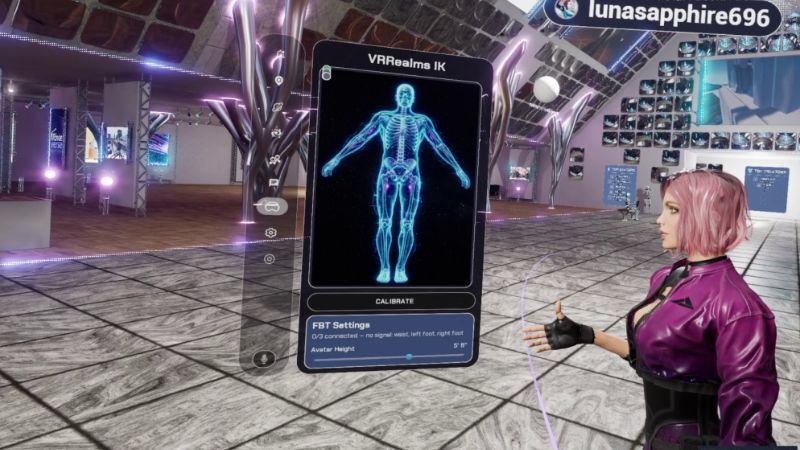
More full-body tracking polish. Full-body IK now works on avatars built on the older UE4 skeleton too, so a lot more Workshop and marketplace characters get real feet and hips — not just the newer ones. We also fixed the "ice-skating" where your feet dragged behind you when you moved on the thumbstick: your legs now blend into a natural walk while moving and snap back to your trackers the instant you stop, so it reads right to everyone in the session, not just you. And a comfort win — step away and go idle, and VR Realms re-runs calibration automatically when you come back and start moving, so your body snaps back into alignment with no manual recalibrate. Physical room-scale stepping is unchanged.
Fixes — nameplates, and joining friends after they re-host
July 17, 2026 · Sessions / Networking / Avatar
A round of fixes from playtests. Player nameplates are reliable again — names show above everyone instead of sometimes staying hidden, they sit steady instead of spinning, and your own plate (with your supporter plate) now shows in mirrors so you can see how you look to others. And a join fix: when a friend left a session and started hosting their own, they sometimes wouldn't show as joinable in your friends list — that now resolves reliably.
Jump with a gun in hand — no more accidental drops
July 17, 2026 · Shooter / Controls
Weapon handling got cleaner for the shooter modes. Jump is now its own button, so you can hop around freely with a rifle in your hands instead of accidentally dropping it mid-fight. Guns still "lock in" when you grab them so they don't fall out of your hand — and to set one down you just grip it again with the same hand. Everything else still drops the moment you release grip, like before.
Fixed black skies in some Workshop maps
July 17, 2026 · Workshop / Maps
Some community maps that used Unreal's default sky were rendering pitch-black in the packaged game while looking fine in the editor. The sky assets those maps rely on now ship with the game, so they get their proper sky and clouds back.
Add TVs and jukeboxes to your maps — stream video & audio
July 9, 2026 · Workshop / Maps / Media
Creators can now drop a shared TV screen or a jukebox/radio into any map — the same tag-based way as everything else. Tag a marker VRItem.TV for a video screen or VRItem.Jukebox for an audio player, and in VR Realms it becomes a real networked screen or speaker at that spot. Players set what it plays from a URL right in VR — a live HLS stream, a hosted video, internet radio, or an mp3 — and everyone in the session sees and hears the same thing, kept in sync for free on live streams. Perfect for a club dance floor or a movie room. (Direct media links only — no YouTube pages — and broadcast only what you have the rights to.) Full setup is in the Interactive Props guide under Build, and it ships alongside Creator Kit v0.3.3.
Turn your map into a shooter — deathmatch & team deathmatch
July 7, 2026 · Game Modes / Workshop / Maps
The first game modes are here, and creators build them the same way as everything else in the kit — with tags, no Blueprints. Tag a spot for the mode (free-for-all or team deathmatch), drop some spawn points, place a scoreboard, and hand out rifles, and VR Realms runs the whole match: health, hits with a red-flash, kills, smart respawns that keep you away from other players, team auto-balancing, and a live scoreboard that lists every player's Steam name and kills with team totals up top. First to the cap wins — their name lights up the board, then it all resets for the next round. It's server-authoritative and synced for everyone in the session, with sensible VR-tuned defaults (and you can set the kill cap, damage and health per map). Free-for-all and team deathmatch are just the start — capture points and more are on the same system. Full setup is in the new Game Modes guide under Build.
Creator Kit v0.3.2 — MetaHuman hair, marketplace clothes, safer uploads
July 7, 2026 · Workshop / Avatar
Creator Kit v0.3.2 is live on GitHub.
The headline
turning an Epic MetaHuman into a Workshop avatar now brings the hair with it — hair, eyebrows, mustache and beard as game-ready hair cards, colored from your MetaHuman's own dye and tuned to stay sharp across a room, plus a lifelike catchlight in the eyes.
It's zero-setup
the avatar materials ship inside the kit, nothing to run. Custom clothing from Fab and the marketplace now carries its colors across too. And the uploader catches an oversized preview image up front (Steam rejects previews of 1 MB or larger) with a clear message instead of a long upload that fails at the very end. Grab it from the downloads link — open your item, hit Build + Upload, and your Workshop ID, title and description carry over automatically.
Want to try all of this yourself? Head to vr-realms.com to join the playtest!
Source
Changelog.gg summarizes and formats this update. How we read updates.