
In this update7
Full notes
Full Typing Ninja update
Read the full published notes in a cleaner layout. The original post stays linked below.
What changed
- UI and audio
- Gameplay
- Events
- Performance
- Fixes
Typing Ninja changes
Typing Ninja v1.6.0: The Major Update
A big one, ninjas! This update adds a whole new game mode, a full progression system, keycaps to collect, three new languages, and a mountain of fixes and polish. Here is everything new.
The game now speaks your language
Typing Ninja is now fully localized. Menus, the tutorial, powerups, the profile, everything. New menu languages in 1.6.0:
Spanish, both España and Latinoamérica
German
French
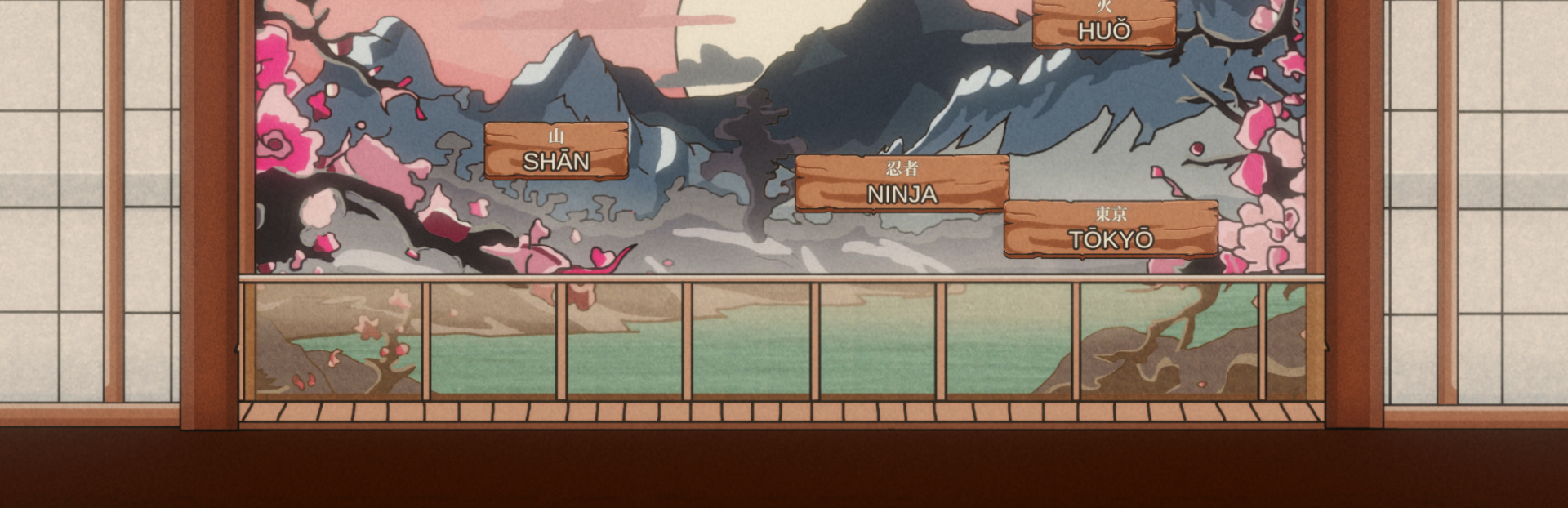
We also added Chinese and Japanese as gameplay languages. Their falling words show the native character stacked above its romaji or pinyin, and you can type either one to clear the word. Learning the script, or just going by sound? Both work. Tone marks and macrons (MĀO, HUǑ, TŌKYŌ) render right in the game font. Arabic and more are on the way in a future update. Type the words in the language you choose. Pick your Menu language and, separately, your Gameplay (falling words) language in Settings. Steam post image
New Profile and Level Up System
Every game you finish now earns XP, and a brand new player card shows it off with your Steam avatar, level, and a smooth filling XP bar. Open your Profile to see the full picture:
Best WPM, Average WPM, Win Rate, Games, Words Typed, and Days Active
A Typing Speed graph that tracks your WPM day by day
An activity heatmap of how much you have played
Steam post imageLevel up and you will see it right on the results screen. The bar fills, you rank up, and the reward drops. Steam post image
Level up and unlock Keycaps
Every level up drops a new keycap for your keyboard in the game.
228 keycaps to collect across 4 rarities: Common, Uncommon, Rare, and Legendary
Preview and equip your favorite in the Profile
Colors, patterns, coins, elements, animals and more
New Challenge Mode: Ping Pong
A brand new monthly Challenge, a fast, arcadey scoring mode all its own. Three colored words fall at once, and each color does something different:
Blue builds your VALUE
Red raises your MULTIPLIER
Green raises your EXTRA
Your score is VALUE × MULT × EXTRA. Chain hits, keep the words alive, and push the combo as high as you can. Steam post imageThe whole mode is built to feel juicy: color matched sparkles on every hit, floating score numbers, a rising pitch crescendo as your final score counts up, and a confetti finish, this new Challenge arrives at the start of each month, each with its own leaderboard.
Continue where you left off
Survival and Story runs are now saved automatically at every phase, stored both locally and on Steam Cloud. Quit in the middle of a run and jump back in later, right where you stopped, even on a different PC. No more losing a great run to real life.
Settings, polished and fixed
Separate Gameplay Language and Menu Language selectors
Video settings properly wired: resolution, window mode, VSync, FPS
Clean volume percentages, aligned columns, and labels that fit in every language
Under the hood: fixes and polish
Powerups now work in every language. The label matches your gameplay language and both spellings work, so in Spanish you can type HIELO or ICE to freeze.
Fixed a save bug where your XP, level and keycaps could reset on relaunch. Progress now sticks.
Zap powerup no longer gets stuck after use, and its kill animation is back to normal.
The pause menu was rebuilt so the buttons no longer overlap.
The tutorial is reworked: bigger, clearer, fully interactive and localized.
Tons of small UI fitting fixes across languages.
Thanks for playing Typing Ninja! Sharpen those fingers. More languages, more keycaps, and a new Challenge every month. See you on the leaderboards.
Source
Changelog.gg summarizes and formats this update. How we read updates.