
Full notes
Full TRAIN CREW update
Read the full published notes in a cleaner layout. The original post stays linked below.
What changed
- UI and audio
- Performance
- Fixes
TRAIN CREW changes
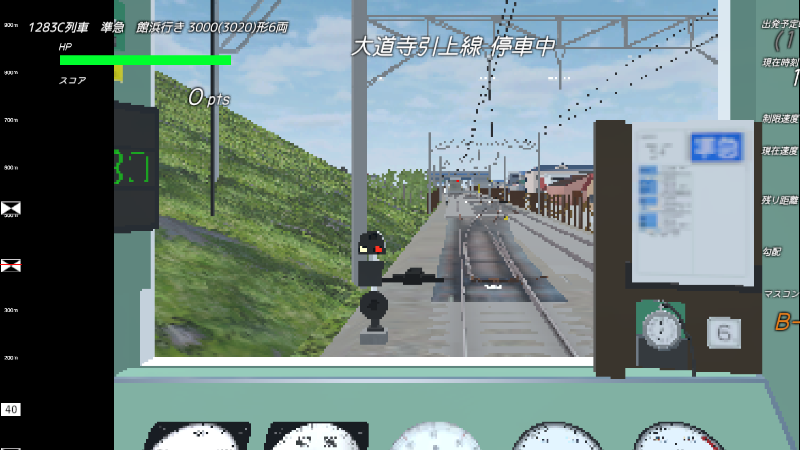
-Added Render Resolution settings.(Settings>Graphics setting>Render Resolution)
This allows you to specify the internal rendering resolution. Lower resolutions (downsampling) will create a pixelated, retro look. Higher multiplier settings (supersampling) will render the game in crisp, high quality.
Steam post imagedownsampling (320x240)
Steam post imagesupersampling (x4)
-Fixed a bug where air sounds would not play when "Other Cab Volume" was set to 0.
-Implemented a potential fix for the issue where Danjiri sounds would not play. (As the issue could not be reproduced on our end, I addressed it by increasing the maximum voice limit and adjusting playback priorities.)
*Originai text (Japanese)*
描画解像度設定追加などのアップデート
・描画解像度の設定を追加しました。(設定>画面設定>描画解像度)
描画処理上の解像度を指定します。小さい解像度(ダウンサンプリング)であれば画質は粗くなりレトロ風になります。倍率での設定(スーパーサンプリング)であれば高画質での描画となります。
・「その他運転台音量」を0にするとエアー音が鳴らなくなる不具合を修正しました。
・だんじりの音が鳴らないことに対する対策をしました(こちらで再現しなかったため音声最大再生数の増加と再生優先度で対策しました)
Source
Changelog.gg summarizes and formats this update. How we read updates.