What changed
0 fixes3 additions2 changes0 removals
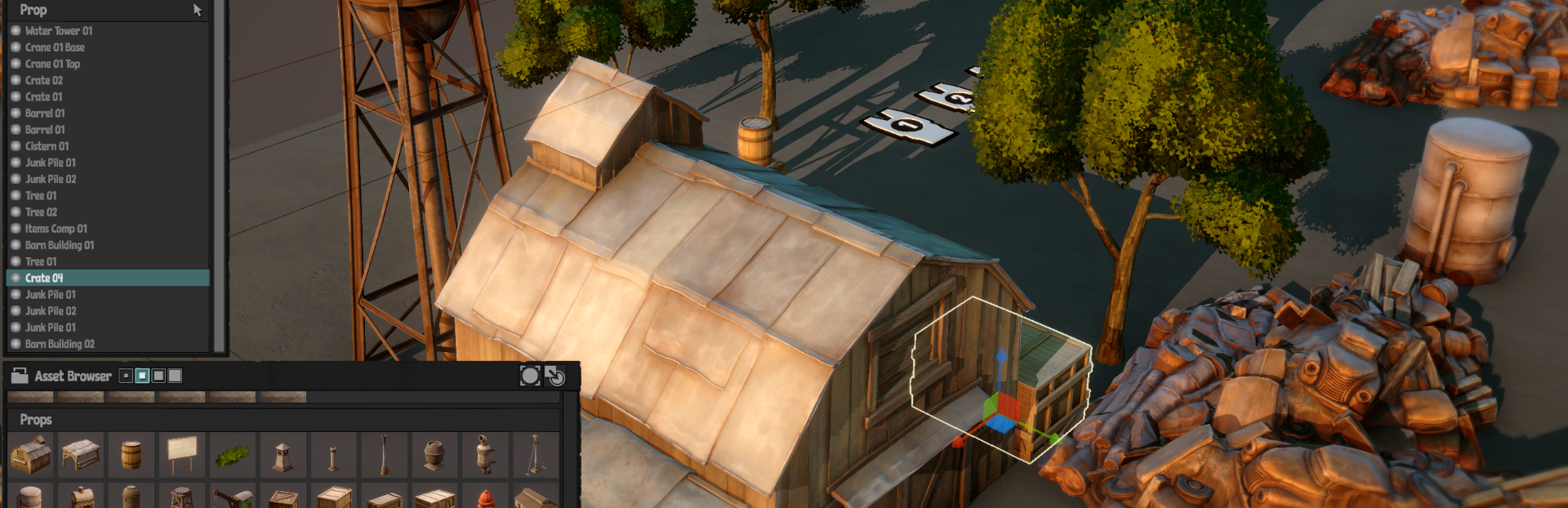
addedI've just uploaded a version of the game that has the new level editor! It's still in beta version, so expect a few bugs here and there. I'm still working on it but could really use some feedback. Once the editor is at a stage where it feels completed, it will be included in the main branch of the game, but for now it's useful to be able to do regular updates to the beta branch :)
changedHere's how you get started with the Level Editor:How to launch the Level Editor Beta Branch: - Right-click on Tipston Salvage in your Steam Library and click on "Properties..." - In the Properties window, go to Betas - In the top right corner of the Betas window, there's a drop-down that says "None". Change this to "editor_testing" - Launch the game!
addedHere's how you get started with the Level Editor:How to access the Level Editor in-game: - When running the beta version of Tipston Salvage, go into the Mission Center (level select room) - Click the new button that says "CUSTOM LEVELS" - In the Custom Levels window, click the "OPEN LEVEL EDITOR" in the lower left corner to launch the level editor! - The Custom Levels window can currently only be interacted with using the Mouse!
addedHere's how you get started with the Level Editor:How to access the Steam Workshop during Beta: - The Workshop is currently hidden for the main game while the level editor is in beta. - To get access to the hidden workshop you need to join the Tipston Salvage Level Builders community on Steam. Follow the link and request access there and I'll add you to the group. - Once I've approved your request, you'll be able to see the workshop on the Tipston Salvage Steam Community Hub. - The workshop can also be opened from within the game by clicking the "GET LEVELS" button in the Custom Levels window - You can now upload and download custom levels to the Workshop
changedHere's how you get started with the Level Editor:If you have any questions or feature requests, the easiest way to get in touch is on the official Discord Server . Posting here on Steam or in the Tipston Salvage Level Builders community works well too!
Tipston Salvage changes
addedI've just uploaded a version of the game that has the new level editor! It's still in beta version, so expect a few bugs here and there. I'm still working on it but could really use some feedback. Once the editor is at a stage where it feels completed, it will be included in the main branch of the game, but for now it's useful to be able to do regular updates to the beta branch :)
changedHow to launch the Level Editor Beta Branch: - Right-click on Tipston Salvage in your Steam Library and click on "Properties..." - In the Properties window, go to Betas - In the top right corner of the Betas window, there's a drop-down that says "None". Change this to "editor_testing" - Launch the game!
addedHow to access the Level Editor in-game: - When running the beta version of Tipston Salvage, go into the Mission Center (level select room) - Click the new button that says "CUSTOM LEVELS" - In the Custom Levels window, click the "OPEN LEVEL EDITOR" in the lower left corner to launch the level editor! - The Custom Levels window can currently only be interacted with using the Mouse!
addedHow to access the Steam Workshop during Beta: - The Workshop is currently hidden for the main game while the level editor is in beta. - To get access to the hidden workshop you need to join the Tipston Salvage Level Builders community on Steam. Follow the link and request access there and I'll add you to the group. - Once I've approved your request, you'll be able to see the workshop on the Tipston Salvage Steam Community Hub. - The workshop can also be opened from within the game by clicking the "GET LEVELS" button in the Custom Levels window - You can now upload and download custom levels to the Workshop
changedIf you have any questions or feature requests, the easiest way to get in touch is on the official Discord Server . Posting here on Steam or in the Tipston Salvage Level Builders community works well too!
I've just uploaded a version of the game that has the new level editor! It's still in beta version, so expect a few bugs here and there. I'm still working on it but could really use some feedback. Once the editor is at a stage where it feels completed, it will be included in the main branch of the game, but for now it's useful to be able to do regular updates to the beta branch :)
Here's how you get started with the Level Editor:
How to launch the Level Editor Beta Branch: - Right-click on Tipston Salvage in your Steam Library and click on "Properties..." - In the Properties window, go to Betas - In the top right corner of the Betas window, there's a drop-down that says "None". Change this to "editor_testing" - Launch the game!
How to access the Level Editor in-game: - When running the beta version of Tipston Salvage, go into the Mission Center (level select room) - Click the new button that says "CUSTOM LEVELS" - In the Custom Levels window, click the "OPEN LEVEL EDITOR" in the lower left corner to launch the level editor! - The Custom Levels window can currently only be interacted with using the Mouse!
How to access the Steam Workshop during Beta: - The Workshop is currently hidden for the main game while the level editor is in beta. - To get access to the hidden workshop you need to join the Tipston Salvage Level Builders community on Steam. Follow the link and request access there and I'll add you to the group. - Once I've approved your request, you'll be able to see the workshop on the Tipston Salvage Steam Community Hub. - The workshop can also be opened from within the game by clicking the "GET LEVELS" button in the Custom Levels window - You can now upload and download custom levels to the Workshop
Please note that since the level editor is still being worked on, things can and most likely will break. I will do my best to keep old level files compatible with each update of the editor, but I can make mistakes 🙃
If you have any questions or feature requests, the easiest way to get in touch is on the official Discord Server. Posting here on Steam or in the Tipston Salvage Level Builders community works well too!
Let's make some levels!
/ Pontus